
Digital Planners for Small Business Owners
A digital planner for small business owners is a downloadable PDF planner system that helps organize daily tasks, client work, projects, meetings, campaigns, and admin notes. The best planner is the one that matches the work you repeat, not the one with the broadest business promise.
Daily Digital Planner sells printable and fillable PDF planner templates, so this page focuses on planner files you can download, print, type into when supported, save, and reuse according to the product instructions. If most of your business work is made of tasks, meetings, projects, priorities, and follow-ups, start with the broader work planner page. If your work includes clients, campaigns, launches, and business notes, compare business planner PDFs after you understand which workflow you need.
This page is about planner organization. It is not a business plan writing guide, accounting tool, tax guide, legal resource, marketing strategy article, or project management software review.
What Is a Digital Planner for Small Business Owners?
A digital planner for small business owners is a downloadable PDF planner template or set of templates used to organize repeatable business work. It can be printable, fillable, or both, depending on the product.
In Daily Digital Planner’s context, a digital planner usually means a PDF-based planner product rather than a software subscription. The file may support a paper workflow, a typed-entry workflow, or a mixed workflow where you type into a supported fillable PDF planner and print a copy afterward.
A small business planner can help give business work a consistent place:
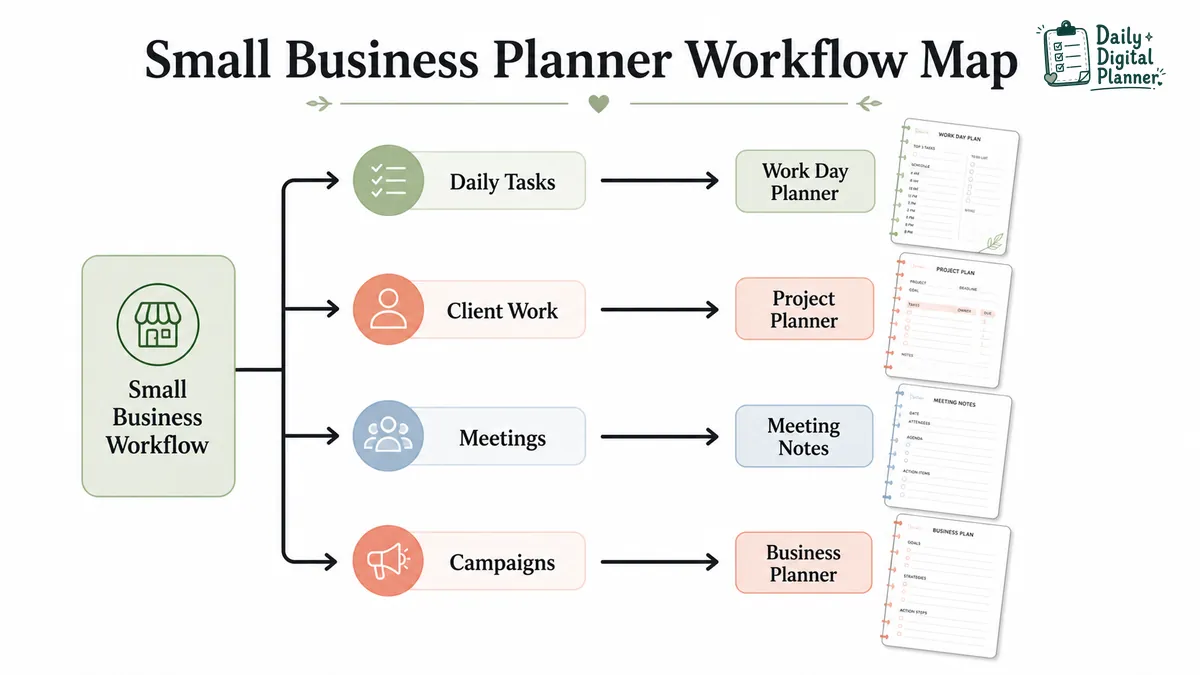
- Daily tasks can sit on one page instead of scattering across emails, notes, and sticky reminders.
- Client work can be tracked through stages, deadlines, notes, and follow-ups.
- Meetings can have one place for agenda items, decisions, and action items.
- Campaigns or launches can use a planner page for steps, dates, notes, and review.
- Admin tasks can stay visible without turning the planner into accounting, legal, or tax advice.
The phrase "small business planner" can mean different things in search results. On this page, it means a PDF planner for organizing business workflow, not a full business plan template or professional business advisory document.
Which Small Business Tasks Can a Planner Help Organize?
A small business planner can organize repeatable work such as daily priorities, client follow-ups, project tasks, meetings, campaigns, and admin notes. The planner does not run the business for you; it gives the work a visible structure.
For a direct product-category path, business planner PDFs are the closest category when the workflow includes client work, project notes, business overview pages, meetings, campaigns, launches, decisions, or delegation.
Daily Priorities and Admin Tasks
Daily priorities and admin tasks fit a planner when you need one visible place for the workday. A small business owner might use the page for order checks, customer messages, invoices to review, listing updates, content notes, appointment reminders, or one top task for the day.
Use a work day planner when the main problem is one busy day. Use productivity planner PDFs when the main problem is choosing priorities, focus blocks, or next actions across several tasks.
Client Work and Project Tracking
Client work and project tracking fit a planner when the business has tasks that move through stages. A service provider may need a place for discovery notes, deliverables, deadlines, approvals, feedback, and follow-up tasks.
When the work is deadline-based, project planner PDFs are usually a closer fit than a general daily planner. For a product-level example, the client workflow planner is a better path when the main job is tracking client stages and next actions.
Meetings, Decisions, and Follow-ups
Meetings, decisions, and follow-ups fit a planner when the important information comes from calls, conversations, or recurring check-ins. A meeting notes page can hold agenda items, discussion points, decisions, owners, and action items.
Use a meeting notes planner when the main problem is capturing what happened and what needs to happen next. For a product-level example, a meeting notes printable can be useful when you want a repeatable meeting page instead of a blank note.
Campaigns, Launches, and Business Notes
Campaigns, launches, and business notes fit a planner when the work has steps, dates, assets, reminders, and review notes. A small business owner may use a campaign tracker for product launches, email campaigns, social content, ads, seasonal promotions, or follow-up tasks.
Business planning pages can also support overview notes, decisions, and goals when the product shows those templates. The Business Overview Planner Printable PDF and Campaign Tracker and Ads Manager Planner are product paths to inspect when those workflows are the main need.
Should You Choose a Printable or Fillable PDF Planner?
Choose a printable planner if you want paper pages, choose a fillable PDF planner if you want to type before saving or printing, and choose a product that supports both if you move between laptop and paper. A downloadable PDF can be printable without being fillable, so check the product page before buying.
| Need | Better Format | Why It Fits | What To Check On The Product Page |
|---|---|---|---|
| You want to write by hand | Printable planner | Printed pages work well for desks, binders, clipboards, packing stations, classrooms, and paper review. | Page size, orientation, margins, screenshots, and print notes. |
| You want to type into the file | Fillable PDF planner | Fillable fields let you type entries before saving or printing when the product supports it. | Confirmed fillable support, compatible PDF reader, and save instructions. |
| You want both paper and typed entries | Printable and fillable PDF version | A mixed workflow works when you plan on a computer but still want a paper copy. | Whether both workflows or versions are included. |
| You want quick printed checklists | Printable PDF page | A fresh page can work for daily admin, shipping, meetings, or project checklists. | Page count, included templates, and print-friendly design. |
| You want reusable typed notes | Fillable PDF page | A typed file can hold client notes, project details, or repeat admin notes when supported. | Fillable fields, file-saving workflow, and product instructions. |
The format decision should come before the design decision. A planner can look right in screenshots but still be the wrong fit if you need typed fields and the product is printable only.
Which Planner Type Fits Your Small Business Workflow?
The right planner type depends on the workflow you repeat most often, not on the fact that you own a business. Choose by the job the planner must do first.
| Small Business Workflow | Start With | Why It Fits | Product or Category Path |
|---|---|---|---|
| Daily task load, admin, and one-day priorities | Work day planner or productivity planner PDFs | These pages keep one workday, priorities, focus blocks, and next actions visible. | Work day or productivity category |
| Client projects and deliverables | Project planner PDFs | Project pages fit stages, deadlines, milestones, notes, and follow-ups. | Project Planner category |
| Client workflow tracking | Client workflow planner | A client workflow planner fits service-provider work with repeated client stages and task handoffs. | Product example |
| Meetings, calls, and decisions | Meeting notes planner | Meeting pages capture agenda items, discussion notes, decisions, and action items. | Meeting Notes category |
| Campaigns, launches, and marketing notes | Business planner PDFs | Business planner pages can support campaign trackers, launch notes, decision logs, and business overview pages. | Business Planner category |
| Several work contexts in one purchase path | Work and productivity planner bundle | A bundle fits users who need daily tasks, projects, meetings, focus, and productivity pages together. | Bundle page |
The table should narrow the buying path. The product page still decides the final match because screenshots, included templates, file type, page size, fillable support, and price can vary by product.
For campaigns, launches, business notes, and overview pages.Project Planner PDFs
For deadlines, milestones, client deliverables, and follow-ups.Meeting Notes Planner
For calls, agenda items, decisions, owners, and action items.Work Day Planner
For daily priorities, admin tasks, and one-day work structure.
What Should You Check Before Buying a Small Business Planner PDF?
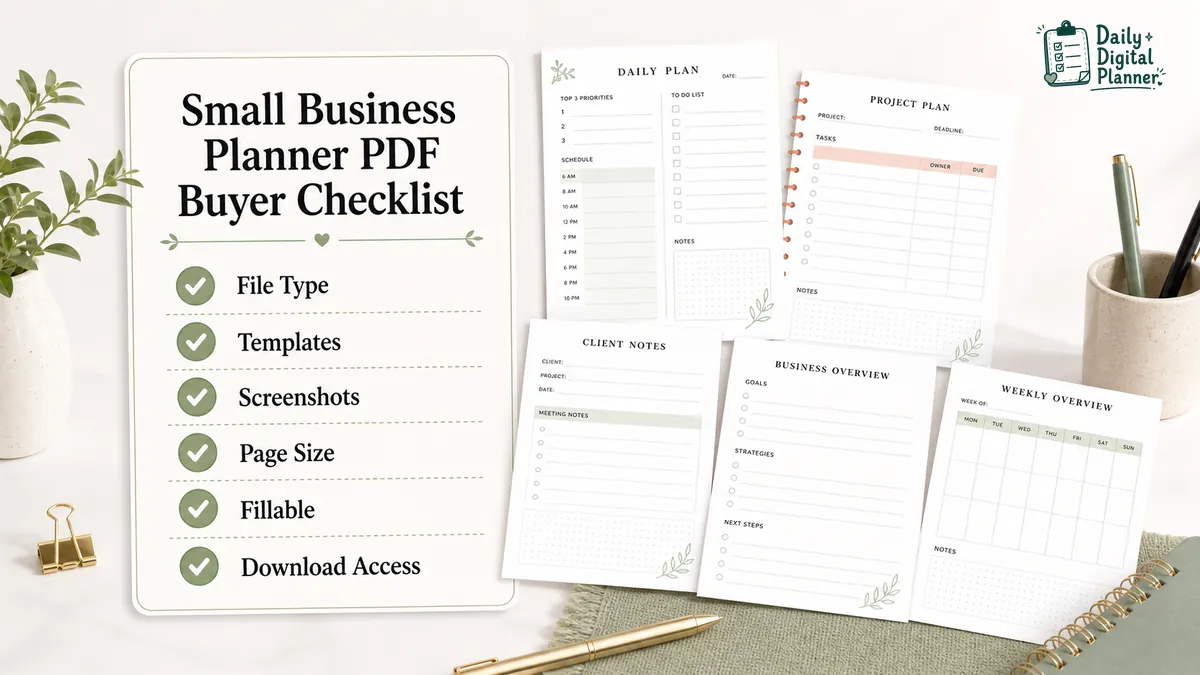
Before buying a small business planner PDF, check the file type, included templates, screenshots, page size, orientation, printable support, fillable support, instructions, price, and download access. These details matter more than a broad planner title.
| Product Detail | What To Check | Why It Matters |
|---|---|---|
| File type | PDF, printable PDF, fillable PDF, or included versions | File type determines whether you print, type, save, or use both workflows. |
| Included templates | Daily, project, meeting, campaign, client, admin, overview, or bundle pages | Included templates should match the business workflow you need. |
| Screenshots | Page previews, field labels, writing space, checkboxes, and layout | Screenshots show whether the planner page fits the way you work. |
| Page size | Letter, A4, or another stated size | Page size affects printing, binder fit, and available writing space. |
| Orientation | Portrait or landscape | Orientation changes how tasks, notes, and tables fit on the page. |
| Printable support | Print notes, margins, blank versions, or paper-use details | Printable support matters when you want handwritten planning. |
| Fillable support | Confirmed fillable fields and compatible PDF workflow | Fillable support matters only when you want typed entries. |
| Instructions | How to open, print, type, save, or reuse the planner | Instructions reduce setup uncertainty after purchase. |
| Current price | The price shown on the product page or checkout | Price can change, so verify it before buying. |
| Download access | Delivery through purchase email and the website Downloads area | Download access tells you where to find the file after checkout. |
Daily Digital Planner digital products are delivered through the store’s purchase flow. If you want to review the checkout and download path first, use How to Buy before choosing a product.
When Is a Planner Bundle Better Than One Business Planner?
A planner bundle is better when one business workflow needs several related templates; one planner is better when the job is narrow and clear. A small business owner does not need a bundle just because the business has many moving parts.
| Buying Situation | Better Choice | Why |
|---|---|---|
| You need one meeting page | Single meeting notes planner | One repeated meeting workflow does not need a full system. |
| You need one project tracker | Single project planner | A focused project page is easier to choose and use. |
| You need daily tasks, meetings, projects, and focus pages | Work and productivity planner bundle | Several work contexts can use separate pages that still belong together. |
| You want to test one workflow first | Single planner | A narrow purchase can show whether the layout fits before you buy more. |
| You want several templates for work, home, and productivity | Planner bundle | A bundle is better when the planning system needs more than one category. |
The simple test is scope. A single planner fits one clear job. A bundle fits several jobs that repeat in the same week.
What Should a Small Business Planner Not Promise?
A small business planner PDF can organize business work, but it should not promise legal, financial, tax, accounting, marketing, or business-growth outcomes. A planner page can make information visible; it cannot replace professional advice or software that performs a different job.
Keep these boundaries clear:
- A small business planner is not the same as a business plan document.
- A PDF planner is not accounting, tax, legal, or financial advice.
- A campaign tracker is not a marketing strategy service.
- A project planner PDF is not team project management software.
- A checklist can organize tasks, but it cannot guarantee productivity, revenue, growth, or business success.
This distinction matters because search results for small business planners often include business plan templates and software tools. Those results signal what users may be comparing, but Daily Digital Planner’s source context is downloadable PDF planner templates and product guidance.
Small Business Planner FAQs
Small business planner FAQs should answer format, scope, buying, and workflow questions directly. These answers are short because the main page already covers the decision path.
Is a small business planner the same as a business plan?
No, a small business planner is not the same as a business plan. A small business planner organizes work tasks and notes, while a business plan explains strategy, market, operations, and finances.
This page covers PDF planner templates for workflow organization. It does not teach business plan writing.
Can I type into a small business planner PDF?
Yes, you can type into a small business planner PDF only when the product includes fillable fields. A normal downloadable PDF is not automatically fillable, so check the product page for fillable support.
If typing matters, compare fillable PDF planners before buying.
Can I print a small business planner PDF?
Yes, you can print a small business planner PDF when the product is designed as a printable PDF. Check page size, orientation, screenshots, margins, and print instructions before checkout.
If paper planning is the main workflow, start with printable planner PDFs.
Which planner should I choose for client work?
Choose a client workflow or project planner when the main job is tracking client stages, tasks, deadlines, and follow-ups. A daily planner can hold one day’s tasks, but client work usually needs notes that carry across more than one day.
For that workflow, compare project planner PDFs or the client workflow planner.
Should I buy a bundle or a single planner?
Buy a bundle when you need several related planning templates, and buy one planner when one workflow is enough. The better choice depends on how many business contexts you need to organize.
Use the work and productivity planner bundle when daily tasks, projects, meetings, and focus pages need to work together.
Is a PDF planner a replacement for project management software?
No, a PDF planner is not a full replacement for project management software. A planner PDF can organize notes, tasks, and checklists, but software may be needed for team assignments, automations, integrations, permissions, or live collaboration.
Choose the planner when the job is personal or small-team organization on a printable or fillable page. Choose software when the work needs live shared systems.
Start With the Planner That Matches Your Small Business Workflow
Start with the planner that matches the business workflow you repeat most often. A work day planner fits daily task load, a project planner fits deadlines and milestones, a meeting notes planner fits calls and action items, and a business planner fits client, campaign, launch, and admin notes.
The most direct shopping path is the business planner PDFs category. If the business needs several planner types together, compare the work and productivity planner bundle before choosing separate products.