
Teacher Planner Bundle for Lessons, Weekly Tasks, and Classroom Admin
A teacher planner bundle is a downloadable set of printable or fillable PDF planner pages for organizing lesson planning, weekly classroom tasks, meetings, notes, and admin routines in one purchase path. It works best when you want several teacher planning pages instead of a single planner template.
Daily Digital Planner focuses on PDF planner products, so this page uses a practical buying lens: what to check before purchase, how the files should work, and when a bundle is a better fit than one planner page. If you are still deciding what kind of teacher planning setup you need, start with the broader guide to digital planners for teachers. If you already know you want several templates together, use this page to compare the teacher bundle path with the main planner bundle hub.
What Is a Teacher Planner Bundle?
A teacher planner bundle is a set of planner PDF pages grouped around teacher work, usually covering more than one planning need. The bundle format matters because a teacher may need lesson pages, weekly task pages, meeting notes, admin notes, and printable checklists at different points in the same week.
A single teacher planner PDF usually solves one layout need. A bundle should connect several related pages so you do not have to buy, download, and organize scattered templates from different places.
For Daily Digital Planner, the safest way to evaluate a teacher planner bundle is to check the product card, screenshots, file type, and download details before checkout. The page title can say "teacher planner bundle," but the product proof should show what the bundle actually contains.
Who Is a Teacher Planner Bundle For?
A teacher planner bundle is for a teacher who needs several repeatable planning pages, not only one lesson plan template. It fits best when weekly planning, daily prep, meetings, notes, and classroom admin tasks all need a consistent place to live.
This type of bundle can help if you prefer paper planning, want a binder setup, or like typing into a PDF before printing. It can also work for teachers who switch between desk planning and digital file storage, as long as the product confirms printable and fillable PDF support.
A teacher planner bundle is probably too much if you only need one narrow page, such as a simple weekly overview. In that case, a single printable planner page or a category-specific planner may be cleaner than a full bundle.
What Should a Teacher Planner Bundle Include?
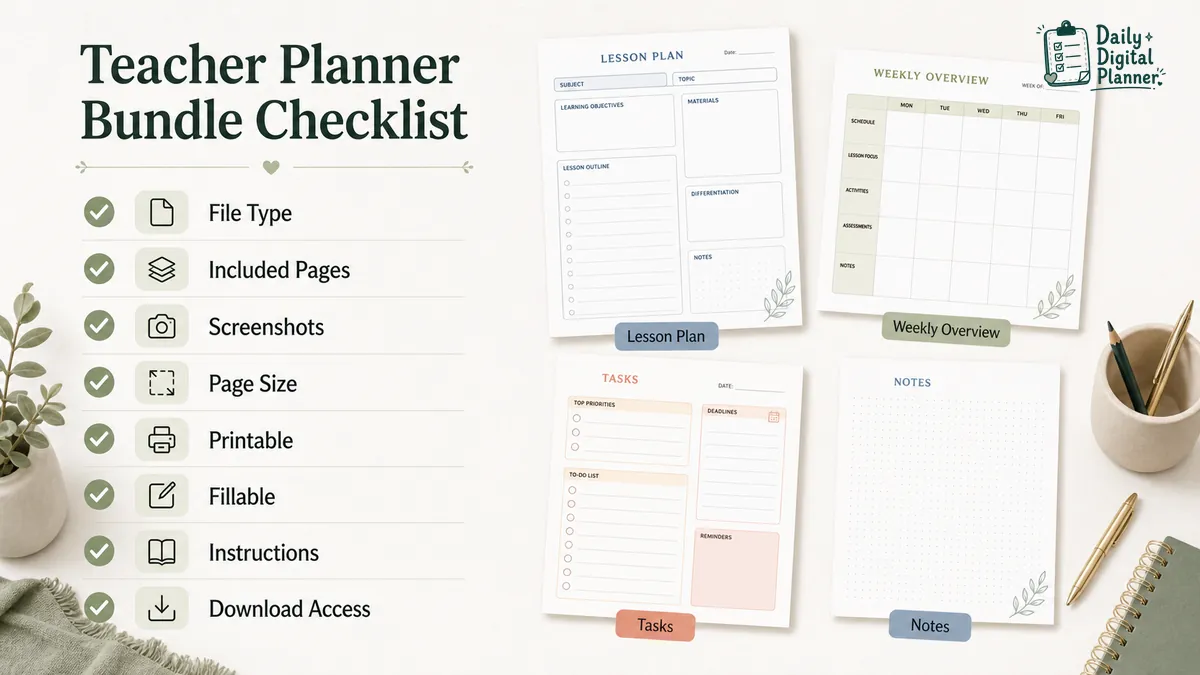
A teacher planner bundle should make its included pages clear before the buyer reaches checkout. Search results for teacher planner bundles show that shoppers expect previews, page types, printable format details, and enough structure to judge whether the bundle covers real teaching work.
Use this checklist while reviewing any teacher planner bundle:
| Page type to look for | Why it matters | What to verify before buying |
|---|---|---|
| Lesson planning pages | Lesson pages help organize daily or weekly lesson blocks. | Confirm the product screenshots show lesson planning pages before saying the bundle includes them. |
| Weekly overview pages | Weekly pages help a teacher see the week before it starts. | Check whether the layout is dated, undated, horizontal, vertical, or open-format. |
| Task or checklist pages | Task pages help track prep, grading follow-up, classroom admin, and recurring work. | Confirm whether the checklist is printable, fillable, or both. |
| Meeting notes pages | Meeting notes pages keep staff, parent, team, or admin notes in one place. | Check whether there is enough room for decisions, follow-ups, and dates. |
| Project or event pages | Project pages help organize classroom projects, events, and deadlines. | Confirm the page fits classroom work rather than only business project planning. |
| Notes pages | Notes pages keep loose reminders and admin notes together. | Check whether blank, lined, or structured notes are included. |
| Printing instructions | Printing details reduce paper-size and scaling mistakes. | Look for page size, margins, and print guidance. |
| Download access details | Download details reduce checkout anxiety. | Check how files are delivered after purchase. |
The main point is simple: do not buy a teacher planner bundle only from the title. Buy it from the visible contents, product screenshots, file type, and download details.
Should Teachers Choose a Printable, Fillable, or Physical Planner?
A printable or fillable PDF teacher planner bundle is strongest when you want instant access and reusable pages instead of a shipped planner with fixed layouts. A physical planner can still be useful, but it usually gives you one bound format and less freedom to reprint a page when your week changes.
The best format depends on how you actually plan:
| Format | Best for | Tradeoff |
|---|---|---|
| Printable PDF teacher planner | Paper binders, desk pages, reprinting, and offline planning. | You need a printer and the right paper-size setup. |
| Fillable PDF teacher planner | Typing into fields before saving or printing. | You need a compatible PDF reader, and the product must confirm fillable support. |
| Physical teacher planner | A bound notebook feel and no file setup. | The layout is fixed, shipping may be required, and pages cannot be reprinted freely. |
| Editable template | Design customization before use. | It takes more setup work, and "editable" should only be trusted when the seller explains what can be edited. |
| Free teacher planner PDF | Testing a simple planner page before buying. | Free pages can be limited, scattered, or missing the exact workflow you need. |
If you plan on paper, a printable PDF can be a strong fit. If you want to type first and print later, confirm that the product is a fillable PDF planner and not only a flat printable page.
How Does a Teacher Planner Bundle Help With Weekly Classroom Planning?
A teacher planner bundle helps weekly planning by keeping the week, lesson notes, task lists, and admin follow-ups in related pages instead of scattered notes. That matters because teacher work often moves between planning, doing, updating, and carrying tasks forward.
A simple weekly flow can look like this:
- Start with the weekly overview page to see the main blocks of the week.
- Add lesson notes or lesson blocks for the days that need more detail.
- Move prep tasks, grading follow-ups, and classroom admin items into a task page.
- Keep meeting notes separate from daily tasks so decisions and follow-ups are not lost.
- Review the week and move unfinished work into the next week.
This is a planning workflow, not a promise that one PDF can replace school systems, curriculum tools, gradebooks, or professional judgment. A teacher planner bundle organizes repeatable information; it should not be treated as classroom management software.
For teachers who want a broader explanation of planner routes by workflow, the guide to digital planners for teachers covers teacher planning needs outside the bundle-buying decision.
When Is a Bundle Better Than a Single Teacher Planner PDF?
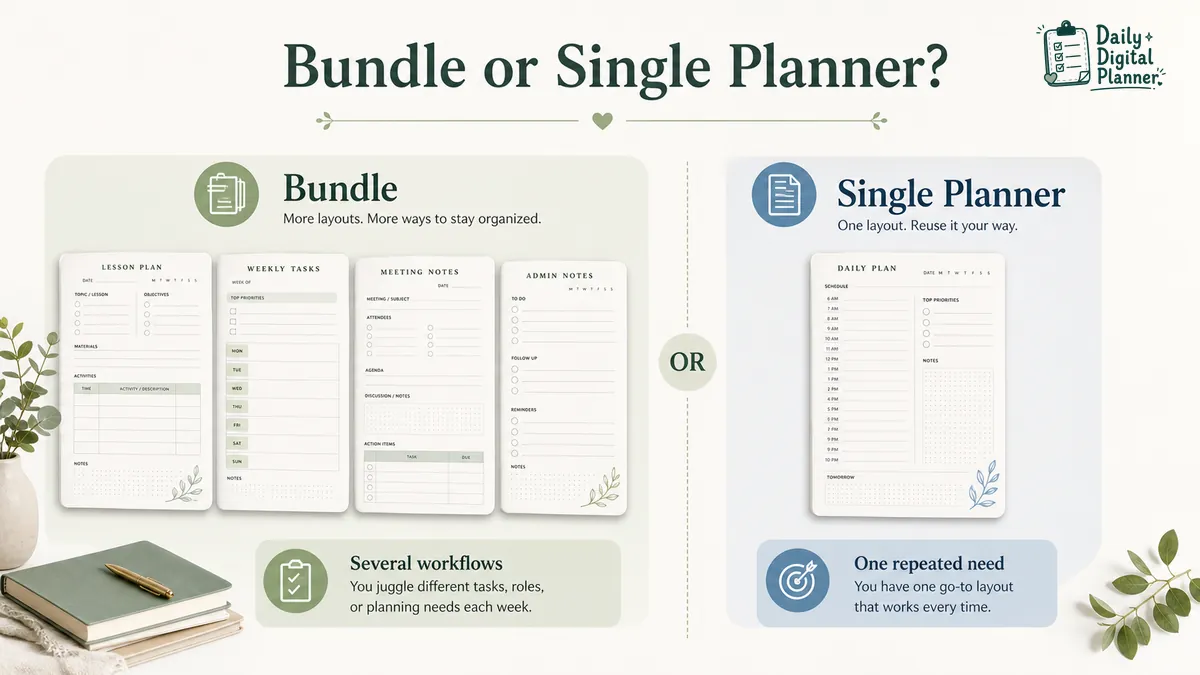
A bundle is better when one planner page cannot cover the number of teacher workflows you repeat during the week. A single PDF is better when you already know the one layout you need and do not want extra pages.
Use this decision table before buying:
| Choose a bundle when… | Choose a single planner when… |
|---|---|
| You need lessons, tasks, meetings, and notes in related pages. | You only need one layout. |
| You want several page types in one download path. | You already know the exact page you want. |
| You print different pages for different weeks. | You use the same page every day. |
| You want a classroom or admin planning setup. | You only need a quick checklist. |
The bundle decision is less about having more pages and more about avoiding mismatched pages. A useful bundle should make related teacher planning pages easier to use together.
How Should Teachers Check a Planner Bundle Before Buying?
Before buying a teacher planner bundle, check the file type, included pages, screenshots, page size, printable or fillable support, instructions, price, and download access. Those details tell you more than the bundle name.
Use this buyer check before checkout:
- File type: Confirm whether the planner is a PDF, a fillable PDF, a printable PDF, or another format.
- Included pages: Check the product description and screenshots for the exact page types.
- Preview images: Look for screenshots that show the actual planner pages, not only a decorative cover.
- Page size: Confirm whether the pages are built for Letter, A4, or another size.
- Printable support: Check whether the product gives printing guidance or page-size notes.
- Fillable support: Confirm fillable fields only when the product says the PDF is fillable.
- Instructions: Look for setup, printing, or PDF-use guidance.
- Current price: Review the product card or checkout page for the current price.
- Download access: Confirm how you receive files after purchase.
- Terms and policies: Review refund, terms, and support pages when needed.
This check is especially important for teacher planner bundles because search results mix physical planners, editable templates, free PDFs, and printable downloads. The same words can mean different file experiences.
How Do Downloads Work After Purchase?
After purchase, Daily Digital Planner delivers downloadable files through WooCommerce email links and the website Downloads section in the customer account area. That download path matters because a teacher planner bundle should be easy to find again when you need to reprint or reuse pages.
The practical flow is:
- Buy the planner product through the site checkout.
- Check the purchase email for download links.
- Log in to the website account area if you need to find the Downloads section later.
- Save the files somewhere you can access during planning.
- Print, type into, or use the PDF according to the product’s format and instructions.
For the full purchase flow, use the how to buy and download planner files page. For printing setup, use the guide on how to print a printable planner PDF. For fillable files, use the guide on how to use a fillable PDF planner in Adobe Acrobat Reader.
Browse Teacher Planner Bundle and Related PDF Planner Pages
Teacher planner bundle shopping should lead to a small set of clear next pages, not a long list of unrelated products. Start with the bundle hub, then move into teacher workflow, printable format, fillable format, or work-planning pages based on what you still need to verify.
Recommended next pages:
| Page | Use it when… |
|---|---|
| Planner Bundle Hub | You want to compare bundle paths before choosing a specific planner set. |
| Planner Bundle Products | You want to browse available planner bundle products and product cards. |
| Digital Planners for Teachers | You want a broader teacher-planner guide before choosing a bundle. |
| Printable Planner | You prefer printing pages for a binder, desk, or classroom planning setup. |
| Fillable PDF Planner | You want to type into the planner before saving or printing. |
| Work Planner | You want a work-style planning page for tasks, priorities, meetings, and admin follow-up. |
If a teacher-specific bundle product is available on the page, review that product first. If a teacher-specific product is not shown, use the related planner bundle products and teacher-friendly PDF planner pages to choose the closest workflow fit.
Teacher Planner Bundle FAQs
Teacher planner bundle FAQs should clarify format, contents, reuse, and download access without making unverified product claims.
What is included in a teacher planner bundle?
A teacher planner bundle should include several related planner pages for teacher work, but the exact contents depend on the product. Check the product card, screenshots, and description before assuming that lesson pages, weekly pages, notes pages, or checklists are included.
Is a teacher planner bundle printable?
A teacher planner bundle is printable only when the product is sold as a printable PDF or includes printable files. Check the file type, page size, and printing instructions before buying.
Can I type into a teacher planner PDF?
You can type into a teacher planner PDF only when the product includes fillable PDF fields or is designed for digital typing. A flat printable PDF may be printable without being fillable.
Is a teacher planner bundle the same as a lesson planner?
A teacher planner bundle is not the same as a lesson planner when it includes several planning page types. A lesson planner focuses on lesson blocks, while a bundle may also support weekly tasks, notes, meetings, and admin routines if those pages are included.
Is a PDF teacher planner better than a physical teacher planner?
A PDF teacher planner is better than a physical planner when you want instant download access, reusable pages, and the option to print selected pages. A physical planner may be better if you want a bound notebook and do not need to reprint or change page order.
Can I reuse a teacher planner PDF during the school year?
A teacher planner PDF can be reused during the school year when the file license and format allow repeated personal use. Check the product terms and whether the pages are dated or undated before planning around reuse.
Is this teacher planner bundle dated or undated?
A teacher planner bundle is dated only if the product description says it is dated for a specific year or school year. If the product is undated, you can usually use the same layout across different weeks or months, depending on the file design.
How is a paid teacher planner bundle different from a free teacher planner PDF?
A paid teacher planner bundle should give more complete organization, clearer previews, and related page types in one purchase path. A free teacher planner PDF can be useful for testing a layout, but it may be limited or scattered across different sources.
What should I check before buying a teacher planner bundle?
Before buying a teacher planner bundle, check the file type, included pages, screenshots, page size, printable support, fillable support, instructions, price, and download access. These details show whether the bundle fits your planning workflow.
How do I download the files after purchase?
Daily Digital Planner download files are delivered through WooCommerce purchase email links and the Downloads section in the customer account area. Use the how to buy and download planner files page if you need the purchase and download steps.
Final Buying Check
A teacher planner bundle is worth choosing when the product proof matches the way you plan: lesson pages, weekly task pages, notes, admin follow-up, printable use, fillable use where available, and a clear download path. If the page title sounds right but the screenshots or file details are unclear, pause before checkout and verify the product contents first.
Use the planner bundle hub to compare bundle paths, or browse planner bundle products when you are ready to review available product cards.