
Digital Planners for Teachers: Lessons, Weekly Tasks, and Admin
A digital planner for teachers is a downloadable PDF planner system that helps organize lesson plans, weekly classroom tasks, meetings, projects, and admin notes.
That sounds simple, but the useful part is choosing the right planner pages for the actual work. A teacher planning one week of lessons may need a different layout from a teacher tracking parent meetings, classroom projects, prep tasks, or daily admin.
Daily Digital Planner sells downloadable planner PDFs. Some planners are designed mainly to print. Some are fillable PDF planners you can type into when the product supports editable fields. This page focuses on the planner workflow, not teaching methods, curriculum design, school policy, or gradebook software.
If you are still comparing formats, start with the broader digital planner guide. If you already know you want paper pages, compare printable planners. If you want to type before saving or printing, look at fillable PDF planners.
What Is a Digital Planner for Teachers?
A digital planner for teachers is a downloadable PDF planner template or set of templates used to organize repeatable teaching work.
In this store context, "digital" does not automatically mean an app subscription or a tablet-only planner. It usually means a digital file you can download after purchase, then use as a printable page, a typed PDF, or both when the specific product supports those fields.
A teacher planner PDF can help hold:
- Lesson blocks, prep notes, weekly plans, and classroom reminders.
- Daily priorities, copies to make, materials to prepare, and admin follow-ups.
- Meeting notes, parent communication notes, school event tasks, and project deadlines.
The planner does not decide what to teach. It does not replace your school’s systems. It gives you a clear place to put the recurring details that otherwise scatter across notebooks, sticky notes, inboxes, and mental lists.
Which Teacher Workflows Can a Planner Help Organize?
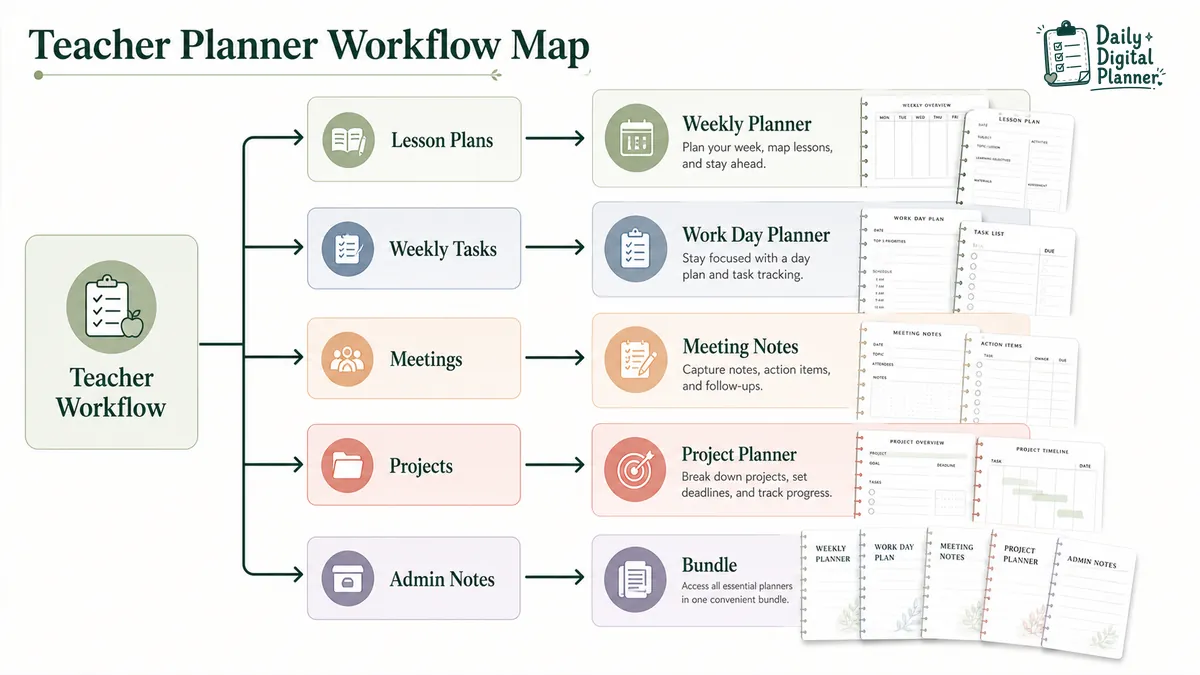
A teacher planner can organize repeatable work such as lesson blocks, weekly tasks, classroom checklists, meeting notes, project tasks, and admin follow-ups.
The right planner depends on which part of the teaching week feels hardest to keep visible.
Lesson Plans and Weekly Overviews
Lesson planning often needs a week-level view. You may want space for class blocks, topics, materials, reminders, and notes for what to adjust later.
A weekly planner PDF fits teachers who need to see the whole school week at once. It can work well for lesson blocks, prep periods, repeated routines, and weekly classroom priorities.
This is different from a full curriculum planner. A PDF planner can hold your lesson structure and notes, but it should not promise to write curriculum, align standards, or replace professional teaching judgment.
Classroom Tasks and Admin Notes
Daily teaching work is full of small tasks: print this, email that person, prepare tomorrow’s materials, update a note, check a deadline, follow up after a meeting.
A work day planner can be a better fit when the problem is one busy teaching day rather than the whole week. A productivity planner PDF may also help when you need to choose the top priorities instead of carrying every task with equal weight.
For this kind of planning, the best page is usually boring in the right way: date, schedule, priorities, checklist, notes, and a clear place to park follow-ups.
Meetings, Parent Communication, and Follow-Ups
Teachers often need a record of conversations and decisions. Staff meetings, parent meetings, support conversations, planning sessions, and team discussions can all create follow-up tasks.
A meeting notes planner is useful when you need to capture an agenda, notes, decisions, action items, and next steps in one place.
Keep sensitive information handled according to your school policies. A planner page can organize your own notes, but it is not a secure student information system.
Projects, Events, and Student Support Notes
Some teacher work is larger than a daily checklist. Classroom events, unit projects, field-trip tasks, display boards, student-support follow-ups, and committee work can stretch across days or weeks.
A project planner PDF fits work with tasks, deadlines, owners, materials, and progress notes. It gives you a place to break the larger work into smaller pieces.
If you only need one page for a single event, one project template may be enough. If you are juggling lessons, admin, meetings, and projects at the same time, a bundle may make more sense.
Should Teachers Choose a Printable or Fillable PDF Planner?
Teachers should choose printable planner pages when they want paper on a desk, clipboard, binder, or planning folder, and fillable PDF pages when they want to type notes before saving or printing.
The format decision should come before the design decision. A pretty planner still needs to match how you actually work during a school day.
| Teacher need | Better format | Why it fits | What to check |
|---|---|---|---|
| You like paper planning during prep time | Printable planner | You can write by hand, keep pages in a binder, and print fresh copies when needed | Page size, orientation, print instructions, included pages |
| You want to type lesson notes or admin notes | Fillable PDF planner | You can type into supported fields before saving or printing | Whether the product is actually fillable, and which PDF reader is recommended |
| You want both typed and handwritten planning | Printable plus fillable support | You can type recurring details, then print and write updates by hand | Field support, saving instructions, print scale, page size |
| You need quick classroom copies | Printable PDF | You can print the same template again when the week changes | Whether the file includes the layout you need |
| You work from a laptop during planning time | Fillable PDF | You can keep typed planning notes in a saved copy | Use a reliable PDF reader such as Adobe Acrobat Reader when needed |
Not every PDF is fillable. If typing matters, check the product description before buying. For workflow help, read how to use a fillable PDF planner in Adobe Acrobat Reader. For print setup, use the guide on how to print a printable planner PDF at home.
Which Planner Type Fits a Teacher Workflow?
The best teacher planner type depends on the workflow you repeat most often, not just the word "teacher" in the product title.
Use this as a quick routing table.
| If your main problem is… | Start with this planner type | Why |
|---|---|---|
| Seeing the school week in one view | Weekly Planner | Good for lesson blocks, prep periods, weekly classroom reminders, and recurring tasks |
| Managing one busy teaching day | Work Day Planner | Good for date-specific tasks, schedule notes, priorities, and admin follow-ups |
| Choosing what matters most today | Productivity Planner | Good when your task list is too long and you need a priority structure |
| Capturing staff or parent meetings | Meeting Notes Planner | Good for agendas, notes, decisions, action items, and next steps |
| Organizing classroom projects or events | Project Planner | Good for deadlines, task lists, materials, and progress notes |
| Covering several planning jobs at once | Planner Bundle | Good when one template will not cover lessons, admin, meetings, and projects |
For lesson blocks, weekly classroom reminders, and recurring tasks.Work Day Planner
For one busy teaching day, priorities, schedule notes, and admin follow-ups.Meeting Notes Planner
For staff meetings, parent meetings, notes, decisions, and action items.Project Planner
For classroom projects, school events, deadlines, and task lists.Planner Bundle
For teachers who need weekly, daily, meeting, and project pages together.
What Should Teachers Check Before Buying a Planner PDF?
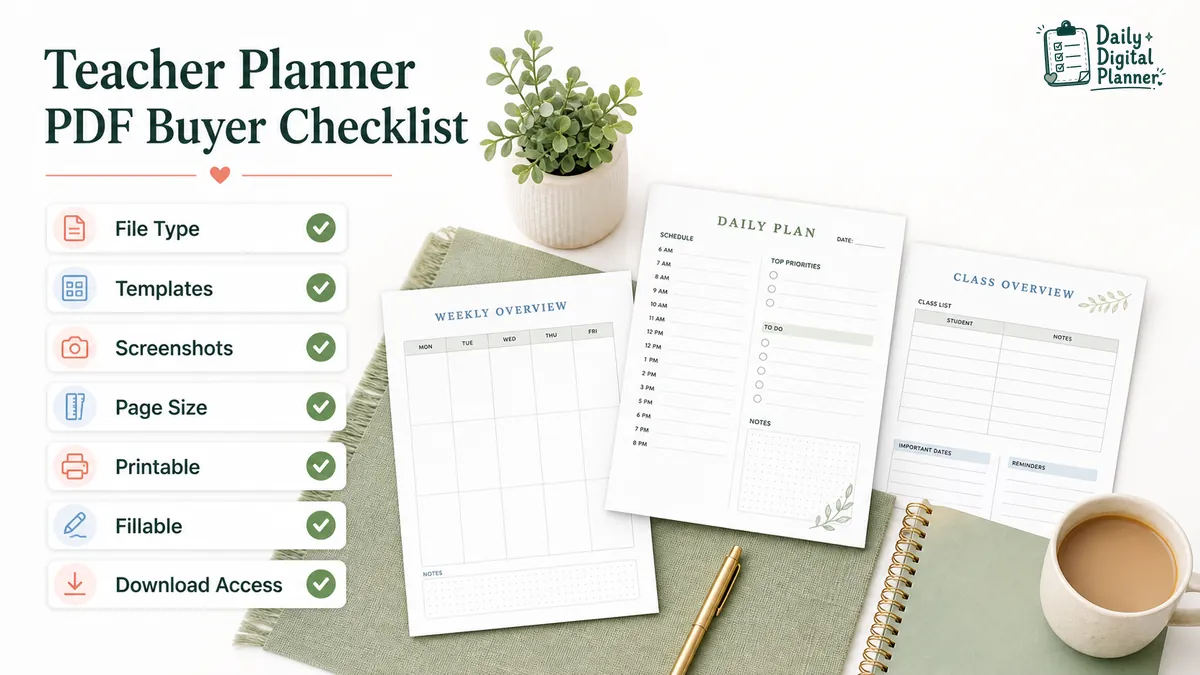
Before buying a teacher planner PDF, check the file type, included templates, screenshots, page size, instructions, price, and download access.
This matters more than a generic promise that a planner is "organized" or "beautiful." A planner page is only useful if the file includes the layouts you expect and works in the way you plan to use it.
| Product detail | Why it matters for teachers | What to look for |
|---|---|---|
| File type | Confirms whether you are buying a PDF, image file, app template, or something else | PDF, printable PDF, fillable PDF, bundle details |
| Included templates | Shows whether the product covers lessons, weekly planning, meetings, projects, or admin notes | A clear list of pages or templates |
| Screenshots | Lets you inspect the actual layout before checkout | Real page previews, not only decorative mockups |
| Page size and orientation | Affects printing, binders, folders, and desk use | US Letter, A4, portrait, landscape, or other listed formats |
| Printable support | Tells you whether the page is intended to print cleanly | Print instructions, scale guidance, page size notes |
| Fillable support | Tells you whether you can type into the planner | Form-field language, PDF reader guidance, save instructions |
| Download access | Explains what happens after checkout | Lifetime download, account downloads, email download link, or store account access |
| Price and bundle value | Helps compare one planner against several templates | Included files, number of pages, bundle scope |
Daily Digital Planner sends download access after checkout, and customers can also find their purchased files in the Downloads section of their account. If this is your first purchase, read how to buy before checkout so you know where the files will be.
When Is a Planner Bundle Better for Teachers?
A planner bundle is better for teachers when one template will not cover the week, the teaching day, meetings, and classroom projects.
One planner is enough when the job is narrow. For example, if your main need is a weekly overview, start with a weekly planner. If your main need is meeting notes, start there.
A planner bundle makes more sense when your planning is spread across several repeated workflows.
| Choose one planner when… | Choose a bundle when… |
|---|---|
| You know the exact planning gap | You need several layouts for different parts of the week |
| You want one clean page type | You want weekly, daily, project, and notes pages together |
| You are testing a new planning habit | You already know you will use multiple templates |
| You only need paper planning for one task | You want a more complete printable/fillable planning system |
The practical question is not "Which planner looks nicest?" It is "Which pages will I actually reach for during a real school week?"
What Should a Teacher Planner Not Promise?
A teacher planner PDF can organize planning information, but it should not promise to replace curriculum planning, grading software, school policy tools, or professional teaching judgment.
That boundary is important. A planner can hold lesson notes, tasks, schedules, and follow-ups. It cannot decide standards, store official student records, manage grades, or guarantee classroom results.
Use a planner for the work it handles well:
- Capturing the tasks you need to remember.
- Keeping lesson and weekly notes visible.
- Tracking meeting follow-ups and project steps.
- Giving recurring school tasks a consistent home.
For official records, student data, grading, curriculum requirements, or school compliance, use the tools and policies required by your school.
Teacher Planner FAQs
Is a teacher planner the same as a lesson plan?
No. A teacher planner can include lesson planning space, but a lesson plan is usually one part of a larger teacher planning system. A planner may also include weekly tasks, meetings, projects, admin notes, and reminders.
Can I type into a teacher planner PDF?
You can type into a teacher planner PDF only when the product is made as a fillable PDF or includes editable form fields. Check the product page before buying, and use a PDF reader that supports typing into form fields.
Can I print a teacher planner PDF?
Yes, if the product is provided as a printable PDF and the page size works with your printer setup. Check the page size, orientation, and print instructions before checkout so you know whether it fits your paper and binder setup.
Which planner should I choose for weekly lesson planning?
For weekly lesson planning, start with a weekly planner because it gives you a broader view of the school week. If you also need daily tasks, meeting notes, and project pages, add those formats or choose a bundle.
Should I buy a bundle or a single teacher planner?
Buy a single teacher planner when you have one clear planning gap. Choose a bundle when your week needs several page types, such as weekly overview, daily tasks, meeting notes, project tracking, and admin pages.
Is a PDF teacher planner a replacement for school planning software?
No. A PDF teacher planner is not a replacement for a gradebook, learning management system, official student record system, or school planning software. It is a personal planning tool for organizing your own printable or typed planning pages.
Start With the Planner That Matches Your Teaching Week
The fastest way to choose a teacher planner is to name the part of the week that needs a home.
If the week feels scattered, start with a weekly planner. If each day needs stronger structure, start with a work day planner. If meetings and follow-ups keep slipping, use a meeting notes planner. If projects and events are the issue, use a project planner.
If you are still choosing by audience, browse the broader planner guides by role and workflow. If you need a general work-planning system first, start with the work planner and then narrow by weekly, daily, meeting, project, or bundle needs.