
Blog
Digital Planner vs Printable Planner: Which Format Should You Choose?

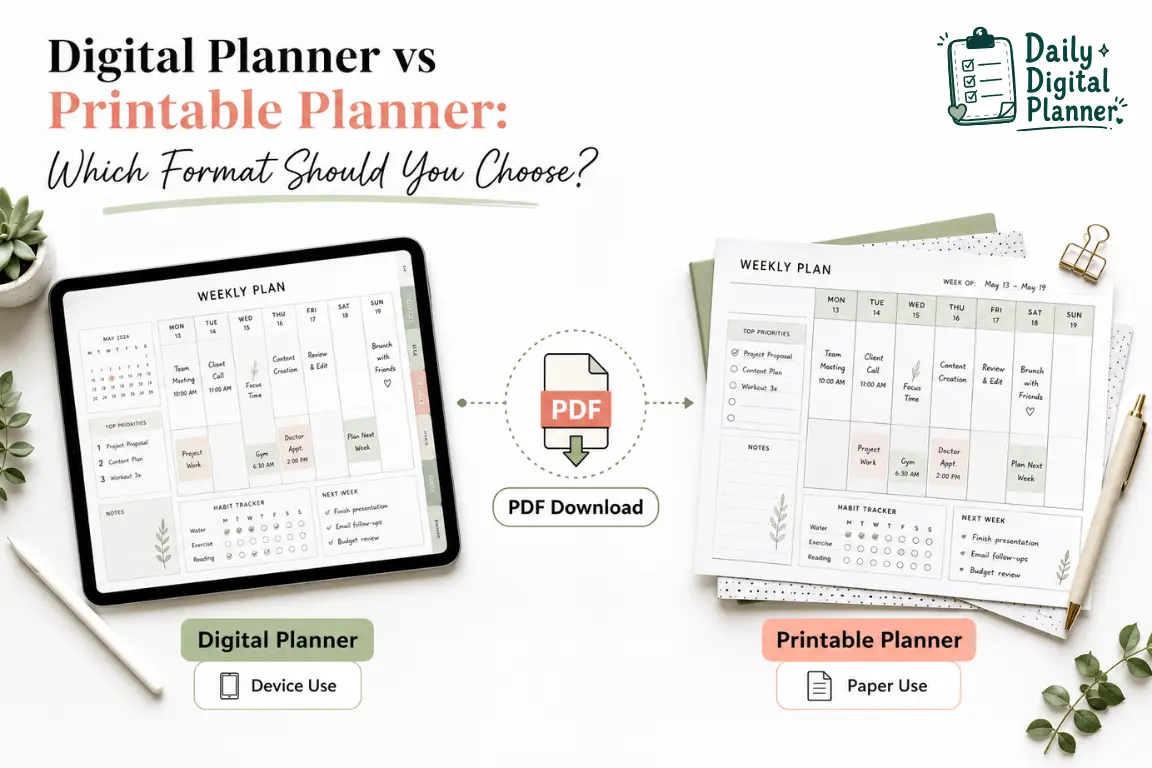
A digital planner is best for device-based planning, while a printable planner is best for paper-based planning; a PDF planner can sometimes support both.
Daily Digital Planner focuses on downloadable PDF planners, so this guide compares planner formats rather than broad productivity apps, Notion templates, or bound notebooks. If you want to compare the PDF planner formats Daily Digital Planner supports, start with digital planner templates and then use this comparison to decide whether your daily planning should live on a device, on paper, or across both workflows.
The main decision is practical: choose the format that matches how you will actually update, review, and reuse your planner during a normal week.
Digital Planner vs Printable Planner: Quick Answer
A digital planner works best on a device, a printable planner works best on paper, and a PDF planner can be useful when you want one downloadable file with flexible use.
- Choose a digital planner if you like using a tablet, laptop, phone, PDF reader, annotation app, typing, or reusable digital pages.
- Choose a printable planner if you prefer handwriting, a binder, a desk routine, a fridge routine, or paper pages that stay visible.
- Choose both if your planning changes by context, such as digital work planning during the day and printable home planning at night.
A paper planner and a printable planner are related, but they are not always the same entity. A paper planner can be any physical planner or notebook. A printable planner starts as a downloadable planner file, usually a printable PDF, that you print and use with paper.
What Is the Difference Between a Digital Planner and a Printable Planner?
A digital planner is a planner format used on a device, while a printable planner is a downloadable planner format printed on paper for handwriting and visible routines.
For the basic definition before comparing formats, see what a digital planner is. In this article, the difference is not just “screen versus paper.” The more useful difference is device-first PDF planning versus paper-first PDF planning.
A digital planner may be opened in a PDF reader, a planner app, or a PDF annotation app. A printable planner is usually opened only long enough to print pages, choose a paper size, or reprint a fresh copy. Both formats can start from a downloadable PDF, which is why the choice can be less rigid than digital app reviews make it seem.
A Digital Planner Is Used on a Device
A digital planner is used on a device, usually as a PDF or digital template opened in a planner app, PDF reader, or annotation app.
The device-first workflow usually involves a tablet, laptop, phone, stylus, keyboard, or touchscreen. Some digital planner PDFs include hyperlinked tabs or clickable sections for faster navigation, but that feature depends on the specific product file. Other digital planners are simple PDF pages that users type into, annotate, duplicate, or save inside their preferred app.
A digital planner works well when your plans change often. It can support typing, undoing edits, carrying less paper, and reusing the same planner file across different planning sessions. If you want to type into fields before saving or printing, compare the format with a fillable PDF planner before purchase.
A Printable Planner Is Printed on Paper
A printable planner is a downloadable planner file printed on paper for handwriting, binders, desks, clipboards, wall displays, or home routines.
A paper-first workflow usually involves a printer, paper, a pen, and a physical place where the planner will stay visible. Printable planner pages may be used in a binder, disc system, clipboard, household command center, classroom area, or work desk. Common printable planner sizes include US Letter and A4 when a product supports those file sizes.
A paper-first workflow starts with the printable planner format because the buyer is choosing a planner page that becomes useful after printing. Printable planners are often easier for people who think better by handwriting, want a screen-free planning block, or need a visible checklist that other household or classroom members can see.
A PDF Planner Can Overlap Both Formats
A PDF planner can be digital, printable, or both when the file is designed for screen use and home printing.
The PDF file is the bridge between digital planners and printable planners. A planner PDF can be downloaded, saved, opened on a device, printed at home, or imported into a compatible annotation app. A fillable PDF can also include fields that let users type into the file before saving or printing, but fillable behavior depends on how the PDF was created.
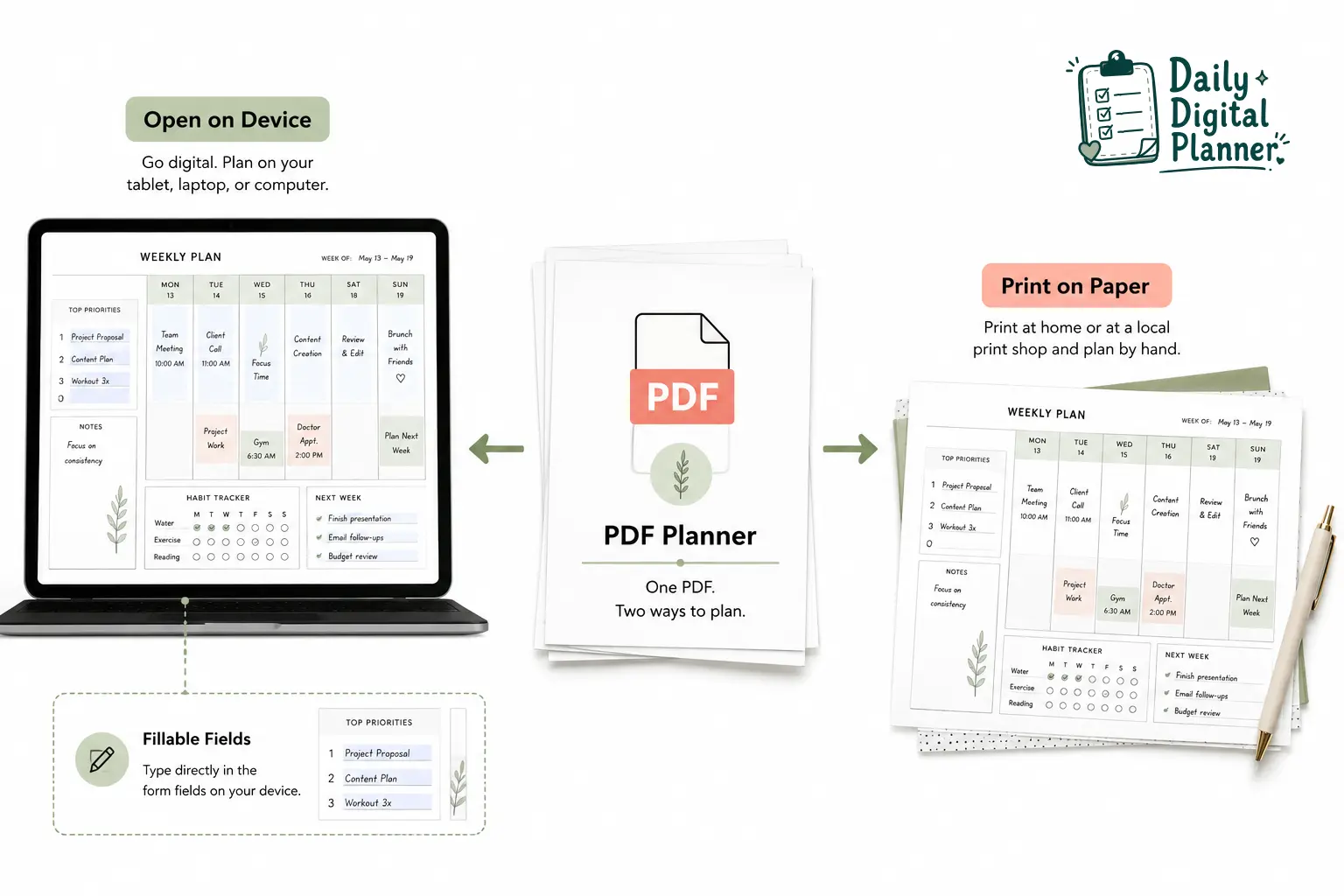
This overlap matters because a buyer may not need to choose one planning identity forever. A work planner can stay digital for quick updates, while a meal planner or household checklist can be printed for visibility.
Digital Planner vs Printable Planner Comparison Table
The clearest comparison between a digital planner and a printable planner is the daily workflow: screen interaction on one side and paper interaction on the other.
| Attribute | Digital Planner | Printable Planner |
|---|---|---|
| Main use | Open on a device | Print and write on paper |
| Typical tools | Tablet, laptop, phone, PDF reader, annotation app | Printer, paper, binder, pen |
| Best for | Portable updates, reusable files, typed or annotated planning | Handwriting, visible routines, desk or home planning |
| Setup | Download and open or import the file | Download, choose paper size, and print |
| Editing method | Type, annotate, duplicate, erase, or save digitally | Write by hand, reprint pages, or use sticky notes |
| Handwriting | Usually requires a stylus or annotation app | Works with any pen or pencil |
| Search and undo | Possible in many apps, depending on the file and app | Not available unless you scan or reprint |
| Battery and screen time | Needs a charged device and screen comfort | Battery-free and screen-free after printing |
| Printing requirement | Optional only if the file is printable | Required before use |
| PDF overlap | Can be a PDF file | Usually starts as a printable PDF |
| Product bridge | Fillable PDF or digital planner PDF | Printable planner PDF |
The best format is the one that removes friction from the place where planning happens. A portable work routine may favor digital planning. A visible home routine may favor printed pages. A mixed week may favor a PDF planner bundle that gives you more than one template type.
When Should You Choose a Digital Planner?
You should choose a digital planner when your planning routine already depends on a device and you want a reusable file that can be updated without reprinting.
Use the digital planner PDF templates page if you want to browse device-friendly planner options before deciding whether printable pages should be part of your routine.
A digital planner is usually the better fit when:
- You use a tablet, laptop, phone, PDF reader, or annotation app every day.
- You want to type tasks, duplicate pages, erase notes, or revise plans often.
- You prefer carrying one device instead of multiple printed planner pages.
- You need portable work planning for tasks, meetings, client notes, projects, or focus blocks.
- You want a digital planner PDF that can stay saved in a folder, cloud drive, or planner app.
- You are comfortable with screen time and keeping a device charged.
Digital planning is not automatically better than paper planning. It becomes better when the device is already part of the user’s planning behavior. If opening an app feels like extra effort, a digital planner can become another file that never gets used.
When Should You Choose a Printable Planner?
You should choose a printable planner when handwriting, paper visibility, and a low-tech setup make planning easier to start and easier to review.
A printable planner is usually the better fit when:
- You like writing tasks by hand.
- You want planner pages on a desk, fridge, wall, binder, clipboard, or classroom table.
- You do not want to learn a planner app before using the template.
- You prefer a screen-free planning session.
- You want to print only the pages you need for a week, project, lesson, routine, or household plan.
- You need a visible checklist for family, classroom, or small business routines.
Printable planners work well when the planner needs to stay in sight. A printed daily page on a desk can act as a visual reminder without notifications, battery, or app switching. If your choice depends on paper size, printer settings, or printing selected pages, use a guide on how to print a printable planner PDF before committing to a paper-first workflow.
Can One PDF Planner Work as Both Digital and Printable?
Yes, one PDF planner can work as both digital and printable when the file is designed for screen use, printing, and any needed fillable fields.
The important condition is file design. A regular printable PDF can usually be opened on a device and annotated, but it may not include clickable tabs or fillable fields. A fillable PDF planner can let users type into fields before saving or printing when the product includes those form fields. A hyperlinked digital planner may be convenient on a tablet but may not be ideal for printing if the pages are designed mainly for screen navigation.
A flexible PDF planner workflow can look like this:
- Download the planner PDF after purchase.
- Save the file in a safe folder or account location.
- Open the file on a device for typing, review, or annotation if the file supports that workflow.
- Print selected pages for handwriting, binder use, desk visibility, or home routines.
- Reuse or reprint pages according to the product’s license terms.
Before choosing a format, check how to buy and download a PDF planner so the download, file access, and personal-use rules are clear.
Best Format by Use Case: Work, Home, Teachers, and Simple Routines
The best planner format depends on where the planner will be used and how often it must be updated.
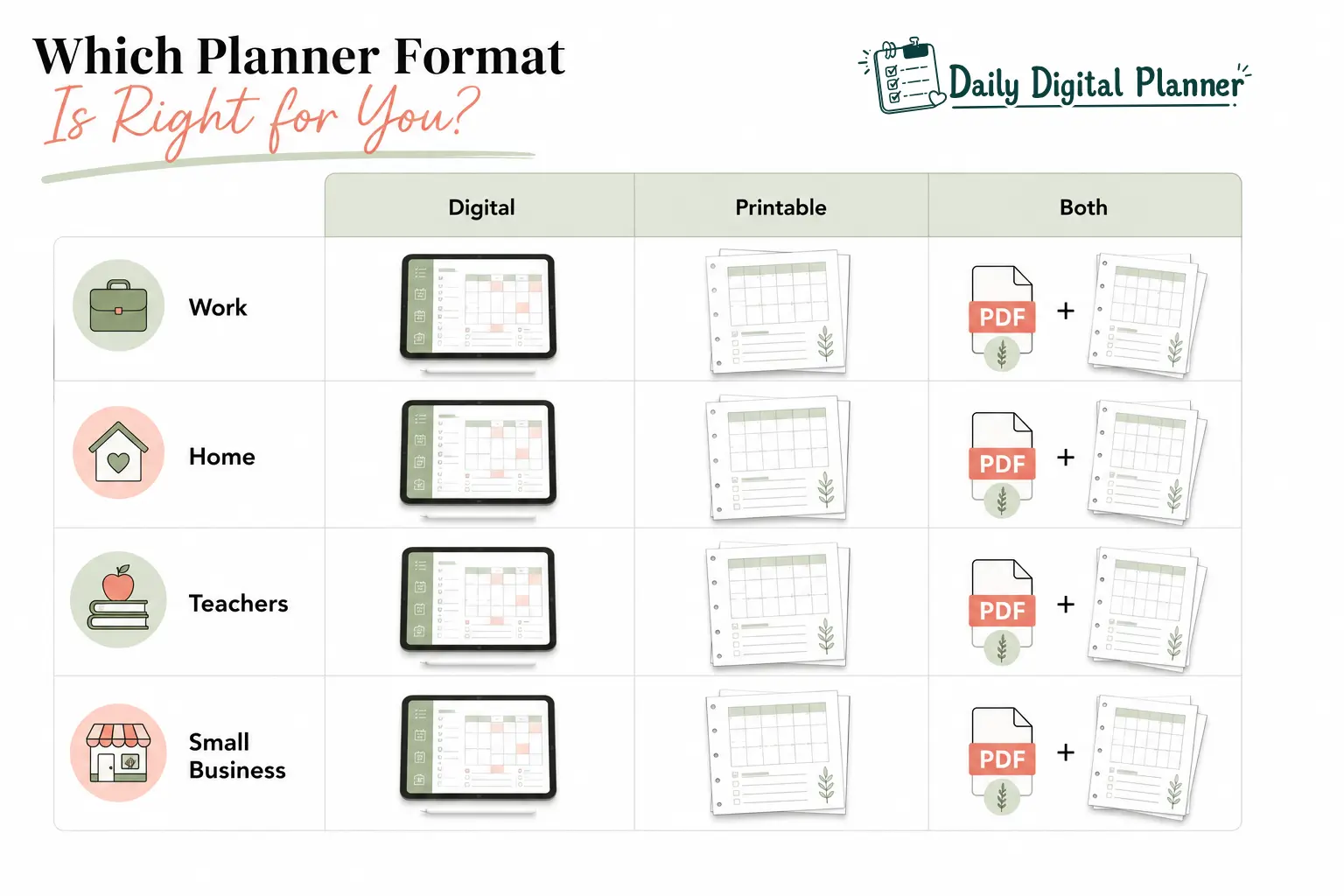
| Use Case | Better Digital Fit | Better Printable Fit | Good Mixed PDF Fit |
|---|---|---|---|
| Work planning | Changing tasks, meetings, project updates, portable notes | Desk checklist, focus block, printed daily agenda | Digital project list plus printed daily focus page |
| Home and life planning | Portable habit tracking, shared digital reference, routine edits | Meal plan, cleaning list, household schedule, fridge checklist | Digital weekly plan plus printed household pages |
| Teachers | Reusable lesson notes, student or class tracking on a device | Classroom checklists, substitute notes, printed lesson pages | Digital master file plus printed classroom pages |
| Small business owners | Client notes, project updates, portable admin planning | Packing lists, counter checklists, printed daily operations | Digital dashboard plus printed workflow pages |
| Simple routines | Reusable templates and typed updates | Visible top tasks, paper checklist, no app setup | Fillable PDF plus printed routine sheet |
Work and Professional Planning
Work and professional planning often works best when digital updates and printable visibility are matched to separate parts of the day.
A professional may use a digital planner for meetings, project notes, task lists, and schedule changes because work information moves quickly. Printed planner pages can still help with a daily focus list, desk review, or top-three priority page. For task lists, project tracking, meetings, and focus blocks, browse work planner templates that match a professional workflow.
Home, Meals, and Routine Planning
Home, meals, and routine planning often works well on printed pages because household tasks need visibility more than complex digital navigation.
A meal plan, cleaning checklist, family schedule, habit tracker, or weekly routine page can be printed and placed where people will see it. A digital planner can still help when the same user wants to revise the plan on a phone or tablet before printing. For routines, meal planning, habits, and household planning, compare home and life planners before choosing a final format.
Teachers and Small Business Owners
Teachers and small business owners often benefit from a mixed planner workflow because they repeat many tasks but still need flexible notes.
A teacher might keep a digital master planner for reusable lessons and print daily pages for classroom use. A small business owner might use a digital file for client planning and print operational checklists for shipping, inventory, appointments, or daily admin. In both cases, the best planner format is the one that reduces repeated setup work.
ADHD-Friendly and Low-Friction Planning
ADHD-friendly and low-friction planning should focus on simple layouts, fewer decisions, and visible next actions without making medical claims.
For users who feel overwhelmed by complex planning systems, the format matters less than friction. A printable page can be easier when the next action needs to stay visible. A digital planner can be easier when typing, editing, or carrying one file prevents paper clutter. A useful layout may include a brain dump, a short task list, a top-three priority area, and a simple daily review.
How to Choose the Right Planner Format Before You Buy
You should choose the right planner format by matching the file type to your device habit, handwriting preference, printing setup, update frequency, and bundle needs.
Use this five-step checklist before buying:
- Decide where planning happens. Choose digital if planning happens on a device. Choose printable if planning happens on paper, at a desk, in a binder, or around the home.
- Check your editing style. Choose digital or fillable PDF if you type, revise, duplicate, or erase often. Choose printable if handwriting helps you commit to tasks.
- Check your printing setup. Choose printable only if you are comfortable with paper size, printer settings, ink, and reprinting selected pages.
- Check update frequency. Choose digital for plans that change many times per week. Choose printable for stable routines, visible checklists, and paper reviews.
- Check whether you need more than one template. If you use both device and paper workflows, the planner bundles page may be more useful than buying one single format.
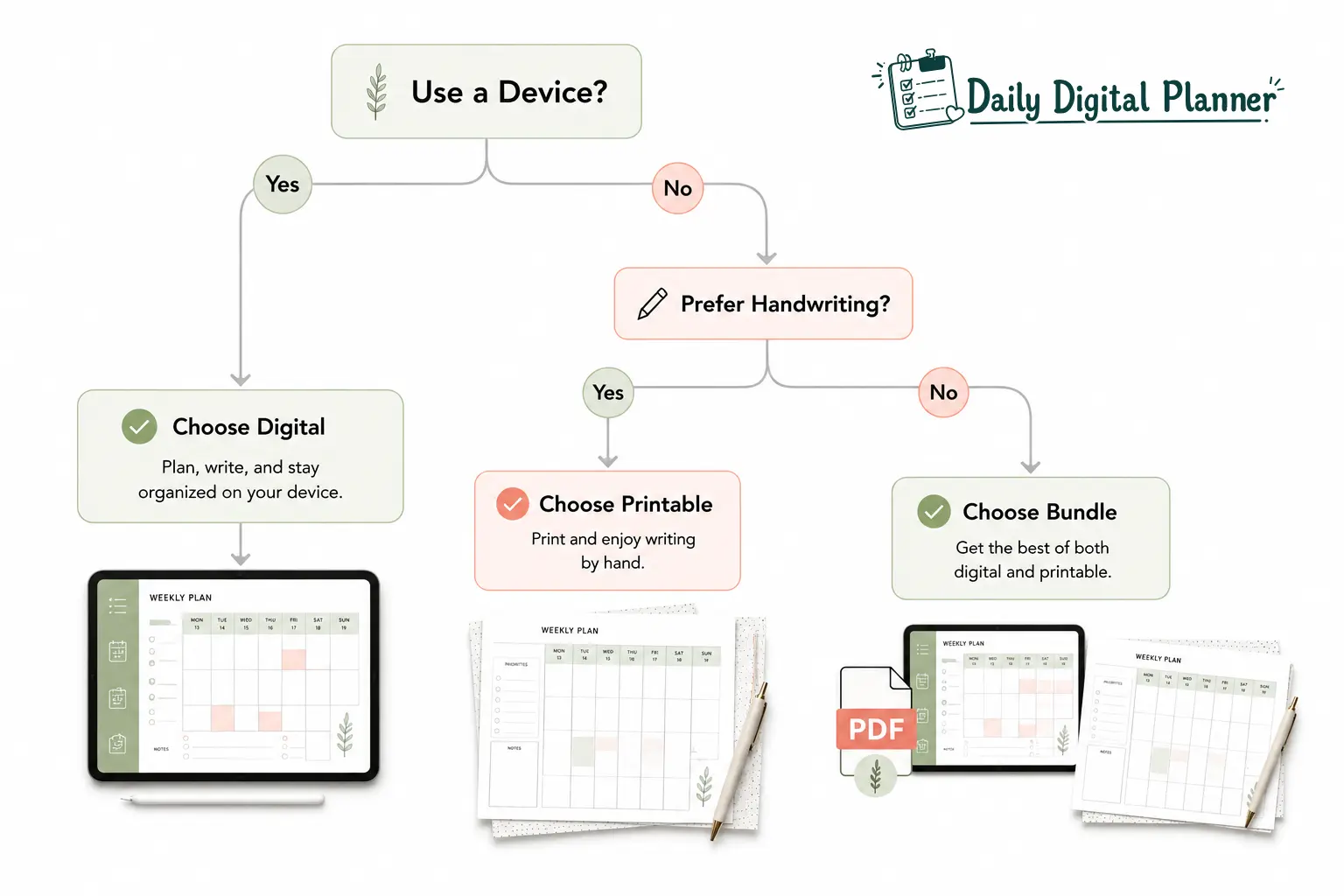
The most common buying mistake is choosing the format that looks best in a product image instead of the format that matches your routine. A beautiful digital planner still needs device comfort. A beautiful printable planner still needs a printer, paper, and a visible place to use it.
Final Recommendation
A PDF planner is often the most flexible choice because it can connect digital planner and printable planner workflows without forcing one planning method for every situation.
Choose a digital planner if you want a reusable file on a device. Choose a printable planner if you want paper pages you can write on. Choose a PDF planner bundle if you want both options for different parts of your week.
For a simple purchase path, review how to buy and download a PDF planner before checkout. Then choose the planner format that removes the most friction from your real planning routine, not the format that sounds best in theory.
FAQ About Digital and Printable Planners
Is a digital planner better than a printable planner?
No, a digital planner is not universally better than a printable planner because the best planner format depends on how you plan each day.
A digital planner is better for device-based updates, typing, portability, and reusable files. A printable planner is better for handwriting, paper visibility, and screen-free routines.
Can a digital planner be printed?
Yes, a digital planner can be printed when the planner file is a printable PDF and the product license allows personal printing.
Not every digital planner is designed for printing. Check the product description for printable pages, paper size, and print instructions before purchase.
Do you need a tablet for a digital planner?
No, you do not always need a tablet for a digital planner if the planner is a PDF that can open on a laptop, phone, or PDF reader.
A tablet is common for handwriting and annotation because it works with a stylus. Typing into a fillable PDF may work better on a laptop or desktop, depending on the PDF reader.
Are printable planners reusable?
Printable planners are reusable when you keep the PDF file and print new personal-use copies according to the product’s license terms.
Reusable does not mean unlimited sharing, resale, or redistribution. Always check the store’s download and license rules before reprinting or sharing files.
What is the difference between a digital planner and a digital calendar?
A digital planner is a planning template for tasks, routines, goals, notes, and reviews, while a digital calendar is mainly for dated events and appointments.
Many users need both. A calendar can hold meetings and deadlines, while a planner can hold task lists, priorities, meal plans, habits, and project notes.
Are digital or paper planners better for ADHD?
Neither digital nor paper planners are automatically better for ADHD because planning needs vary by person, routine, and friction level.
Simple layouts, visible next actions, fewer sections, and easy review points can support low-friction planning. Avoid any planner format that requires too many steps before you can write down the next task.
How much does it cost to print a printable planner?
Printable planner printing cost depends on page count, paper size, ink use, color settings, and whether you print at home or through a print shop.
Before printing a full planner, test one or two pages first. This helps confirm margins, size, readability, and ink use before you commit to the full file.
Is a fillable PDF planner the same as a digital planner?
A fillable PDF planner is a type of digital-friendly PDF planner that includes fields for typing, saving, and sometimes printing.
It is not always the same as a hyperlinked digital planner. A fillable PDF focuses on typed entries, while a hyperlinked planner focuses on navigation inside the file.
One thought on “Digital Planner vs Printable Planner: Which Format Should You Choose?”