
Blog
Fillable PDF Planner vs Printable Planner: Key Differences

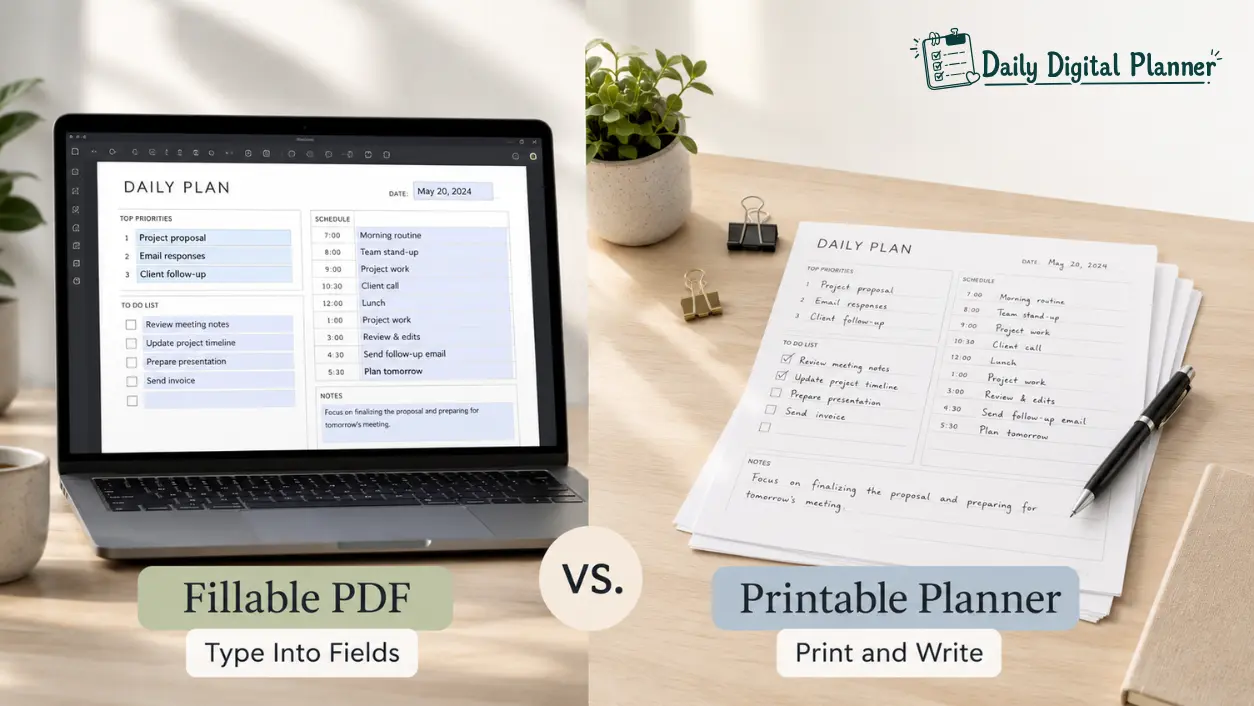
A fillable PDF planner is best when you want to type into planner fields and save a clean digital copy, while a printable planner is best when you want to print pages and write by hand. Some PDF planners can support both workflows, but the product page should confirm fillable fields, paper sizes, and printing instructions before you buy.
That distinction matters because both formats may arrive as downloadable PDF planner files. The file format can look similar, but the workflow is different. A fillable PDF planner is defined by interactive fields. A printable planner is defined by paper output. A hybrid PDF planner can be useful only when the file is built to handle both typed entries and printed pages.
Daily Digital Planner focuses on clean, practical PDF planner templates for people who want low-friction planning for work, home, routines, and everyday productivity. This guide keeps the decision simple: choose the planner format based on how you actually enter information, where the planner will live, and whether you need typed fields, printed pages, or both.
For the broader format hub, start with digital planner PDF templates after verifying the page is live.
Fillable PDF Planner vs Printable Planner: Quick Answer
A fillable PDF planner is for typing into PDF fields, while a printable planner is for printing pages and writing by hand.
- Choose a fillable PDF planner if you want to type, save, edit, and optionally print.
- Choose a printable planner if you want to print pages, write by hand, and use a binder or paper setup.
- Choose a PDF planner that supports both if your routine moves between a computer and paper.
Here is the simple distinction before the detailed comparison:
| Feature | Fillable PDF Planner | Printable Planner |
|---|---|---|
| Main action | Type into fields | Print and write by hand |
| Main tools | Compatible PDF reader, keyboard, device | Printer, paper, pen, binder |
| Best for | Clean typed entries, reusable digital copies, printing after filling | Paper routines, handwriting, visible desk or home planning |
| Setup | Download, open in compatible reader, fill fields | Download, choose paper size, print pages |
| Output | Saved PDF or printed filled page if supported | Printed blank planner pages |
| Main risk | Fields may not work in every app | Wrong scaling, paper size, ink, or print settings |
| Product check | Fillable fields and software recommendation | Paper size, print instructions, personal-use terms |
The rest of the article explains the same decision in more detail: fillable is about typed interaction, printable is about paper output, and PDF planner is the shared file format.
What Is a Fillable PDF Planner?
A fillable PDF planner is a PDF planner file with fields you can type into before saving or printing.
The defining attribute is not the design style, the page count, or whether the planner looks digital. The defining attribute is the presence of fillable fields. These fields allow typed entries in selected areas of the page, such as task lists, appointment boxes, note sections, habit trackers, or checklists.
In a clean planning workflow, a fillable PDF planner can help you enter information without rewriting the page by hand. You may type a weekly schedule, adjust a priority list, save the file, and print the completed page later if the file and PDF reader support that workflow.
This format is useful when planning starts on a laptop, desktop, or tablet. It is also useful when you want repeated planner pages to stay neat, especially for work planning, business admin, teaching routines, or recurring household checklists.
The important caveat is product proof. A PDF is not automatically fillable. The product page or file preview should confirm that the planner includes fillable fields.
How Fillable Fields Work
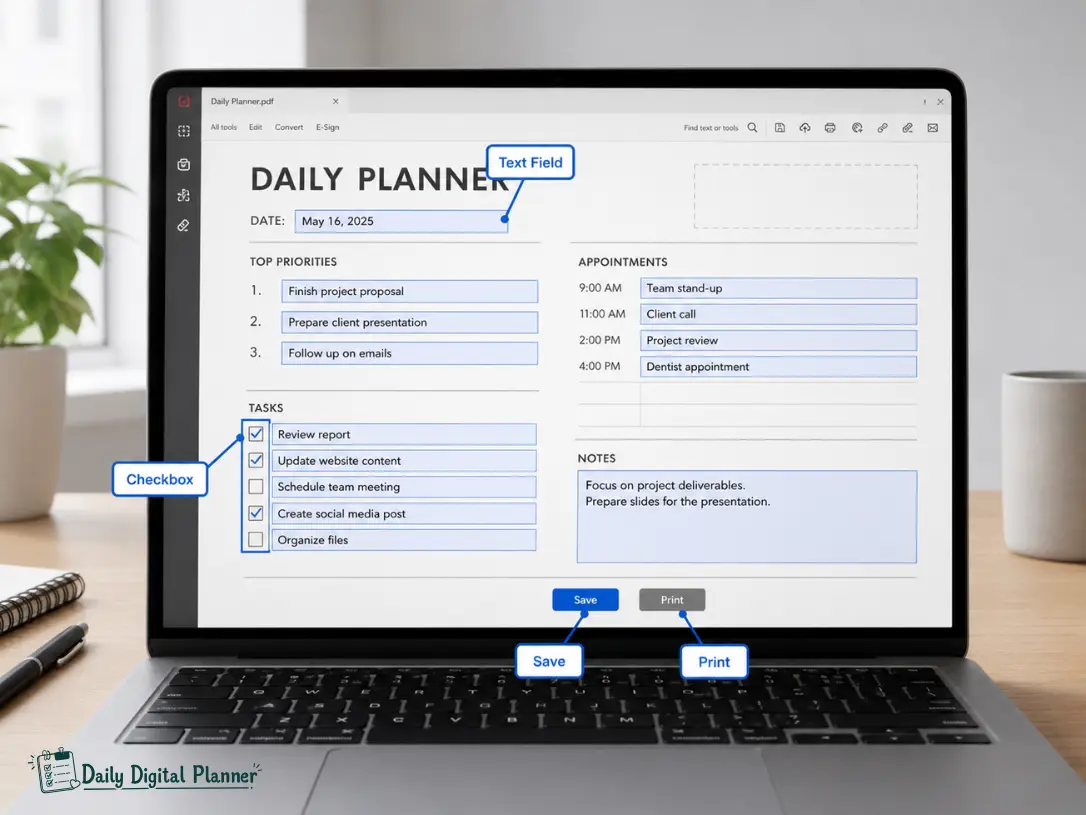
Fillable fields work by turning selected areas of a PDF planner into interactive boxes for typed text, checkmarks, or other supported inputs.
The field is part of the PDF form structure. When the user clicks or taps inside a supported field, the PDF reader accepts typed information. Depending on the file, the field may support short text, longer notes, dates, checkboxes, or simple repeated entries.
Common fillable planner fields include:
- Text fields for tasks, notes, and priorities
- Checkbox fields for completed actions or habits
- Date fields for daily, weekly, or monthly planning
- Larger note areas for project planning or reflection
- Repeated fields for schedules, meals, routines, or classroom notes
The exact behavior depends on the planner file and the PDF reader. Some files allow only typed text. Some include checkboxes. Some work best on desktop software. That is why the product page should show screenshots, preview pages, or clear instructions before the buyer relies on the fillable feature.
Why a Compatible PDF Reader Matters
A compatible PDF reader matters because fillable fields can behave differently across browsers, preview apps, tablets, and desktop software.
Some viewers can open a PDF but do not reliably save form fields. A browser preview may display the planner page without preserving entries. A mobile file viewer may show the design but not support every field type. A dedicated PDF reader is usually safer when the product relies on fillable fields.
Use the product instructions as the rule. If the seller recommends Adobe Acrobat Reader or another PDF reader, follow that guidance. If the product page only says “fillable PDF” without naming a reader, test one page before relying on the planner for a full routine.
Before using a fillable planner, check:
- Whether the product recommends a specific PDF reader
- Whether typed entries can be saved
- Whether checkboxes or date fields are supported
- Whether typed entries print clearly
- Whether the file works on your device
After the fillable behavior is clear, the next question is whether you want the final planner to stay digital, become a printed page, or support both workflows.
What Is a Printable Planner?
A printable planner is a downloadable PDF designed to become paper pages before you write in it.
The defining attribute of a printable planner is paper output. You download the file, print the page, and complete it by hand with a pen, pencil, highlighter, or binder system. The page may be a daily planner, weekly layout, meal planner, cleaning checklist, budget tracker, work planner, teacher sheet, or routine tracker.
Printable planners work well when the planner needs to be visible in a physical place. A printed weekly plan on a desk, a meal planner on the fridge, or a home routine checklist in a binder can be easier to notice than a saved file.
Printable does not mean shipped. In this context, a printable planner is usually a digital download. The user prints the pages personally or through a print shop.
The Print-and-Write Workflow
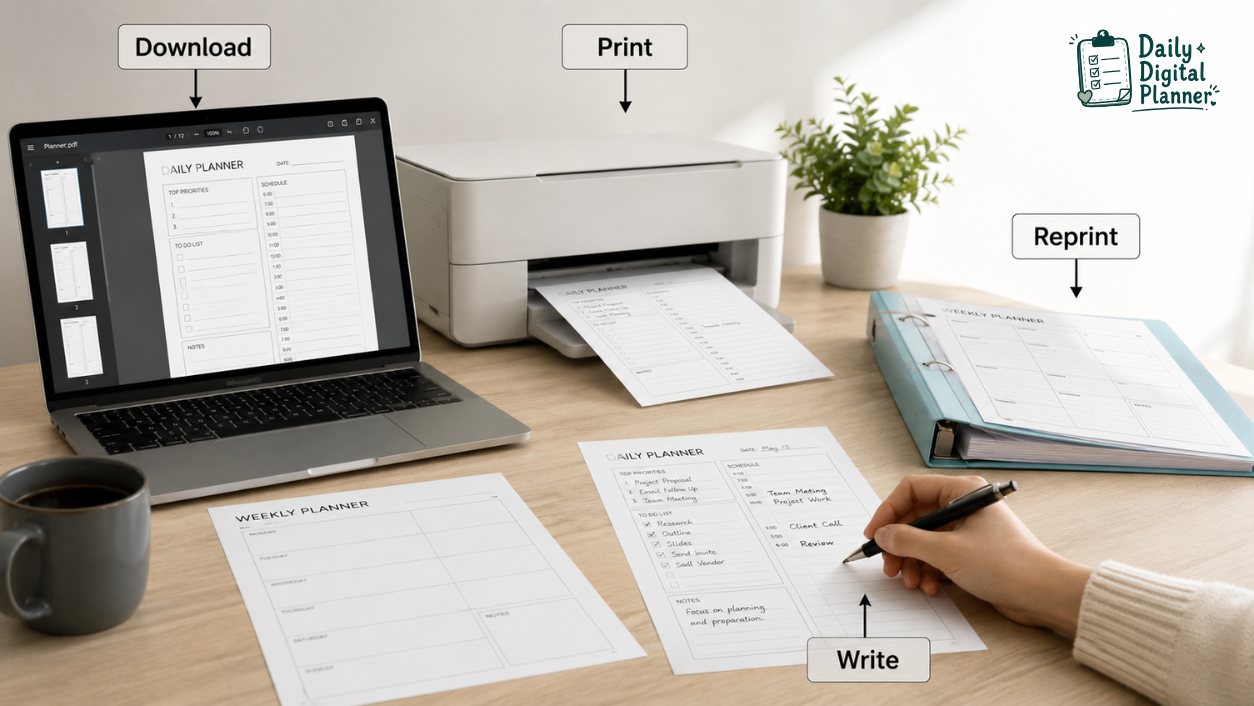
The print-and-write workflow starts with downloading the PDF, printing the pages you need, and completing them by hand.
This workflow is simple because it does not depend on interactive PDF fields. You choose the planner pages, select the correct printer settings, print the pages, and write directly on paper. If you need another copy, you print the page again according to the product license.
A print-and-write planner works especially well when:
- You think more clearly with handwriting
- You want a visible page on a desk, wall, fridge, or clipboard
- You use a binder, discbound notebook, folder, or household command center
- You want to print repeated blank pages
- You do not want to set up a PDF reader for typed fields
For detailed printing setup, use the planned print a printable planner PDF guide once that support page is live.
Paper Size, Ink, and Reprinting
Paper size, ink, and reprinting matter because a printable planner becomes a physical planning system after download.
For US buyers, US Letter size is often important because it matches common home and office printers. A4 may matter if the buyer uses international paper sizing. Do not assume every product includes both sizes. The product page should list exact paper sizes before you publish or rely on that claim.
Ink use also matters. A minimal printable planner template is usually easier to print repeatedly than a heavy full-color design. If you print pages every week, low-ink layouts can be more practical than decorative pages with large color blocks.
Before printing many pages, test:
- Paper size, such as US Letter or A4 if listed
- Print scaling, such as actual size or fit-to-page based on the file instructions
- One-sided or double-sided printing
- Margin space for hole punching or binding
- Ink use for repeated pages
- Personal-use rules for reprinting
Paper planning is not automatically simpler than fillable planning. It simply moves the setup from software compatibility to printer, paper, and physical organization.
Fillable PDF Planner vs Printable Planner Comparison Table
The comparison basis for a fillable PDF planner and a printable planner is how each format receives information, stores it, and turns it into a usable planning page.
| Attribute | Fillable PDF Planner | Printable Planner |
|---|---|---|
| Primary input | Typed entries in PDF fields | Handwriting after printing |
| Shared format | Usually a downloadable PDF | Usually a downloadable PDF |
| Core attribute | Fillable fields | Printer-friendly pages |
| Main tool | Compatible PDF reader | Printer and paper |
| Editing | Delete or revise typed entries if supported | Cross out, erase, or reprint |
| Saving | Save completed PDF if supported | Not applicable unless scanned or photographed |
| Printing | Optional when the file supports it | Required for normal use |
| Paper size concern | Important only when printing | Important before every print run |
| Best for | Typed routines, clean edits, recurring work, printable typed copies | Handwriting, binders, visible routines, low-tech planning |
| Main risk | Unsupported PDF viewer or unsaved fields | Wrong scaling, ink cost, paper mismatch |
| Buyer check | Are fields included and can they save? | Which sizes and print instructions are included? |
The table shows why the two formats overlap but are not the same. Fillable describes interaction inside the file. Printable describes output on paper. A PDF planner can have one attribute, both attributes, or neither if the seller has not built the file for that workflow.
Can a Fillable PDF Planner Also Be Printable?
Yes, a fillable PDF planner can also be printable when the same PDF file is built with fillable fields and printer-friendly pages.
This is the hybrid scenario. The planner can be typed into first, then printed as a completed page. Or the same planner can be printed blank and completed by hand. That flexibility is useful for people who plan work on a computer but still want paper pages for a meeting, fridge, binder, classroom, or desk.
The key phrase is “when the file is built for it.” A product page should confirm the file includes fillable fields and supports printing. Without that proof, treat the two capabilities as separate.
Use this hybrid rule:
- Fillable attribute = typed interaction inside the PDF.
- Printable attribute = paper output after download.
- PDF planner = the shared file format that may support one or both.
Type First, Then Print
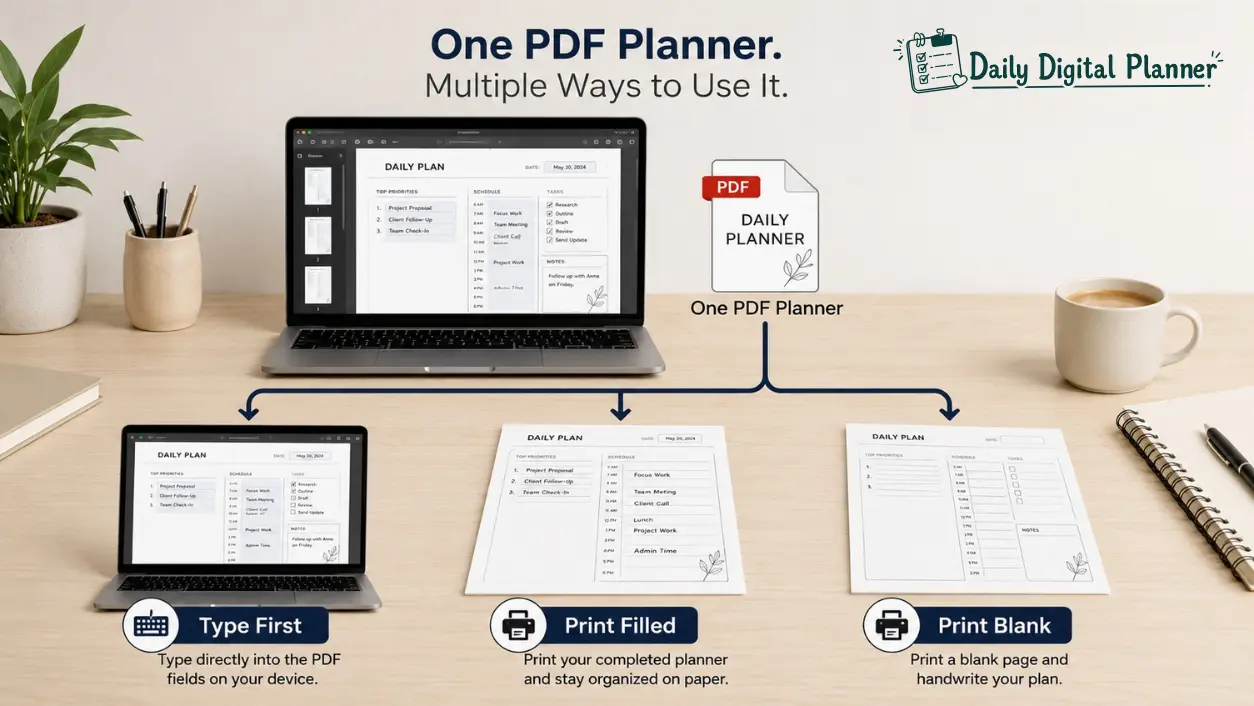
Typing first and printing later works when the fillable PDF saves your entries and the printed page keeps the typed text readable.
This workflow is helpful for schedules, work priorities, classroom plans, business checklists, and household routines that change before they become final. You can type a draft, adjust it, save it, and print the cleaner version.
Use this workflow when:
- You want a neat paper copy without rewriting
- You revise tasks before printing
- You share the page with family, students, clients, or coworkers
- You keep a printed desk copy after planning digitally
Before printing a full planner, print one test page. Confirm the typed entries fit inside the fields and appear clearly on paper.
Print Blank Pages, Then Write by Hand
Printing blank pages from a fillable PDF works when the planner design is printer-friendly and the user wants a handwritten copy.
In this workflow, you ignore the fillable fields and print the page as a normal printable planner. This can be useful when you like the planner layout but do not need typed entries for every use case.
For example, you may type a work plan during the week but print blank meal planning pages for the kitchen. You may save a typed business checklist but print blank daily pages for handwritten priorities. The same PDF planner can support different habits only if the product permits and the file is designed for both.
When Should You Choose a Fillable PDF Planner?
Choose a fillable PDF planner when your planning starts on a screen and you want typed entries you can edit before printing.
This format is strongest when planning is tied to a keyboard, desktop workflow, or repeated information. It lets you keep entries neat, update a plan before it is final, and reduce rewriting.
A fillable PDF planner is a good fit if:
- You prefer typing over handwriting
- You want a saved digital copy
- You revise schedules or task lists often
- You plan on a laptop, desktop, or tablet
- You want to print a completed page after filling it
- You use recurring templates for work, teaching, business, or home routines
- You are comfortable opening files in a compatible PDF reader
The main limitation is compatibility. If the fields do not work in your reader, the fillable feature becomes frustrating. Product instructions and one-page testing matter more than the label “fillable” alone.
When Should You Choose a Printable Planner?
Choose a printable planner when your planning starts on paper and visibility, handwriting, or binder use matters more than typed fields.
This format is strongest when the planner page needs to sit in a physical place. Printable planner pages are easy to keep on a desk, fridge, clipboard, classroom station, or household binder. They also work well for people who remember tasks better after writing them by hand.
A printable planner is a good fit if:
- You prefer handwriting
- You want printed pages in a binder or folder
- You need a routine page that stays visible
- You do not want software setup
- You want to print repeated blank templates
- You are comfortable managing paper size, scaling, ink, and printer settings
The main limitation is printing. A printable planner PDF may be instant to download, but the final experience depends on paper, printer settings, and how you organize the pages after printing.
Best Format by Use Case: Work, Home, Teachers, and Simple Routines
The best format by use case is the one that reduces setup friction for the exact place where the planner will be used.
The same planner format can feel easy in one setting and annoying in another. Work planning may benefit from typed updates. Home routines may benefit from visible paper. Teaching and small business planning often need repeatable templates. Low-friction planning depends on fewer steps, not on a specific format label.
Work and Professional Planning
For work and professional planning, a fillable PDF planner is often better for typed updates, while a printable planner is better for desk visibility.
Choose fillable for work when tasks change during the day, when you need clean typed notes, or when you prepare a plan before a meeting. Choose printable when you want a daily focus page, project checklist, or time-blocking sheet visible beside your keyboard.
Work planning often needs:
- Priority lists
- Meeting notes
- Project tasks
- Follow-up reminders
- Weekly planning pages
- Client or admin checklists
When the work planner hub is live, use work planner templates as the internal bridge for task, meeting, project, and focus workflows.
Home, Meals, and Routine Planning
For home, meals, and routine planning, a printable planner is often better when several people need to see the page.
Meal planners, cleaning checklists, family schedules, grocery lists, and household routines usually work best when they are visible. A printed page on a fridge or binder can support a routine without requiring anyone to open a file.
A fillable PDF planner can still help at home when you want to type repeated routines first. For example, you can type a weekly meal plan, save it, and print it for the kitchen if the file supports that workflow.
When the home and life planner hub is live, use home and life planners as the internal bridge for meals, habits, routines, and household planning.
Teachers and Small Business Owners
For teachers and small business owners, the best format is often the one that can be reused across repeated weekly workflows.
Teachers may need lesson notes, classroom checklists, weekly schedules, or printable pages for a binder. Small business owners may need client follow-ups, content planning, inventory notes, order checklists, or admin routines.
Choose fillable when you want to type repeated notes and save a clean copy. Choose printable when the page needs to be carried, posted, shared, or marked by hand. Choose both when the workflow starts digitally but ends on paper.
For these audiences, product previews matter. A useful product page should show whether the planner is fillable, printable, or both.
ADHD-Friendly and Low-Friction Planning
For ADHD-friendly and low-friction planning, the better format is the one that makes the next action visible with the least setup.
This is not a medical claim. It is a planning-design rule. Some users prefer fillable PDF planners because typed fields reduce rewriting and keep pages clean. Other users prefer printable planners because paper pages remain visible in the environment.
Look for low-friction attributes:
- Simple layouts
- Clear priority areas
- Short task lists
- Enough white space
- Reprintable pages
- Optional typed fields
- Minimal setup steps
The best planner is the one you can start using without building a complicated system around it.
What to Check Before You Buy a PDF Planner
Before you buy a PDF planner, check whether it is fillable, printable, both, and compatible with your device, printer, and personal-use expectations.
This checklist prevents the most common wrong-format purchase: buying a printable planner when you expected typed fields, or buying a fillable PDF when you only wanted easy paper printing.
| Buyer Check | Why It Matters |
|---|---|
| Does the planner include fillable fields? | A flat printable PDF is not automatically fillable. |
| Which PDF reader is recommended? | Fillable fields may depend on compatible software. |
| Can the file be printed? | Some buyers need paper copies or blank pages. |
| Which paper sizes are included? | US Letter and A4 print differently; verify exact sizes. |
| Are print instructions included? | Scaling and margins can affect the final page. |
| Are preview images clear? | Screenshots help confirm fields, pages, and layout. |
| Is it a digital download only? | A PDF planner is usually not a shipped physical product. |
| What are the personal-use terms? | Reprinting, sharing, and reuse rules depend on the license. |
| Are color or low-ink versions included? | Ink use affects repeated printing. |
Daily Digital Planner buyers should also check how digital downloads work before purchase. Use how digital downloads work after verifying the support page is live.
Final Recommendation
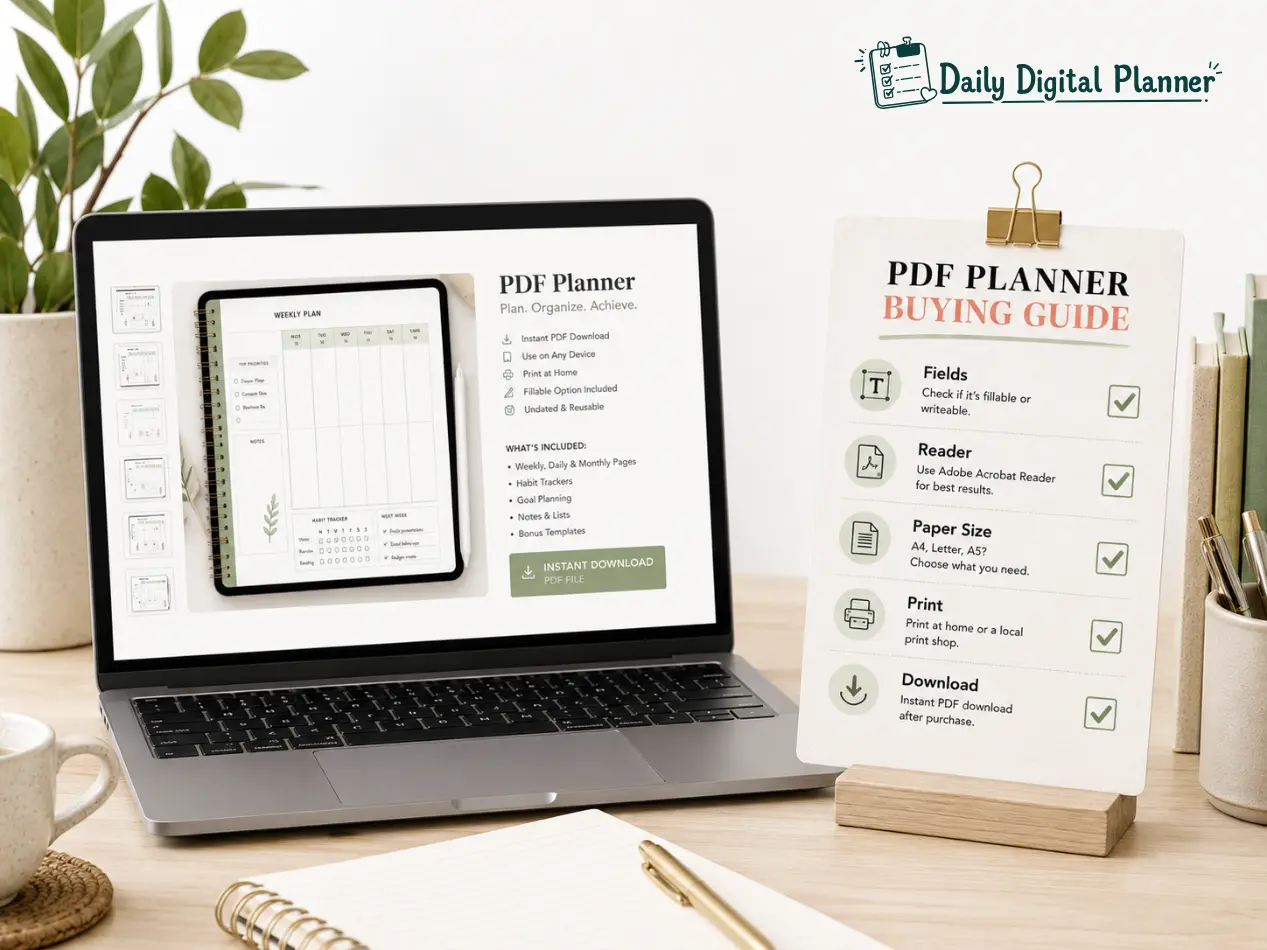
The safest recommendation is to choose fillable for typing, printable for handwriting, and both when your routine moves between screen and paper.
Choose a fillable PDF planner if your planning starts on a device and you want clean typed entries. Choose a printable planner if your planning starts on paper and you want handwriting, visibility, or binder organization. Choose a hybrid PDF planner only when the product page confirms both fillable fields and printable pages.
Use this final rule before buying:
- If the planner’s job is typed editing, choose fillable.
- If the planner’s job is paper visibility, choose printable.
- If the planner’s job changes by context, choose a PDF planner that supports both.
For broader planner format decisions, use digital planner PDF templates after verifying the destination page is live.
FAQ About Fillable PDF and Printable Planners
These FAQ answers clarify the most common format, typing, printing, software, and delivery questions before a buyer chooses a PDF planner.
Is a fillable PDF planner the same as a printable planner?
No, a fillable PDF planner is not the same as a printable planner because fillable means typed PDF fields, while printable means paper output.
The two formats can overlap. A product can be both fillable and printable if the PDF includes interactive fields and printer-friendly pages. But those are two separate attributes, so the product page should confirm both.
Can you print a fillable PDF planner?
Yes, you can print a fillable PDF planner when the file allows printing and the typed entries print correctly in your PDF reader.
The safest approach is to type a small test entry, save the file, and print one page before printing a full planner. This confirms whether typed text, checkboxes, margins, and paper size work as expected.
Can you type in a printable planner?
You can type in a printable planner only if it includes fillable fields or if you use separate PDF annotation/editing software.
A standard printable planner is usually a flat PDF designed for printing and handwriting. It is not automatically fillable just because it opens on a computer.
Do I need Adobe Acrobat Reader for a fillable PDF planner?
You need a compatible PDF reader for a fillable PDF planner, and Adobe Acrobat Reader is often recommended only when the product instructions say so.
Do not assume every browser preview or mobile viewer will save form fields. Follow the seller’s instructions and test the file before relying on it for a full planning workflow.
Are fillable PDF fields visible when printed?
Typed entries usually print if the PDF file and PDF reader support printing filled form fields.
Field highlight visibility depends on the viewer, settings, and product file. Test one printed page before printing multiple copies, especially if the planner uses checkboxes or longer text fields.
Are these physical planners?
PDF planners are usually digital downloads, not physical planners shipped by mail.
After purchase, the buyer downloads the file and uses it according to the product instructions. If a paper version is needed, the buyer prints the pages at home or through a print shop.
Which format is better for ADHD-friendly planning?
The better format for ADHD-friendly planning is the one that keeps the next action visible and reduces setup friction.
Some users prefer fillable PDF planners because typing reduces rewriting. Others prefer printable planners because paper pages stay visible. Avoid treating either format as a treatment or guaranteed productivity fix.
What is the difference between a fillable PDF planner and an editable PDF planner?
A fillable PDF planner usually means you can type into specific fields, while an editable PDF may mean the file’s design or text can be changed with editing software.
For most planner buyers, “fillable” is the safer term when the goal is typing tasks, dates, notes, or checkmarks into the planner. “Editable” can mean different things depending on the seller and software.