
Blog
How to Prioritize Tasks With a Priority Planner Template

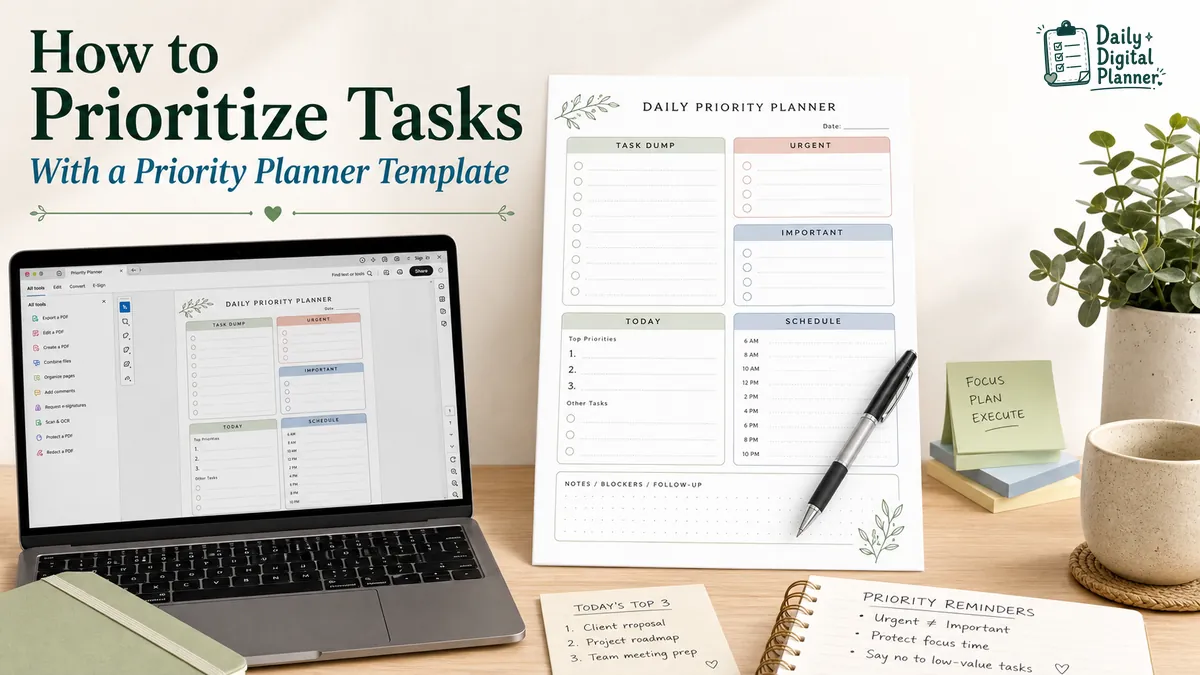
To prioritize tasks with a planner, write down every task first, mark which tasks are urgent and important, choose a small number of tasks for today, then move the rest into scheduled, delegated, deferred, or later lists. A priority planner template makes that process easier because it gives you fixed spaces for urgency, importance, top priorities, deadlines, and notes.
In this guide, "planner" means a printable or fillable PDF planner template, not Microsoft Planner software. The goal is not to copy a long to-do list onto a nicer page. The goal is to use the page as a sorting tool, so the workday has fewer loose decisions.
If your priority list is one part of a larger work setup, connect it with a work planner that also covers meetings, projects, deadlines, and focus blocks. A priority planner helps you decide what deserves attention first. A work planner helps you place that decision inside the rest of the day.
How Do You Prioritize Tasks With a Planner?
You prioritize tasks with a planner by using the page as a sorting surface, not just as a place to rewrite everything you need to do. The planner should help you decide what matters first, what can wait, and what should leave today’s list.
Start with a full task dump. Write down work tasks, admin tasks, household tasks, follow-ups, errands, and anything else that is taking up mental space. This first list can be messy. It is only the raw material.
Next, mark deadlines and urgency. A task is urgent when it has a real time limit or creates a problem if it is ignored. A task is important when it supports a meaningful outcome, such as finishing client work, preparing a meeting, paying a bill, filing a form, or keeping a project moving.
Then choose a smaller daily list. A priority planner should push you toward a decision:
- Capture every task in one place.
- Mark the tasks with real deadlines.
- Separate urgent tasks from important tasks.
- Choose the top priorities for today.
- Schedule, delegate, defer, or remove the rest.
- Review unfinished tasks before planning tomorrow.
This workflow keeps the planner honest. If everything stays on today’s list, nothing has really been prioritized. A useful priority planner template should make the second decision visible: what not to do right now.
What Is a Priority Planner Template?
A priority planner template is a planner page designed to sort tasks by importance, urgency, rank, or daily capacity before the user starts working. It differs from a normal to-do list because it asks the user to classify tasks, not only collect them.
A basic to-do list can hold every task in one column. That is useful for capture, but it can also hide the difference between a five-minute follow-up and a deadline that affects the whole day. A priority planner adds fields that force a clearer choice.
Common fields include:
- Task name
- Due date
- Priority level
- Urgency marker
- Importance marker
- Estimated effort
- Notes or blockers
- Next action
- End-of-day review
A printable priority planner is useful when you want a page on your desk, in a binder, or beside your laptop. A fillable PDF planner is useful when you want to type into the planner, save a copy, edit it later, or print a clean page after filling it out.
If you are still comparing planner formats, this guide sits inside the larger world of digital planner PDF templates. A priority planner is the task-sorting part of that system.
Which Priority Method Should You Use in a Planner?
You should choose the priority method based on the planning problem you actually have: urgency overload, too many daily tasks, unclear importance, or a simple need to rank work. One method does not fit every day.
The comparison below gives each method a job. The point is not to make the page complicated. The point is to choose a structure that matches the task list in front of you.
| Priority Method | Best For | How It Works | Planner Page Fit |
|---|---|---|---|
| Priority Matrix | Too many tasks with mixed urgency | Sort tasks by urgent and important | Matrix planner page |
| Eisenhower-style planner | Deciding what to do, schedule, delegate, or defer | Uses four action groups | Urgent-important grid |
| 1-3-5 Rule | Limiting the workday | Picks 1 big task, 3 medium tasks, and 5 small tasks | Daily priority page |
| Priority 1/2/3 | Fast ranking | Labels tasks by first, second, and third priority level | Simple daily task list |
| Daily Top 3 | One-day focus | Picks only the most important tasks for today | Daily work planner |
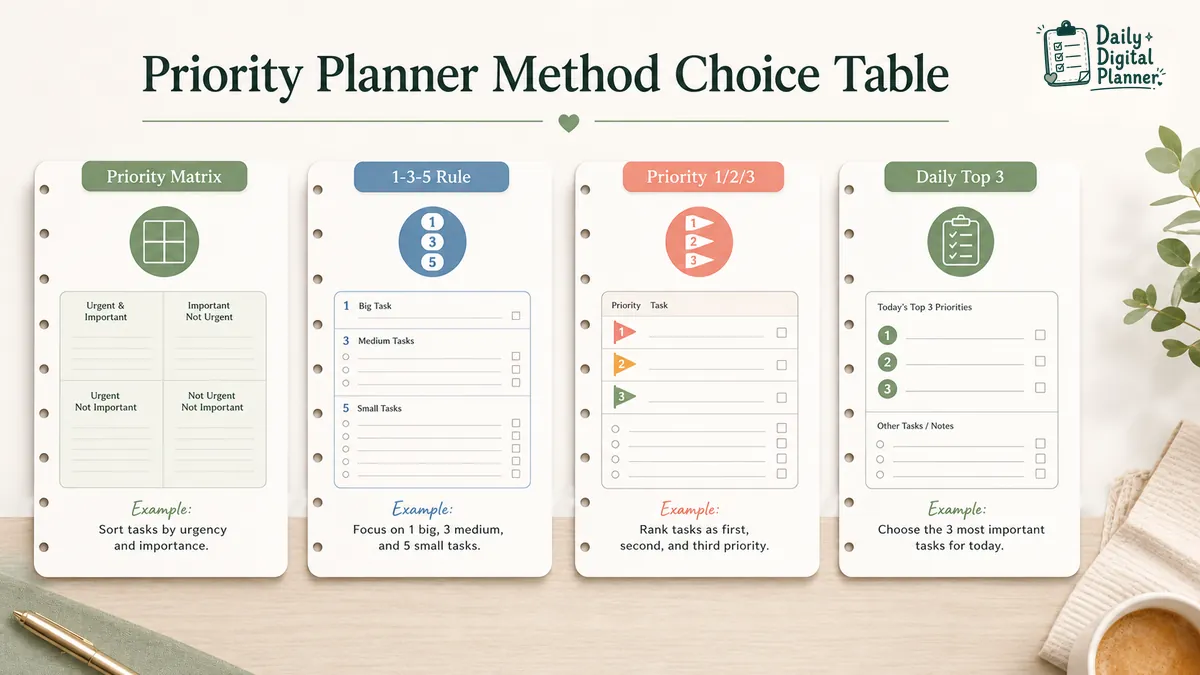
A priority matrix works well when the task list is noisy. It helps you decide which items are urgent, important, both, or neither. A 1-3-5 planner works better after you already know the task pool and need a realistic daily workload. A Priority 1/2/3 planner is the simplest option when you only need to mark which tasks come first.
Many users combine methods. For example, you can use a matrix to sort a messy list, then copy only the top few tasks into a daily planner page. That keeps the sorting work separate from the execution page.
How Does a Priority Matrix Planner Sort Urgent and Important Tasks?
A priority matrix planner sorts tasks by two signals: whether they are urgent and whether they are important. Urgency is about time pressure. Importance is about value, consequence, or progress.
That difference matters because urgent tasks can feel loud even when they are not the best use of the day. Important tasks can be quieter, especially when they do not have a deadline yet. A matrix makes both signals visible at the same time.
| Quadrant | Meaning | Planner Action |
|---|---|---|
| Urgent + Important | Time-sensitive and meaningful | Do first |
| Important + Not Urgent | Meaningful but not immediate | Schedule |
| Urgent + Not Important | Time-sensitive but lower value | Delegate, batch, or limit |
| Not Urgent + Not Important | Low value or not needed now | Defer or remove |
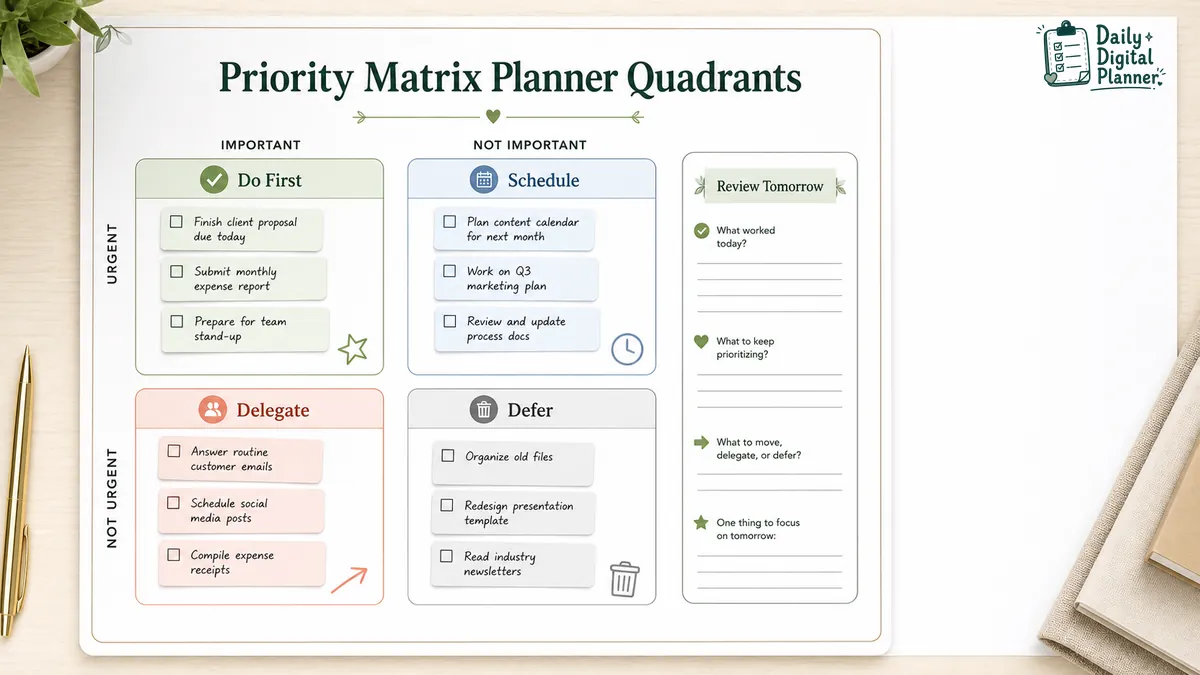
Here is a simple work example. A client deliverable due today belongs in urgent and important. Preparing next month’s product plan may be important but not urgent, so it needs a scheduled block instead of a vague reminder. A low-value message that someone else can answer may be urgent but not important. A nice-to-have idea with no deadline may belong on a later list.
A priority matrix planner PDF is useful when your task list needs this kind of sorting before you choose the day plan.
How Can a 1-3-5 Rule Planner Narrow Your Daily Task List?
A 1-3-5 planner narrows the day to one large task, three medium tasks, and five small tasks. The method is useful when your planner keeps turning into a list that no normal day can finish.
The value of the 1-3-5 rule is its limit. It asks you to admit that not every task belongs in the same daily space. A large task might be writing a proposal, finishing a client deliverable, or preparing a lesson. Medium tasks might be calls, review work, or a batch of admin. Small tasks might be quick messages, file downloads, form updates, or simple follow-ups.
The method works best after a task dump or priority matrix. First, sort the task pool. Then choose what fits the day:
- 1 big task that deserves the deepest attention.
- 3 medium tasks that matter but should not take over the day.
- 5 small tasks that can be handled quickly or batched.
This is a daily execution method, not a full project management system. It helps you decide what can fit today after the larger work has already been sorted.
For users who like this structure, a 1-3-5 rule planner PDF gives the method a fixed page instead of leaving the limit in your head.
What Should You Write on a Daily Priority Planner Page?
A daily priority planner page should include the task, why it matters, when it is due, how large it is, and what action happens next. The page should make the next decision visible, not just store the task.
Useful fields include:
- Today’s top priority: the task that matters most if the day gets interrupted.
- Secondary tasks: two or three tasks that should happen after the top priority.
- Deadline or due date: the real time limit, if one exists.
- Effort size: a quick mark for large, medium, or small tasks.
- Urgency marker: a signal that the task has time pressure.
- Importance marker: a signal that the task affects a meaningful outcome.
- Notes or blockers: the missing detail, file, person, or decision that could slow the task down.
- Follow-up action: the next step after the task is done or paused.
- End-of-day review: a short check on what was finished, moved, or dropped.
The examples do not need to be dramatic. A professional might prioritize a client report, a meeting agenda, and an invoice follow-up. A small business owner might prioritize customer messages, product listing updates, and order checks. A home planning day might include an appointment, a school form, grocery planning, and household admin.
A planner page works best when the fields are specific enough to create a decision. "Clean up work tasks" is vague. "Reply to three client emails before 11 AM" is easier to act on.
When Should You Use a Printable or Fillable Priority Planner PDF?
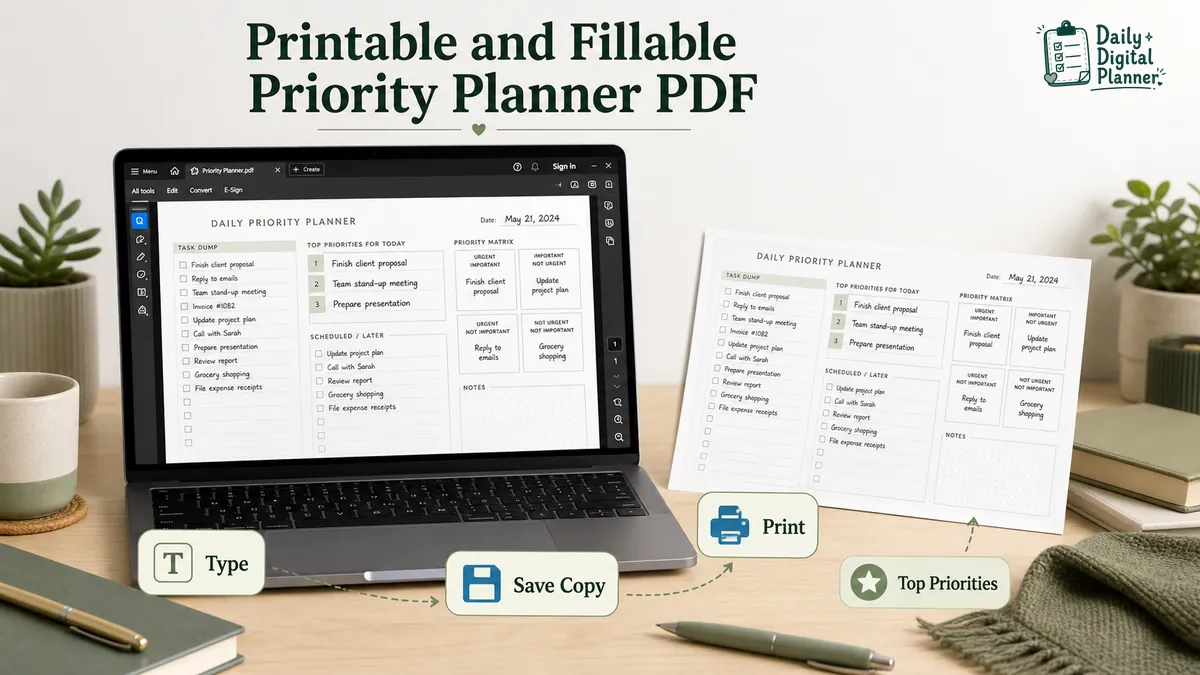
Use a printable priority planner when you want a desk page or handwriting workflow, and use a fillable PDF when you want to type, save, edit, or print a clean copy. The right format depends on how you actually plan.
A printable priority planner PDF is useful when you want paper in front of you. It works well for desk planning, binder systems, morning review, and people who think better by writing. It also gives the task list a visible place outside a phone or app.
A fillable PDF planner is useful when you prefer to type into fields before printing or saving a copy. For example, you might fill out tomorrow’s priority list on your laptop, save the PDF, then print the page for your desk. If you use Adobe Acrobat Reader, this fillable PDF planner guide explains the basic workflow.
Daily Digital Planner products are downloadable digital products. After purchase, customers can access download links by email and through the Downloads area in their account. That matters for priority planners because the same file can be saved, printed, or reused according to the product format.
If you need printing help, use the guide on how to print a printable planner PDF before changing scale, paper size, or printer settings.
What Should You Check Before Choosing a Priority Planner Template?
Check the file type, page size, fields, screenshots, instructions, and download access before buying a priority planner template. A good-looking planner is not enough if the page does not match the way you sort tasks.
Use this checklist before choosing one:
- PDF file type: confirm whether the product is a downloadable PDF.
- Printable or fillable format: check whether you can type into the fields or whether the page is designed mainly for printing.
- Page size: look for US Letter, A4, or another size when the product page lists it.
- Actual screenshots: review the planner page layout before buying.
- Priority method: check whether the page uses a matrix, 1-3-5 layout, top-three list, or numbered priority system.
- Instructions: look for basic guidance if the template has fillable fields or a specific method.
- Download access: confirm how the file is delivered after purchase.
- Use case fit: decide whether the page fits daily work, business tasks, household tasks, project tasks, or mixed planning.
This check matters because "priority planner" can describe several different page types. A matrix planner is better for sorting a messy task list. A numbered priority planner is better for a simple daily page. A 1-3-5 planner is better when the main problem is overfilling the day.
Which Daily Digital Planner Priority Templates Fit This Use Case?
Daily Digital Planner has several priority-focused PDF templates, and each one fits a slightly different way of sorting tasks. Choose a product only after the method is clear.
For a broader category view, the productivity planner PDFs section groups planners built around task management, priority sorting, daily focus, and work organization.
| Planner Type | Best For | Product Bridge |
|---|---|---|
| Priority Matrix Planner | Sorting urgent and important tasks | Priority Matrix Planner, Daily Urgent-Important Tracker |
| Minimalist Priority Matrix | Simple printable task sorting | Priority Matrix Planner, Minimalist Daily Urgent-Important Tracker |
| Fillable Priority Matrix | Typing tasks before saving or printing | Priority Matrix Fillable PDF Productivity Planner |
| 1-3-5 Rule Planner | Limiting the daily workload | 1-3-5 Rule Planner PDF |
| Priority 1/2/3 Planner | Fast daily ranking | Priority 1/2/3 Planner |
The best fit depends on what feels hard right now. If the task list is unclear, start with a matrix. If the list is clear but too long, use 1-3-5. If the day only needs a quick order of importance, use a Priority 1/2/3 page.
Priority Planner FAQ
Is a priority planner the same as a to-do list?
No, a priority planner is not the same as a to-do list because it sorts tasks by importance, urgency, rank, or daily capacity. A to-do list collects tasks. A priority planner turns that collection into a decision.
What is the easiest way to prioritize tasks in a planner?
The easiest way to prioritize tasks in a planner is to start with a task dump, mark urgent and important tasks, then choose only a few tasks for today. This keeps the planner from becoming a copied version of the same long list.
Should I use a priority matrix or a 1-3-5 planner?
Use a priority matrix when you need to sort many tasks, and use a 1-3-5 planner when you already know the task pool and need a realistic daily list. The matrix helps with selection. The 1-3-5 planner helps with daily limits.
Can I use a printable priority planner for work tasks?
Yes, you can use a printable priority planner for work tasks if it includes fields for due dates, top priorities, notes, and follow-up actions. It works best when the page helps you choose the next action, not only list the task name.
Can I type into a priority planner PDF?
You can type into a priority planner PDF only if the file is fillable. A standard printable PDF may need to be printed and written by hand unless you use a separate markup tool.
What should I do with tasks that are not urgent or important?
Tasks that are not urgent or important should move off the main day plan. Put them on a later list, delete them, batch them, or review them during a weekly planning session.