
Blog
Color vs Black and White Printable Planner Pages: Which Should You Print?

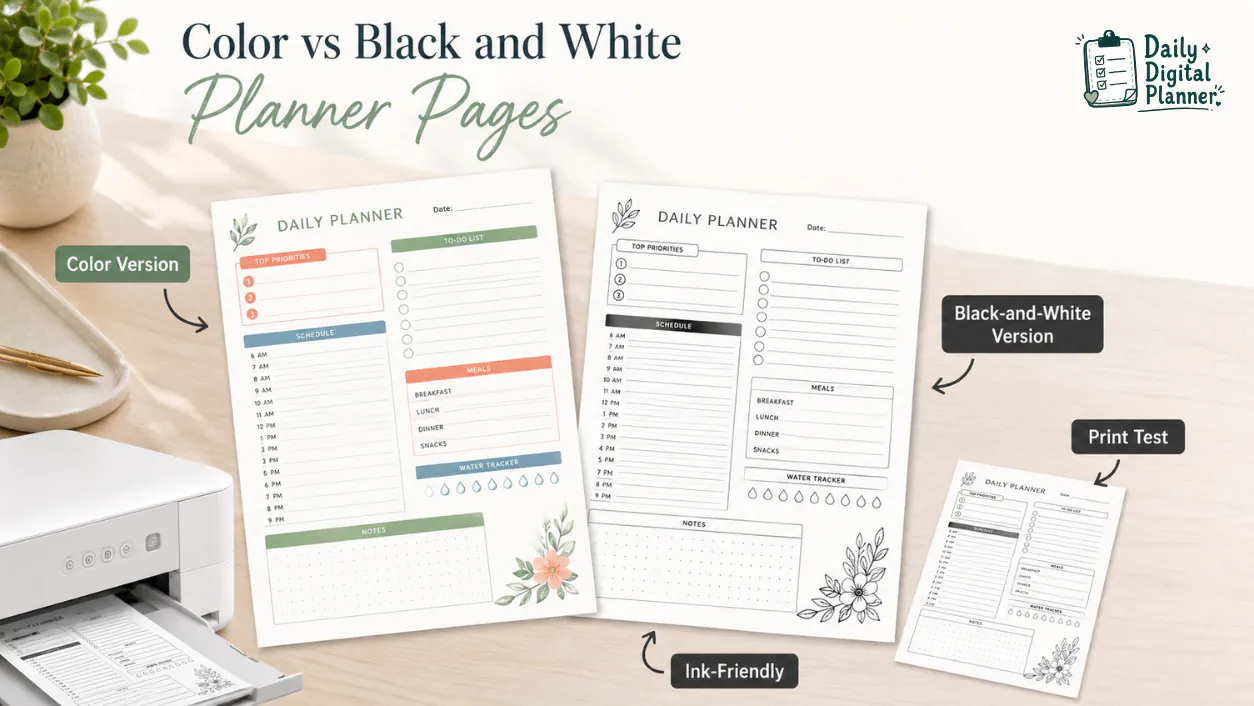
Color printable planner pages are best when you want visual separation and style, while black-and-white or ink-friendly planner pages are best when you print often and want cleaner, lower-color-ink pages. The right choice depends on how much you value color cues, how often you print, what your printer settings can handle, and what the planner product actually includes.
Daily Digital Planner sells downloadable planner PDF products, so this guide focuses on a practical buying and printing decision. If your main goal is to print planner pages at home, start with printable planner PDFs before choosing color or black-and-white versions. If the printer setup itself is the hard part, use the guide to print a printable planner PDF at home before printing a full set.
The safest rule is to verify the product page before checkout. A planner product may include color pages, black-and-white pages, ink-friendly pages, multiple page sizes, or only one version. The product page is the source of truth for the exact files included in the download.
Quick Answer: Should You Print Planner Pages in Color or Black and White?
Print planner pages in color when visual separation, category cues, and a more designed look matter most. Print planner pages in black and white or an ink-friendly version when you print often, want clearer writing space, or want to reduce color ink use.
- Choose color pages for visual sections, category grouping, mood, and a more finished planner look.
- Choose black-and-white or ink-friendly pages for frequent printing, handwriting contrast, and lower color-ink dependence.
- Choose both versions when a planner product includes both files and you want flexibility across different printer, paper, and planning situations.
Color and black-and-white planner pages are not simply aesthetic choices. They change how the page looks after printing, how much the design competes with handwriting, and how confidently you can print more than one page at a time.
What Are Color Printable Planner Pages?
Color printable planner pages are PDF planner pages that use color accents, visual sections, or decorative cues intended to print in color. The color may appear in headings, borders, tabs, icons, checkboxes, habit trackers, weekly blocks, or category areas.
Color planner pages can make a layout easier to scan when the colors separate different parts of the page. A soft color header can mark the date area. A colored sidebar can separate priorities from notes. A muted accent can make a meal plan, schedule, or weekly review feel more structured.
Color is most useful when it clarifies the planner page instead of filling every writing area. A good color printable planner page still leaves enough white space for handwriting, checkmarks, corrections, and notes.
If the PDF format itself is still unclear, start with what a PDF planner is before comparing print styles.
What Are Black-and-White or Ink-Friendly Planner Pages?
Black-and-white or ink-friendly planner pages are printable planner pages designed to stay readable without relying on color. They usually use black lines, grayscale accents, simple icons, clear section borders, and white writing areas.
An ink-friendly planner page is not always a pure black-and-white page. Some products may use light gray shading, thin borders, or minimal accents to keep the page easy to read while reducing dependence on color ink. The product screenshots and included file names should clarify whether the download includes a true black-and-white version, an ink-friendly version, or a color page that can be printed in grayscale.
Black-and-white planner pages work well when you print often, use a home printer, prefer clean handwriting space, or want a planner page that looks simple in a binder. They also make it easier to add your own color with pens, markers, stickers, or highlighters after printing.
What Is the Difference Between Color and Black-and-White Printable Planner Pages?
Color planner pages emphasize visual separation, while black-and-white planner pages emphasize printer-friendly contrast and frequent printing. The main differences are ink use, readability, writing space, printer settings, and product-page proof.
| Comparison Basis | Color Printable Planner Pages | Black-and-White or Ink-Friendly Planner Pages | What to Check Before Printing |
|---|---|---|---|
| Visual style | Color accents can separate sections, categories, dates, and priorities. | Monochrome lines and grayscale accents keep the page simple. | Check product screenshots for how much color or shading appears behind writing areas. |
| Ink use | Color pages use color ink or toner when printed in color. | Black-and-white or ink-friendly pages usually reduce color-ink dependence. | Printer model, paper, quality mode, and settings can change the result. |
| Readability | Color can help scanning when the palette is light and organized. | Black-and-white can improve contrast when the page has clean line weight. | Avoid heavy background blocks that make handwriting harder to see. |
| Writing space | Color should support the page without crowding task fields or notes. | White space and simple borders often make handwriting clearer. | Look for screenshots that show real writing areas, not just decorative previews. |
| Printer settings | Color mode prints the design as intended when the printer and paper support it. | Grayscale or black-and-white mode can simplify output. | Print one test page before printing a full planner set. |
| Best use | Use color for planning pages where visual grouping helps. | Use black-and-white for repeated pages, daily sheets, work pages, and frequent printing. | Match the version to the pages you will print most often. |
| Product proof | The product should show whether color files are included. | The product should show whether black-and-white or ink-friendly files are included. | Do not assume both versions are included unless the product page says so. |
For scale, paper, and test-page workflow, use the guide to print a printable planner PDF at home. This page stays narrower: it helps you decide which visual version to print.
Ink Use and Printer Settings
Black-and-white or ink-friendly planner pages usually reduce color-ink use, but the actual result depends on printer settings, paper, printer model, and the planner design. A page with heavy black fills can still use a lot of ink, while a light color page may print gently depending on the design.
Use conditional language when comparing ink. Black-and-white is usually safer for frequent home printing, but it is not a universal guarantee that every printer will use less total ink on every page.
Readability and Writing Space
Readability depends on contrast, line weight, white space, and whether the design sits behind the writing area. A color planner page can be easy to use when the color separates sections without covering the places where you write.
Black-and-white pages can feel cleaner when the planner is text-heavy, task-heavy, or printed every day. The best version is the one that keeps your notes, checkmarks, and schedule readable after printing.
Product Photos and Actual Print Results
Product photos show the planner design, but a test print shows how the page looks on your printer and paper. A product screenshot can tell you the layout, color density, page orientation, and writing space, but it cannot fully predict your printer output.
Print one representative page before printing a large batch. The test page should include the most detailed section of the planner, not only a simple cover or blank page.
Which Version Should You Choose for Your Planner Routine?
Choose the version that matches how often you print and how much visual structure you want on the page. A weekly overview, daily work page, meal planner, and habit tracker may each need a different balance of color, contrast, and ink-friendly design.
Choose Color Pages If You Want Visual Separation
Choose color pages when section separation, mood, category grouping, or visual appeal matters more than color-ink savings. Color can help a planner page feel more organized when the accents guide your eye from one area to another.
Color pages are a good fit when you want:
- Weekly spreads with visible blocks for work, home, meals, or appointments.
- Habit trackers where color separates rows, categories, or progress areas.
- Planner pages that look polished in a binder, portfolio, or desk setup.
- Visual cues that help you scan the page quickly.
Color should still leave enough space for writing. If the preview looks beautiful but the writing areas are dark, crowded, or heavily patterned, print one test page before committing to a full set.
Choose Black-and-White Pages If You Print Often
Choose black-and-white or ink-friendly pages when you print often, want clean writing space, or want to reduce dependence on color ink. A daily planner page, recurring work sheet, or household checklist may be easier to use in a simple black-and-white format.
Black-and-white pages are a good fit when you want:
- Frequent printing without relying on color ink.
- Clean lines and high contrast for handwriting.
- A simple look for binders, clipboards, and workspaces.
- Planner pages you can decorate or color-code after printing.
Black-and-white also works well for users who prefer their own pens, highlighters, or stickers. The printed page stays neutral, and your own markings create the color system.
Use Both Versions If the Product Includes Both
Use both versions when a planner product includes color and black-and-white files and you want flexibility. The color version may work well for monthly or weekly pages, while the black-and-white version may work better for daily pages you print repeatedly.
This is also where the difference between visual versions and file-input versions matters. Color versus black-and-white is a print appearance choice. Blank vs fillable PDF planner versions are file-input choices because they affect whether you write by hand or type into supported fields.
Before buying, check whether the specific product includes the versions you expect. The words "printable planner PDF" tell you the format; the product details tell you the included files.
How Do Printer Settings Affect Planner Page Color?
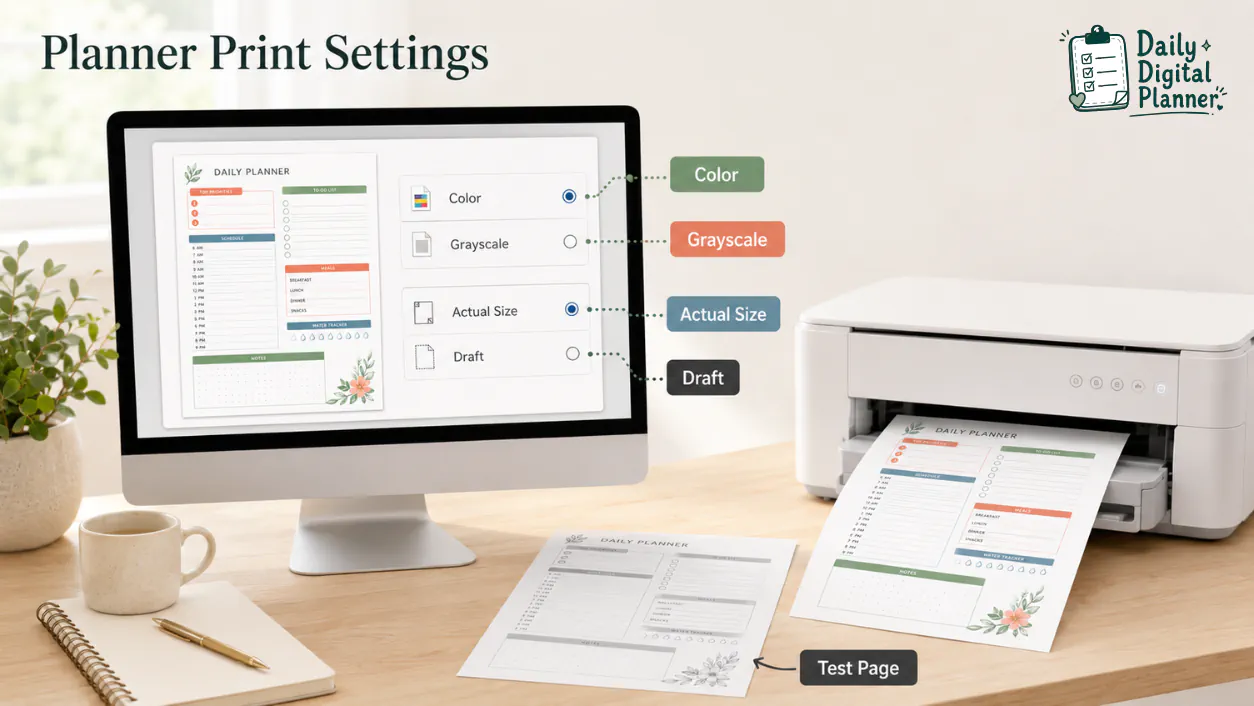
Printer settings can change how a planner PDF prints, so test color, grayscale, draft, and actual-size settings before printing many pages. A color PDF can often be printed in grayscale, but the result may not look the same as a planner page designed as an ink-friendly version.
Use this print check before a full batch:
- Open the saved PDF in a PDF reader rather than relying only on a browser preview when possible.
- Select the correct paper size for the planner file.
- Choose actual size or 100% scale when the product instructions require it.
- Compare color mode, grayscale mode, and black-and-white mode if your printer offers those options.
- Use draft mode only if the planner lines, checkboxes, and small text remain readable.
- Print one test page before printing a full planner set.
Grayscale and black-and-white are not always identical. Grayscale can convert colors into shades of gray, while black-and-white printing may simplify the output more aggressively depending on the printer. If readability matters, compare the result with a test page.
What Paper and Page Size Should You Check Before Printing?
Check the planner’s page size, printer paper, scale setting, and margins before printing a full set. Color and black-and-white choices matter less if the page is scaled incorrectly or printed on the wrong paper size.
US Letter is 8.5 x 11 in, and A4 is 210 x 297 mm. These are common planner page sizes, but the exact included size depends on the product. Some planner files may also be portrait or landscape, and orientation affects how the page should be printed.
Before printing, check:
- Page size listed on the product page.
- Paper size selected in the print dialog.
- Orientation, such as portrait or landscape.
- Scale setting, such as actual size, 100%, or another product-specific instruction.
- Margins and edge spacing after the test print.
- Whether the planner page remains readable after printing in color, grayscale, or black and white.
If the page size is the confusing part, compare US Letter vs A4 planner size before printing. Page-size clarity prevents wasted paper before color choice even becomes relevant.
What Should You Check Before Buying Color or Black-and-White Planner PDFs?
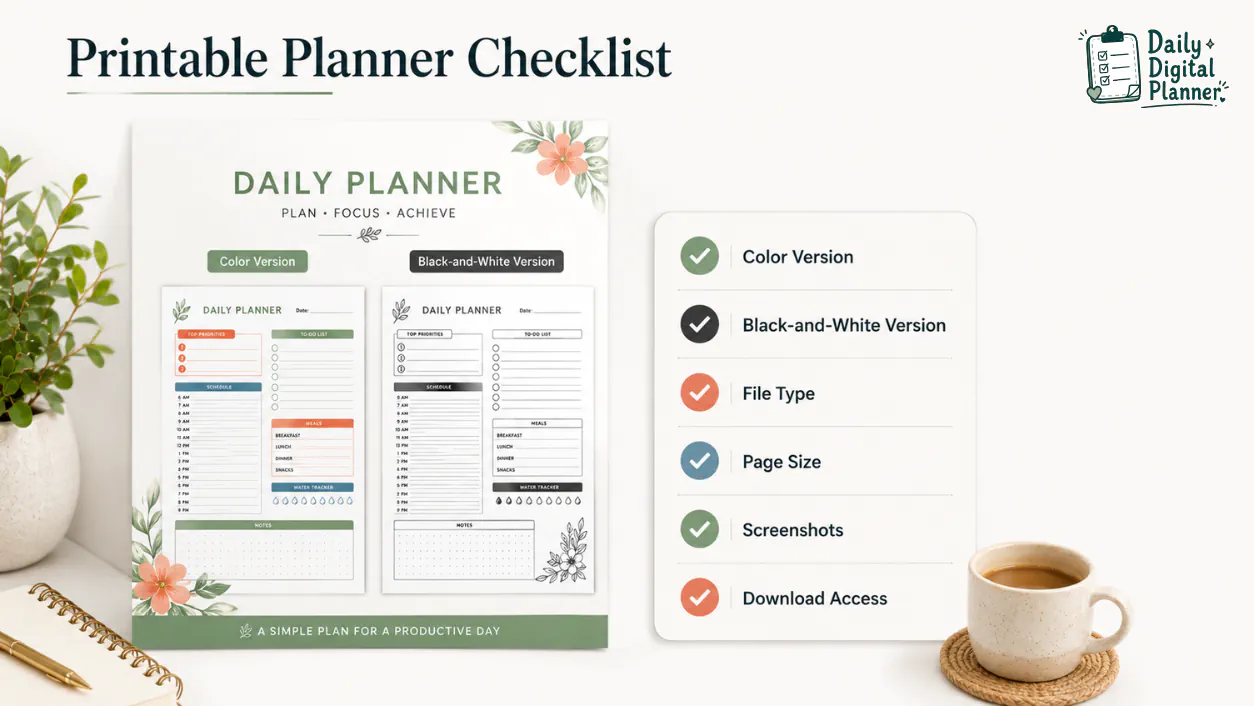
Check the product page for included versions, file type, screenshots, page size, instructions, price, and download access before buying color or black-and-white planner PDFs. The product page should tell you what files you receive and how those files are meant to be used.
Use this buyer checklist before checkout:
- File type: confirm the download is a PDF planner file.
- Included versions: confirm whether the product includes color, black-and-white, ink-friendly, fillable, or blank versions.
- Page size: check whether the product lists US Letter, A4, or a product-specific size.
- Orientation: confirm portrait or landscape when the layout matters.
- Screenshots: inspect color density, writing space, line weight, and page layout.
- Print instructions: look for scale, margins, paper size, and test-page guidance.
- Download access: confirm how files are received after checkout.
- No physical item: confirm that the product is a digital download when the product page or support page says so.
Before checkout, review how to buy and download planner files from Daily Digital Planner if you want the purchase and download flow explained first.
How Color and Ink-Friendly Versions Fit Daily Digital Planner Products
Daily Digital Planner sells downloadable PDF planners, so color and ink-friendly versions should be confirmed on each product page before checkout. Before buying a Daily Digital Planner product, check the product page to confirm whether the download includes color pages, black-and-white pages, ink-friendly pages, or multiple versions.
This source-specific check prevents two common mistakes. The first mistake is assuming every color planner PDF includes a separate black-and-white file. The second mistake is assuming a color planner page will print exactly like a purpose-made ink-friendly version when printed in grayscale.
Daily Digital Planner product pages may also mention file type, page size, orientation, screenshots, download access, and usage notes. Treat those details as buying proof. If you want to browse from the broader print-first category, return to printable planner PDFs and compare the product details before checkout.
FAQ About Color and Black-and-White Printable Planner Pages
Do black-and-white planner pages use less ink?
Black-and-white planner pages usually reduce color-ink use, but total ink use still depends on the design, printer settings, paper, and printer model. A clean ink-friendly page with thin lines is usually safer for frequent printing than a page with heavy fills.
Can I print a color planner PDF in black and white?
Yes, you can often print a color planner PDF in black and white or grayscale if your printer settings allow it. The result may differ from a planner page designed specifically as a black-and-white or ink-friendly version, so print one test page first.
Is black and white the same as grayscale?
Black and white is not always the same as grayscale. Grayscale can turn colors into shades of gray, while black-and-white mode may simplify the page more strongly depending on the printer or print driver.
Are black-and-white planner pages better for writing?
Black-and-white planner pages can be better for writing when they provide higher contrast, clean lines, and more open white space. Color planner pages can also be easy to write on when the color accents stay away from the main writing areas.
What paper should I use for printable planner pages?
Use paper that matches the planner file size and your printer’s supported settings. Check whether the product lists US Letter, A4, portrait, landscape, or another size before printing a full set.
Are free black-and-white printables the same as paid planner PDFs?
Free black-and-white printables are not automatically the same as paid planner PDFs. A paid planner PDF may include more page types, screenshots, instructions, download access, fillable versions, color versions, black-and-white versions, or page-size options, but the product page must confirm what is included.