
Blog
How to Choose the Right Digital Planner Layout

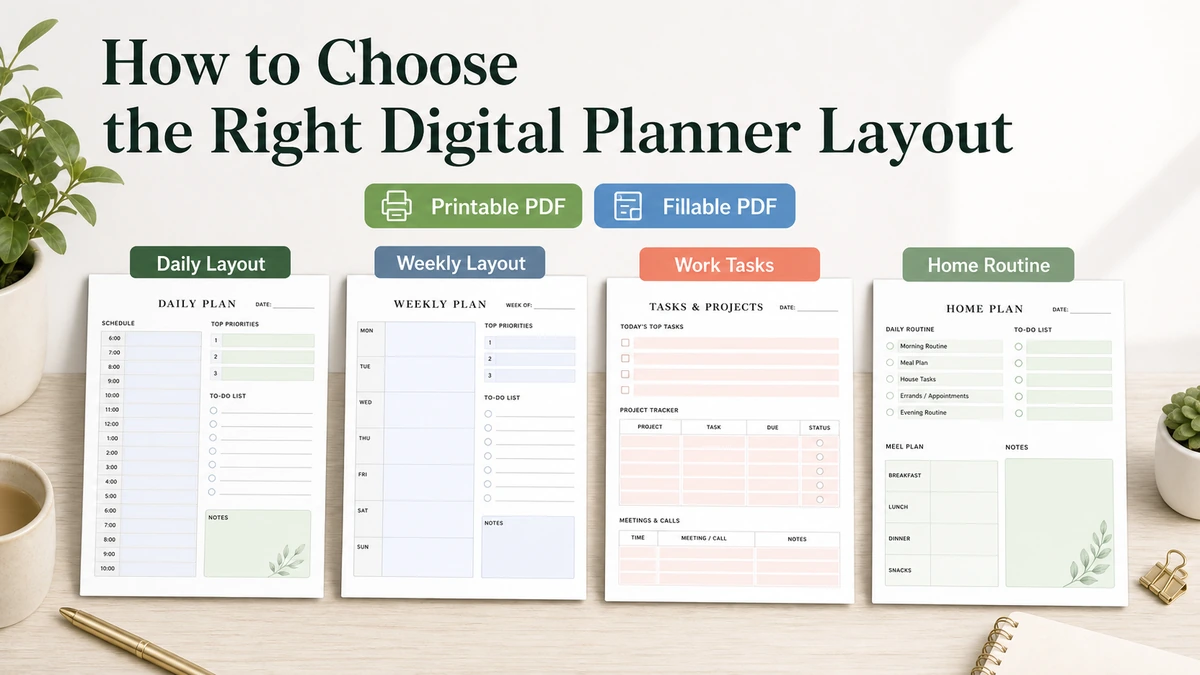
Choose a digital planner layout by looking at how you plan on a normal day, not by picking the prettiest page in a screenshot. If you need a lot of detail, a daily layout will feel easier. If you need to see the whole week, a weekly layout is usually the better starting point. If your planning is split between work, home, printing, and typing into a PDF, the layout needs to match those uses before the design style matters.
If you are still comparing planner types, start with digital planner PDF templates before choosing a layout. If you already know you want a PDF planner, use this guide to narrow the choice by planning view, use case, input method, and the details shown on the product page.
Quick Answer: Which Digital Planner Layout Should You Choose?
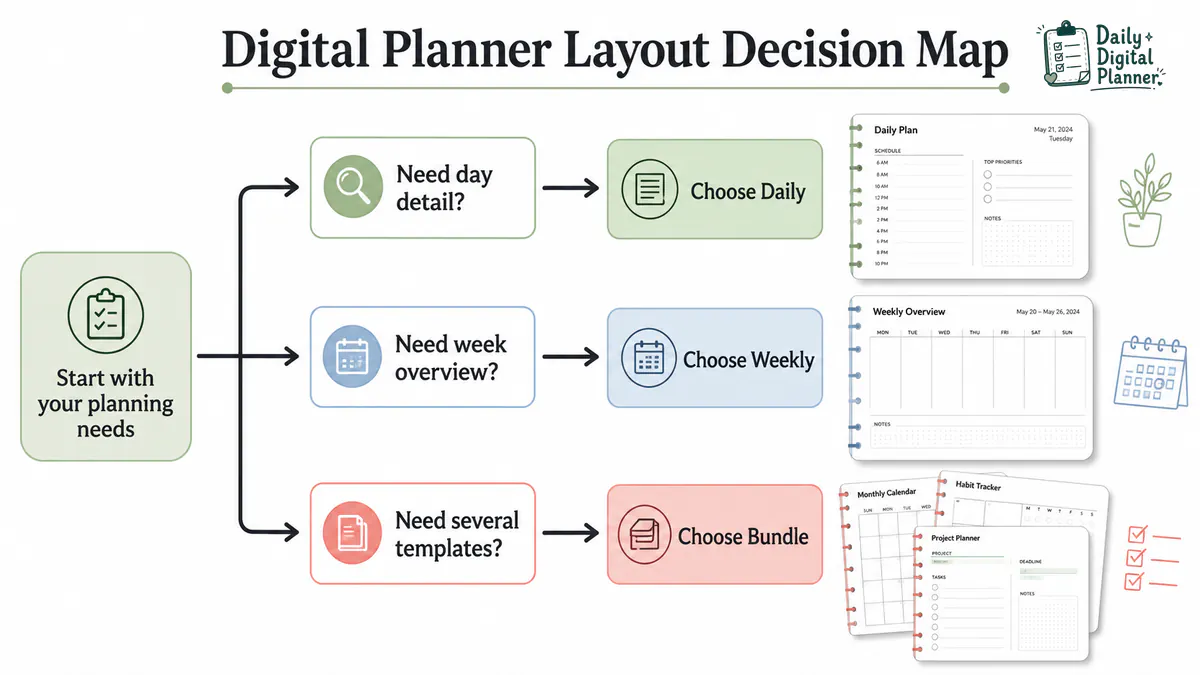
Choose the digital planner layout that matches the way you plan most often: daily for detailed days, weekly for a wider view, work or home layouts for a specific routine, and a bundle when one page type is not enough. The layout should make your next planning step obvious when you open or print the PDF.
- Choose a daily layout if your days need schedules, priorities, routines, task lists, notes, or detailed planning space.
- Choose a weekly layout if you need to see appointments, recurring tasks, deadlines, meals, family plans, or work priorities across the full week.
- Choose a work or home layout when one part of your life needs its own sections.
- Choose a planner bundle when you need daily, weekly, work, home, project, or routine pages in the same planning system.
A useful rule: choose by routine first, format second, and design style last. A page can look calm and polished, but if the boxes are too small or the sections do not fit your week, you will stop using it.
What Does a Digital Planner Layout Mean?
A digital planner layout is the page structure that decides where dates, tasks, notes, routines, fields, and sections appear inside a planner PDF. In this article, layout does not mean only color, cover style, or decoration. It means the parts of the page you actually use.
If the format itself is still unclear, review what a digital planner is before comparing layouts. Layout choice is easier once the file type and the page structure are separate in your head.
A digital planner layout can include:
- Planning interval: daily, weekly, monthly, project, routine, or tracker pages.
- Page sections: schedules, to-do lists, priorities, notes, meals, habits, meetings, or project steps.
- Input method: blank printable areas, fillable PDF fields, or both if the product supports both.
- Product details: screenshots, included pages, file type, page size, orientation, and download instructions.
That is why layout choice is different from the broader digital planner vs printable planner decision. One question is about the format. This one is about the page you will use after the file is downloaded.
Which Planning View Fits Your Routine: Daily, Weekly, Monthly, or Project?
Choose the planning view based on how far ahead you need to see and how much detail you write down. Daily, weekly, monthly, and project layouts solve different problems, so none of them is automatically the best choice.
| Planning view | Best when you need | Check before choosing |
|---|---|---|
| Daily layout | A full page for tasks, routines, notes, appointments, priorities, or time blocks | Enough writing space for one real day |
| Weekly layout | A week-at-a-glance view of tasks, events, meals, deadlines, or recurring routines | Clear day sections and enough notes space |
| Monthly layout | Dates, deadlines, appointments, events, bills, or high-level planning | Readable calendar boxes and useful overview space |
| Project or task layout | Steps, priorities, meetings, client notes, deadlines, or workflow tracking | Sections that match the kind of work you repeat |
Choose a Daily Layout If Your Day Needs Detail
Choose a daily layout if each day needs its own page for appointments, tasks, priorities, routines, or notes. This works well when the shape of the day changes often and a small weekly box is not enough.
A daily layout fits when:
- You plan one day at a time.
- You need space for appointments, errands, priorities, and notes on the same page.
- You want a page you can print or reuse for workdays, school days, or home routines.
- Weekly pages feel too cramped for your task list.
The tradeoff is page count. A daily layout gives more room, but it usually creates more pages than a weekly or monthly view.
Choose a Weekly Layout If You Need a Full-Week View
Choose a weekly layout if you need to see tasks, appointments, routines, and deadlines across the whole week. This layout is strongest when the hard part is seeing the week clearly, not writing a long plan for one day.
A weekly layout fits when:
- You want Monday through Sunday in one view.
- You plan meals, chores, school tasks, appointments, or recurring work by the week.
- You need to spread tasks out instead of crowding one day.
- You prefer fewer pages and a broader view.
The tradeoff is writing space. Weekly pages show more days at once, but each day has less room than a dedicated daily page.
Choose a Monthly Layout If You Plan Around Dates and Deadlines
Choose a monthly layout if dates, deadlines, appointments, events, bills, or launches are the main things you need to see. A monthly page gives you the map before you get into daily or weekly details.
A monthly layout fits when:
- You need a calendar-style overview.
- You plan around deadlines, appointments, family events, billing dates, or launches.
- You want to see the shape of the month on one page.
- You use daily or weekly pages but still need a broader date view.
The tradeoff is task detail. Monthly layouts are good for timing, but they usually do not give enough room for step-by-step work.
Choose a Project or Task Layout If You Manage Workflows
Choose a project or task layout if you need to track steps, priorities, meetings, clients, deadlines, or notes that do not fit neatly into a calendar. A project layout is organized around progress instead of only dates.
A project or task layout fits when:
- You manage client work, business tasks, assignments, or multi-step projects.
- You need sections for priority, deadline, status, notes, and next action.
- You want a repeatable page for work that lasts longer than one day.
- You need planning space that is not tied to a single date.
The tradeoff is calendar visibility. A project page can help you track the work, but you may still need a daily, weekly, or monthly page to schedule when the work happens.
Should You Choose a Work, Home, or All-in-One Planner Layout?
Choose a work layout when professional tasks need most of the space, a home layout when routines and household tasks need most of the space, and an all-in-one layout when those parts overlap. The layout should give the most room to the planning you actually do every week.
Choose a Work Layout for Tasks, Meetings, and Priorities
Choose a work layout when your planner needs to hold tasks, meetings, priorities, notes, projects, or client work. A good work page separates planned work from follow-ups, deadlines, and loose notes.
A work layout fits when:
- You need task lists, priorities, meeting notes, project notes, or follow-up sections.
- You plan across clients, deadlines, or repeated work routines.
- You use focus blocks, status checks, or next-action lists.
- You do not need much meal, chore, or household planning space on the same page.
Look at the kind of work you repeat. A meeting-heavy week needs different sections from a project-heavy week.
Choose a Home Layout for Routines, Meals, and Household Tasks
Choose a home layout when routines, meals, chores, family schedules, resets, or household tasks are the main reason you need a planner. A home page should make repeat tasks easy to see without treating everything like an office project.
A home layout fits when:
- You plan meals, groceries, cleaning routines, family tasks, or household resets.
- You need recurring sections more than open task space.
- You want routines and responsibilities in one place.
- You print pages for a binder, clipboard, command center, or desk setup.
Home layouts usually work better with breathing room. If the page is packed with tiny boxes, it may be harder to use after printing.
Choose an All-in-One Layout When Work and Home Overlap
Choose an all-in-one layout when one planner has to hold work tasks, home routines, personal priorities, and recurring notes. If those sections fight for space, a planner bundle may be clearer than one crowded page.
An all-in-one layout fits when:
- You want one planning system for work and home.
- You need daily, weekly, routine, and task pages together.
- You are not sure which page type you will use most.
- Your planning needs change by season, project, or household routine.
The risk is clutter. If the page tries to do everything, it may be harder to scan than two or three focused templates.
How Do Printable and Fillable PDF Formats Change the Layout Choice?
Printable layouts need enough blank space for handwriting, while fillable PDF layouts need fields in the places where you type tasks, dates, notes, or checkmarks. The same planner idea can feel very different depending on whether you print it, type into it, or do both.
For print-first planning, compare printable planner layouts with enough writing space and clear page areas. If you want to type before printing, choose fillable PDF planner layouts with fields placed where you need them.
| Format condition | Layout needs | Why it matters |
|---|---|---|
| Printable PDF planner | Clear lines, readable sections, enough writing space, suitable page size, and print-friendly margins | The printed page has to work with a pen after download |
| Fillable PDF planner | Typeable fields, natural entry areas, saveable pages, and enough room for typed text | The PDF has to work before printing or saving a completed copy |
| Blank PDF planner | Open writing space without required digital fields | The user may prefer handwriting or manual annotation |
| Mixed printable and fillable planner | Readable print space plus typeable fields where the product supports them | The user may type some entries and handwrite others |
The exact formats, fields, sizes, and instructions depend on the individual product page. Do not assume every planner product includes the same versions.
Printable Layouts Need Writing Space and Clear Print Areas
A printable layout should leave enough space to write by hand after the page is printed. A layout that looks roomy on screen can still feel tight once it is on paper.
Before choosing a printable layout, check:
- Whether the product is a PDF file meant for printing.
- Whether the screenshots show enough writing space for your handwriting.
- Whether the page size and orientation match how you want to print.
- Whether the section labels stay readable after printing.
- Whether the page still works in black and white if you plan to save ink.
Printable planner users usually need less decoration and more usable space. The page has to work with a pen, not just in a product image.
Fillable PDF Layouts Need Typeable Fields and Saveable Pages
A fillable PDF layout should place typed fields where you naturally enter tasks, notes, dates, or checkmarks. Field placement matters because typing into a PDF is not the same as writing across a blank printed page.
Before choosing a fillable layout, check:
- Whether the product says it includes fillable PDF fields.
- Whether the typed areas match the entries you plan to add.
- Whether the fields are large enough for tasks, notes, or repeated text.
- Whether the product gives instructions for saving a completed copy.
- Whether the planner can still be printed after you type into it.
If the confusing part is handwriting versus typing, compare blank vs fillable PDF planner versions before choosing the layout.
What Layout Details Should You Check Before Buying a Digital Planner PDF?
Check the product page for the included pages, file type, printable or fillable support, screenshots, page size, orientation, instructions, price, and download access before buying a digital planner PDF. Exact page counts, sizes, fields, and prices can vary by product, so check the product page instead of relying on a general guide.
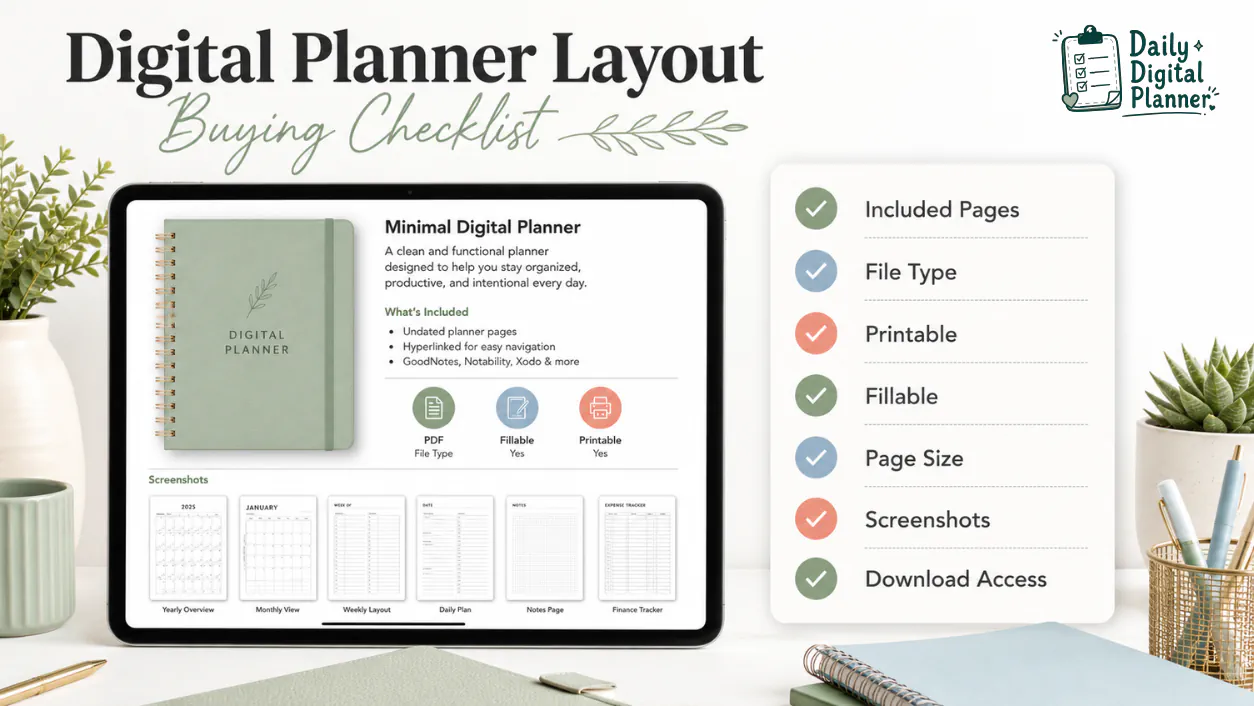
Use this checklist before checkout:
- File type: confirm whether the planner is a PDF or another file type listed on the product page.
- Included pages: check whether it includes daily, weekly, monthly, task, routine, project, tracker, or bundle templates.
- Input method: confirm whether it is printable, fillable, blank, or a mix of supported versions.
- Page size and orientation: check the size listed on that product page and whether the planner is portrait or landscape.
- Screenshots: inspect writing space, section labels, field placement, and page density.
- Instructions: look for notes about printing, filling, saving, opening, and downloading.
- Price and download access: confirm what you are buying before checkout.
- Digital delivery: make sure you understand whether the product is a digital download and not a shipped physical planner.
Before checkout, review how to buy and download planner files from Daily Digital Planner. It explains the purchase and download flow, which is useful when you are buying a file instead of waiting for a shipped item.
When Should You Choose a Planner Bundle Instead of One Layout?
Choose a planner bundle when you need several layouts for different routines instead of one repeated page type. A single daily page may be enough for everyday planning, but it may not cover weekly overviews, work projects, home routines, meal planning, notes, and reusable templates.
A planner bundle makes sense when:
- You need separate layouts for work, home, and personal planning.
- You want daily and weekly pages in the same planning system.
- You need task pages, routine pages, tracker pages, or project pages in addition to calendar pages.
- You are not sure which layout you will use most.
- Your planning needs change between busy work weeks, home reset days, and longer projects.
A planner bundle is not automatically better than one planner. It is better only when the extra page types solve a real planning problem. Check the bundle page and product screenshots before assuming it includes the exact layout you need.
How Should You Test a Digital Planner Layout Before You Commit?
Test a digital planner layout with one normal day, one normal week, or one repeated routine before printing many pages or buying a larger set. A short test shows whether the page has enough room and whether the format works the way you expect.
- Pick one planning interval to test: one day, one week, one month, or one project.
- Use the layout for a real routine, not an ideal version of your life.
- Check whether tasks, dates, routines, and notes have enough space.
- If printing, print one page first and check readability, margins, and writing space.
- If filling, type into the fields and save a copy before relying on the file.
- If work and home needs compete for space, consider whether a bundle is clearer than one crowded layout.
This small test is more useful than comparing twenty screenshots. The right layout should feel workable after download, not only attractive in the preview.
FAQ About Choosing a Digital Planner Layout
What format should a digital planner be?
A digital planner is often a PDF when the goal is a downloadable planner file that can be opened, printed, typed into when supported, or used in compatible PDF apps. Some planners may include other file types, so check the product page before buying.
What should a digital planner include?
A digital planner should include the pages needed for its planning job, such as daily, weekly, monthly, task, routine, project, notes, tracker, or bundle pages. The product page should also show file type, screenshots, page size, printable or fillable support, instructions, and download access.
Is a daily or weekly planner layout better?
Neither daily nor weekly planner layouts are better for everyone. Choose a daily layout for detail and one-day focus, and choose a weekly layout when you need to see tasks, dates, and routines across the full week.
Which planner layout is best for work and home?
The best planner layout for work and home is either an all-in-one layout with clear sections or a bundle with separate work and home templates. If one page feels crowded, separate layouts are often easier to scan.
Do I need GoodNotes or an iPad to choose a digital planner layout?
No, you do not need GoodNotes or an iPad just to choose a digital planner layout. App choice matters only if you plan to annotate, organize, or reuse the PDF on a tablet; for printable or fillable PDFs, product format and instructions matter more.
Should I use a free digital planner layout first?
A free digital planner layout can help you test whether you prefer daily, weekly, monthly, or project pages, but it should not replace product details before buying. Before purchasing a planner PDF, check the included pages, screenshots, format, instructions, and download access.