
Blog
What Is a Brain Dump Planner for Work Tasks?

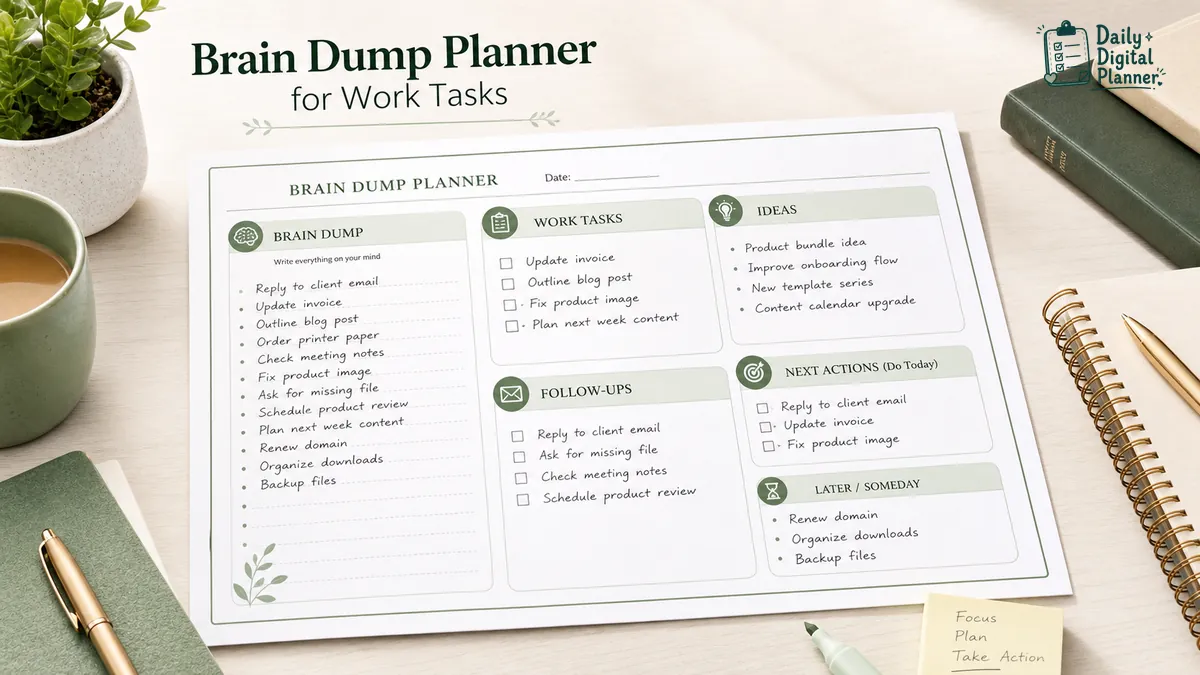
A brain dump planner is a planner page for capturing unsorted work tasks, reminders, ideas, notes, and open loops before sorting them into priorities, next actions, scheduled tasks, and later lists. It gives scattered work a first place to land before you decide what belongs in a work planner, a priority page, a calendar, or a focus session.
This guide is about brain dump planner pages, printable PDFs, and fillable PDF planner workflows. It is not medical advice, a therapy method, or a promise that one page will fix every kind of overwhelm. The useful part is simpler: write the loose items down first, then sort them into something you can act on.
For Daily Digital Planner users, a brain dump planner sits between raw notes and structured planning. It can catch work tasks, meeting follow-ups, project ideas, personal reminders, and small admin items before they crowd the daily plan.
What Is a Brain Dump Planner?
A brain dump planner is a structured capture page for writing down everything that is taking attention before deciding what belongs on a task list, schedule, project plan, or later list. It is not just a blank notes page, and it is not the final to-do list.
The page works because many tasks arrive before they are ready to be organized. A client reply, a meeting note, a product idea, a bill reminder, and a half-finished admin task can all sit in the same mental pile. A brain dump planner gives those items a temporary home.
A useful brain dump planner usually has at least two zones:
- Raw capture: the messy list of tasks, reminders, ideas, questions, errands, and follow-ups.
- Sorting area: the place where those items become priorities, scheduled tasks, delegated items, waiting items, or later items.
In a PDF planner context, a brain dump planner can be printed and written on by hand. If the PDF includes supported fillable fields, it can also be typed into, saved, and printed later. The format matters less than the job: capture first, sort second.
How Does a Brain Dump Planner Work?
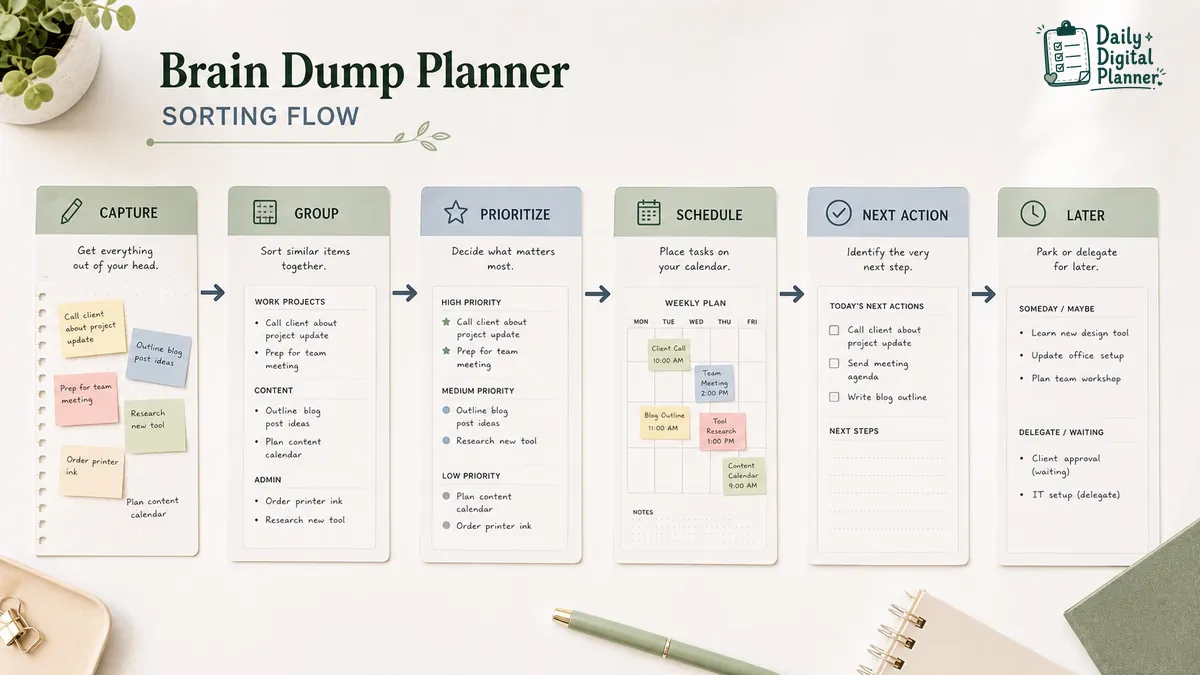
A brain dump planner works by separating capture from decision-making: first write everything down, then group similar items, choose what needs action, and move the chosen items into a planner, schedule, or priority list.
The first pass should be quick. Do not judge the list while you are writing it. A mixed work dump might include:
- reply to client
- update invoice
- outline blog post
- order printer paper
- check meeting notes
- fix product image
- ask for missing file
- schedule product review
After the capture pass, the same list can be grouped into categories:
| Raw item | Sorted category |
|---|---|
| Reply to client | Client follow-up |
| Update invoice | Admin |
| Outline blog post | Content |
| Order printer paper | Supply |
| Check meeting notes | Meeting action |
| Fix product image | Product task |
| Ask for missing file | Waiting or ask |
| Schedule product review | Calendar |
That second pass is where the planner becomes useful. You may choose two or three tasks for today, schedule one item for tomorrow, leave a waiting item in a follow-up list, and remove a task that no longer matters.
The workflow is simple:
- Capture everything quickly.
- Mark related items.
- Group items into categories.
- Choose the tasks that need action.
- Move scheduled work into a planner, calendar, or focus block.
- Leave non-urgent items in a later list.
What Should You Write in a Brain Dump Planner?
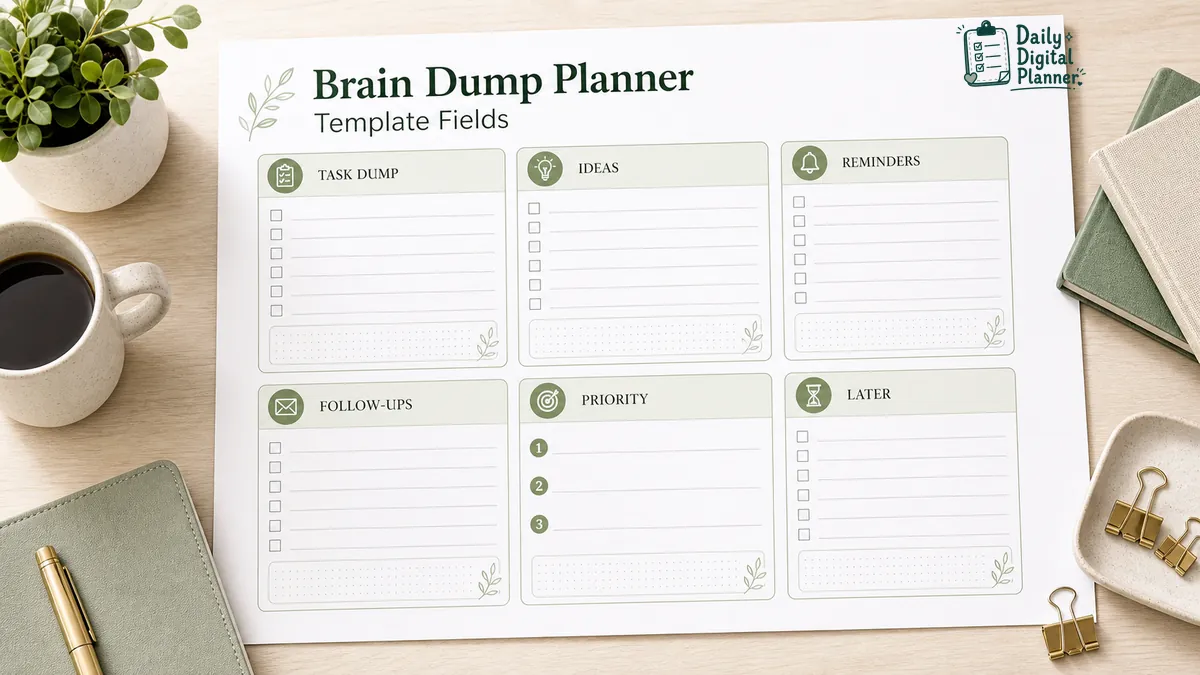
Write anything that is taking attention but has not yet become a clear action, including work tasks, reminders, ideas, follow-ups, project notes, errands, questions, and later items. The brain dump page is allowed to be mixed at first.
Use the page for items such as:
| Capture item | Example |
|---|---|
| Work tasks | Send report, update listing, review draft |
| Follow-ups | Client reply, meeting note, supplier question |
| Ideas | Product bundle idea, blog topic, workflow improvement |
| Admin | File receipt, update password, organize downloads |
| Blockers | Waiting for assets, missing file, unclear deadline |
| Later items | Course to review, template to redesign, routine to test |
The best entries are specific enough to sort later. "Marketing" is hard to act on. "Draft email for July product launch" is easier to move into a schedule or next-action list.
You can also write small unfinished reminders. These are often the items that keep reappearing while you are trying to work: "send receipt," "check printer ink," "ask about deadline," "rename files," or "move notes from meeting." They may not deserve a big project plan, but they still need a place.
How Do You Sort a Brain Dump After Writing It?
Sort a brain dump by turning raw notes into categories such as do now, schedule, delegate, waiting, later, and remove, then choose a small set of next actions. Sorting is the step that keeps a brain dump from becoming another long list.
Use simple labels first:
| Sorting label | Use it for |
|---|---|
| Do now | Short tasks that can be finished soon |
| Schedule | Tasks that need a date, time, or work block |
| Delegate or ask | Items that need another person |
| Waiting | Items blocked by a reply, file, approval, or decision |
| Later | Useful but not urgent items |
| Remove | Duplicates, stale reminders, or items that no longer matter |
The sorting labels should help you make decisions, not create extra work. If one label is enough for a task, stop there. If an item needs more detail, move it to the right planner page after the brain dump.
For example, "fix checkout issue" might become a scheduled task. "Ask designer for logo file" might become a delegate or ask item. "Research new template idea" might become a later item unless it belongs to the current project.
When the list is still too large, use a priority planner template after the brain dump. The brain dump captures the open loops. The priority page helps decide which tasks deserve attention first.
Is a Brain Dump Planner the Same as a To-Do List?
No. A brain dump planner captures everything before it is organized, while a to-do list contains selected tasks that are ready to act on. The two pages can work together, but they do not do the same job.
| Brain dump planner | To-do list |
|---|---|
| Raw capture | Chosen actions |
| Can be messy | Should be usable |
| Includes ideas, reminders, blockers, and notes | Usually includes tasks only |
| Comes before sorting | Comes after sorting |
| Helps reveal what is taking attention | Helps guide execution |
A brain dump should not be judged like a final plan. It may contain duplicate reminders, unfinished thoughts, questions, and items that do not matter by the end of the sorting pass.
A to-do list should be smaller and clearer. It should hold tasks that have already been chosen. If the to-do list keeps growing until it feels unusable, put a brain dump page before it and sort the raw items first.
When Should You Use a Printable or Fillable Brain Dump Planner PDF?
Use a printable brain dump planner when handwriting helps you capture quickly, and use a fillable PDF version only when the product includes supported fillable fields and you want to type, save, or print later. The right format depends on how you work through the first messy pass.
A printable brain dump planner is useful when you want a page on the desk while you work. You can write fast, circle related items, draw arrows, and cross out stale reminders without opening another app.
A fillable PDF planner is useful when you prefer typing into fields before saving or printing a clean copy. Fillable behavior depends on the PDF file itself and the reader you use, so check the product details before assuming a brain dump PDF can be typed into.
| Format | Best for | Practical note |
|---|---|---|
| Printable brain dump planner | Handwriting, quick capture, desk planning | Print the page and write by hand |
| Fillable brain dump planner PDF | Typing, saving, reusable digital copies | Confirm that fillable fields are included |
| Blank PDF planner page | Printing or annotating | It may not include typed form fields |
If you are still choosing the general format, compare printable planner PDFs with fillable PDF planners before choosing a specific template.
For setup help, use the guide on how to print a printable planner PDF or how to use a fillable PDF planner in Adobe Acrobat Reader. After purchase, Daily Digital Planner customers receive digital download access through the WooCommerce purchase email and the website Downloads section.
How Does a Brain Dump Planner Fit With Work Planning?
A brain dump planner usually comes before the work planner: it captures the unsorted work, then the work planner turns selected items into priorities, schedule blocks, meeting follow-ups, or project tasks. It is the intake page, not the whole system.
The relationship is easiest to see as a sequence:
- Brain dump planner: capture tasks, reminders, ideas, blockers, and notes.
- Priority planner: decide which tasks matter first.
- Work planner: place chosen tasks into the workday with meetings, projects, and follow-ups.
- Pomodoro planner: work through one selected task in timed focus sessions.
The work planner is the broader page for daily tasks, meetings, projects, and focus. The brain dump planner supports it by keeping the first capture pass separate from the final day plan.
This separation matters for busy workdays. If every stray reminder goes straight into the daily plan, the plan becomes crowded. If every stray reminder stays in your head, the plan stays incomplete. A brain dump page gives the reminders a place before you decide where they belong.
When a captured item needs ranking, move it to a priority planner template. When a selected task needs focused execution, move it into a Pomodoro planner or another focus-session page.
What Should You Check Before Choosing a Brain Dump Planner Template?
Before choosing a brain dump planner template, check the file type, included pages, page size, orientation, screenshots, instructions, printable or fillable support, price, and download access. A good-looking template still needs the right fields for the way you capture and sort tasks.
Use this checklist before buying or downloading a brain dump planner PDF:
- PDF file type: confirm that the product is a PDF if you need printable planner pages.
- Printable support: check that the page can be printed for handwriting.
- Fillable fields: confirm this only if typing into the planner matters.
- Page size: look for US Letter, A4, or other listed sizes if paper fit matters.
- Orientation: choose portrait or landscape based on your desk, binder, or screen use.
- Raw capture area: make sure there is enough room for the first messy list.
- Sorting categories: look for sections such as priority, later, waiting, or next action.
- Product screenshots: review the visible layout before buying.
- Usage instructions: check whether the product explains how to download, print, or use the file.
- Price and download access: confirm the current product price and how files are delivered after purchase.
Do not assume every brain dump planner has the same features. Some pages are simple printable worksheets. Some are part of a larger work planner bundle. Some may include fillable fields, but that should be verified on the product page.
Brain Dump Planner Templates From Daily Digital Planner
Daily Digital Planner has work and productivity planner products that support brain-dump-style capture, including a dedicated Brain Dump Digital Planner product and related focus/productivity planners. This section is a product bridge, not a replacement for checking the product page details.
The main product for this guide is Brain Dump Digital Planner Printable For Work Productivity. Use the product page to verify current screenshots, included files, printable or fillable support, price, and download details before buying.
You can also browse productivity planner PDFs if you want related work-planning templates. Productivity planner pages may include task capture, focus support, priority planning, distraction logs, or other work organization layouts.
Related low-friction planning templates may include:
Those product titles can be useful for users searching for low-friction focus and task-capture templates. They should not be read as medical treatment claims. The safe buying step is still the same: open the product page, check the screenshots and details, then choose the page that matches your workflow.
FAQ About Brain Dump Planners
What is a brain dump planner?
A brain dump planner is a planner page for writing down unsorted tasks, reminders, ideas, and notes before organizing them into actions. It usually has a raw capture area and a sorting area.
How do you use a brain dump planner for work?
Use a brain dump planner for work by writing down every task or reminder first, then grouping related items, choosing next actions, and moving selected tasks into a work planner, schedule, or priority list.
Is a brain dump planner the same as journaling?
No, a brain dump planner is not exactly the same as journaling. Journaling is usually reflective writing, while a brain dump planner is usually practical capture and sorting for tasks, reminders, ideas, and follow-ups.
Can I print a brain dump planner PDF?
Yes, you can print a brain dump planner PDF if the product is sold as a printable PDF and the file details support printing. Check the product page for file type, page size, screenshots, and any printing notes before buying.
Can I type into a brain dump planner PDF?
You can type into a brain dump planner PDF only if the PDF includes fillable fields and is opened in a compatible PDF reader. A printable PDF is not automatically fillable.
Can a brain dump planner help with ADHD?
A brain dump planner can support low-friction task capture for some ADHD/productivity users, but it is not medical treatment and should not replace professional advice. Keep the claim practical: the planner gives scattered tasks a place to be captured and sorted.
What happens after a brain dump?
After a brain dump, sort the notes into next actions, scheduled tasks, delegated items, waiting items, later items, and anything that can be removed. The goal is to turn raw capture into a smaller set of usable decisions.