
Blog
How Do You Plan Deep Work Sessions With a Planner?

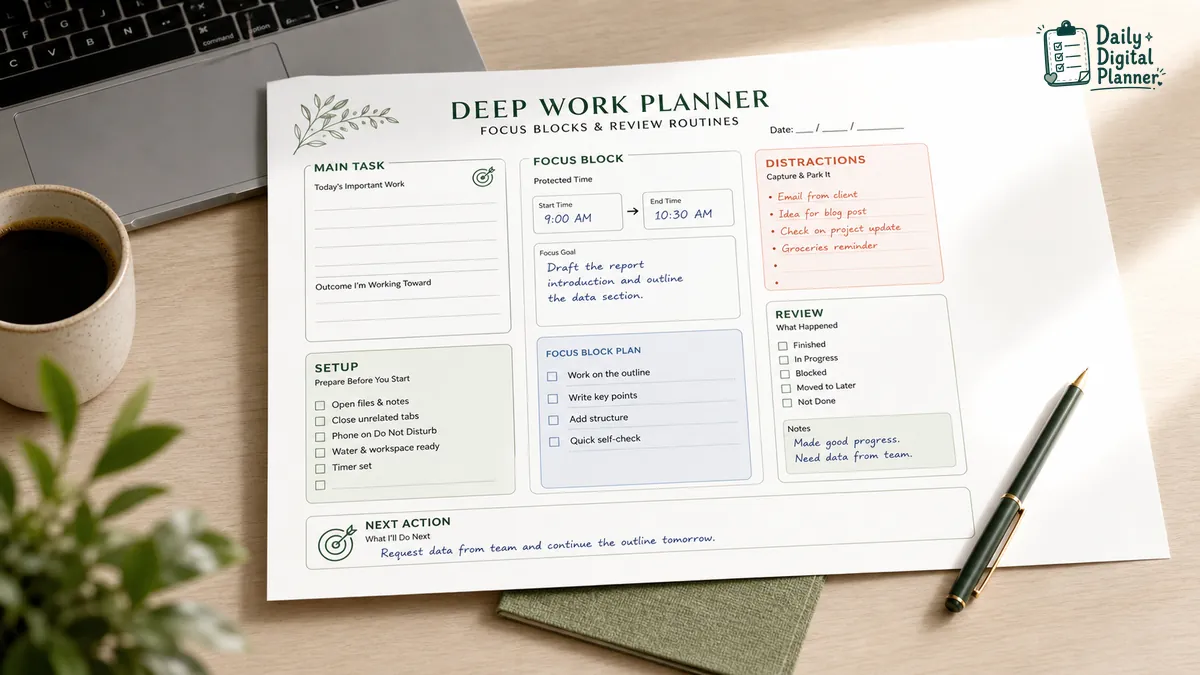
A deep work planner helps you plan a focus session by choosing one important task, reserving a protected focus block, preparing the work environment, capturing distractions, and reviewing the result afterward. It turns "I need to focus" into a visible page with a task, a time block, a setup checklist, and a next action.
This guide is about planner templates and PDF planning pages. It is not an app ranking, a book summary, or a promise that one method will fix every distraction. The useful part is practical: put one important piece of work inside a block you can protect, then review what happened when the block ends.
A deep work block usually sits inside a broader work planner with meetings, admin tasks, projects, and review notes. The deep work planner handles the protected session itself.
What Is a Deep Work Planner?
A deep work planner is a planner template for turning one important task into a protected focus block with preparation notes, distraction capture, and a short review after the session. It gives the session a start point, an end point, and a place to record what happens instead of relying on memory.
The planner page is not meant to hold every task for the day. That job belongs to a work planner, task list, calendar, or project page. A deep work planner is narrower: it protects one block of focused work and helps you decide what to do next when the block ends.
A useful deep work planner usually includes these zones:
- Main task or outcome: the work you want to protect during the block.
- Start and end time: the visible boundary for the focus block.
- Setup checklist: the files, tools, notes, workspace, or materials needed before starting.
- Distraction or later notes: the place to write down interruptions, ideas, and blockers without leaving the task.
- Review result: the short note that says what was finished, moved, blocked, or left unfinished.
- Next action: the decision that keeps the work from staying vague after the session.
In a PDF planner context, a deep work planner can be printed and used beside your workspace. If a specific PDF includes supported fillable fields, it can also be typed into, saved, and printed later.
How Do You Plan a Deep Work Session Step by Step?
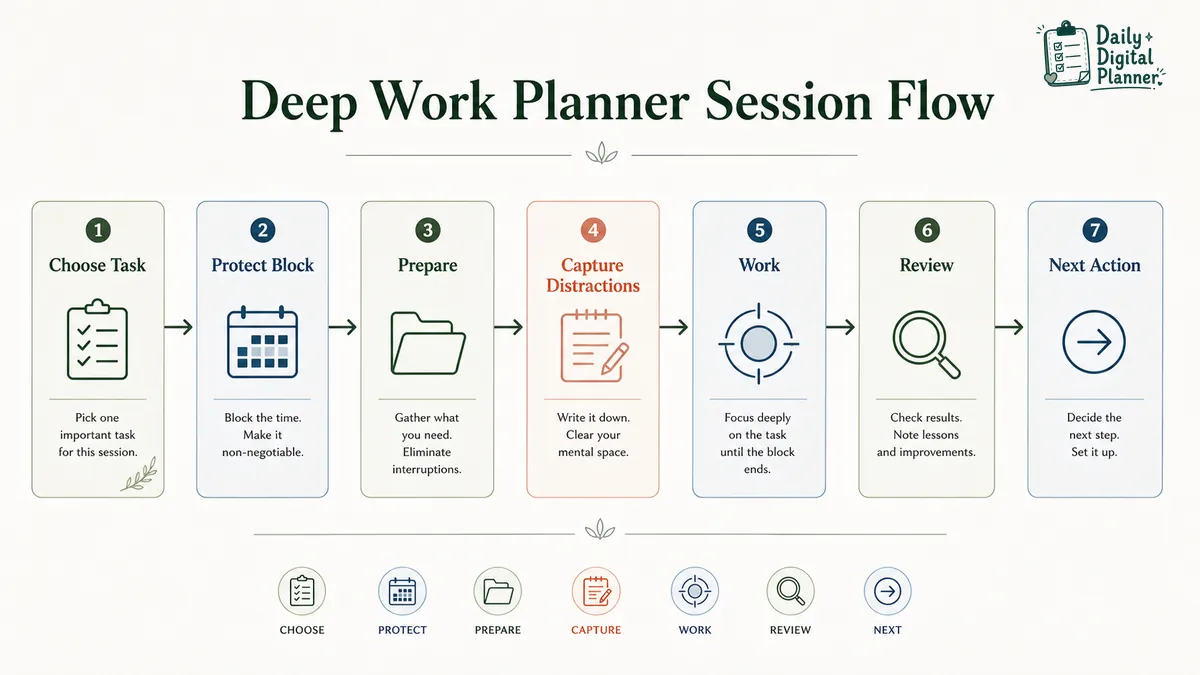
Plan a deep work session by choosing the task before the block starts, setting a protected time window, preparing the materials, writing down distractions instead of following them, and reviewing the result when the block ends. The goal is not to make the page complicated. The goal is to make the focus block clear enough to start.
Use this sequence:
- Choose one task or outcome. Pick the work that deserves protected attention before the session begins. If the list is messy, use a brain dump planner first, then use a priority planner template to choose what matters most.
- Reserve the focus block. Write the start time, end time, and task on the planner page. The time block should be realistic enough to protect, not just an ideal slot you will ignore.
- Prepare the page, files, and workspace. Open the document, gather notes, close unrelated tabs, place the planner page where you can see it, and make the task easy to re-enter if you get interrupted.
- Set boundaries where possible. Silence notifications, mark the work block on your calendar, or decide what kind of interruption is allowed before the block ends.
- Capture distractions on the planner page. Write down later ideas, quick reminders, missing files, or questions instead of switching tasks immediately.
- Review the result. Mark what was finished, what moved forward, what got blocked, and what next action should be scheduled.
The review step is what keeps a deep work planner from becoming only a schedule box. A protected block matters more when the page records the result and the next decision.
What Should a Deep Work Planner Template Include?
A deep work planner template should include a task field, a protected time block, a setup checklist, a distraction capture area, a result note, and a next-action field. These fields make the session easier to start, easier to protect, and easier to review.
The template does not need to look crowded. A useful page can stay simple if each field has a clear job.
| Planner field | What it records | Why it matters |
|---|---|---|
| Task or outcome | The work to protect | Keeps the block from becoming general desk time |
| Time block | Start and end time | Gives the session a visible boundary |
| Setup checklist | Files, workspace, materials, notifications | Reduces avoidable switching before the block starts |
| Distraction list | Interruptions, later ideas, blockers | Captures notes without leaving the work |
| Review note | Finished, unfinished, blocked, moved | Turns the session into a next decision |
| Next action | Finish, schedule, delegate, break down | Prevents the work from staying vague |
A deep work worksheet may use different labels, but the job is the same. The page should help you enter the session with one clear task and leave the session with one clear review.
For example, "finish report" is too broad if the report has several stages. "Draft the report introduction and outline the data section" is easier to place inside a focus block and review afterward.
What Are Focus Blocks, and How Do They Fit Into a Work Planner?
Focus blocks are reserved periods of time for one important task or one kind of work, and they fit inside a work planner beside meetings, admin tasks, projects, and review notes. A focus block is not the whole workday. It is one protected part of the workday.
A work planner handles the full picture: daily tasks, meetings, project notes, follow-ups, and focus work. A deep work planner handles the protected session inside that broader plan.
The difference is easiest to see by function:
| Planning item | Main job | Example use |
|---|---|---|
| General task list | Holds work that needs attention | Reply to client, update invoice, review draft |
| Work planner | Organizes the workday | Tasks, meetings, projects, priorities, focus blocks |
| Focus block | Protects time for one task or one work type | Draft proposal from 9:00 to 10:30 |
| Deep work planner | Plans and reviews the protected session | Main task, setup, distractions, result, next action |
Focus blocks work best when they are visible before the day gets crowded. If the focus block stays only in your head, it is easy for meetings, messages, and small tasks to fill the space.
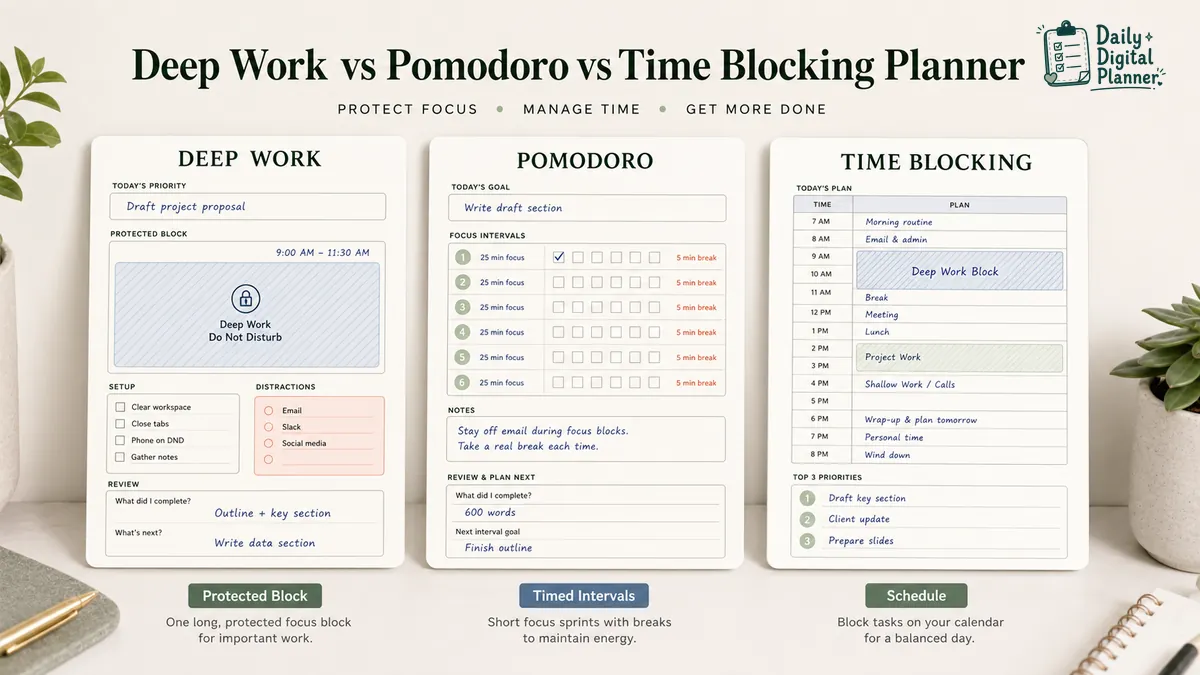
How Is a Deep Work Planner Different From a Pomodoro Planner?
A deep work planner protects a larger focus block around one important task, while a Pomodoro planner tracks shorter repeated work intervals, breaks, and session counts. Both can support focus, but they organize the session differently.
A deep work planner is useful when the task needs a longer runway: writing, analysis, planning, design, bookkeeping, or any work that takes time to settle into. A Pomodoro planner is useful when shorter intervals and visible breaks make the task easier to start or finish.
| Planner type | Best fit | Typical page focus | Review question |
|---|---|---|---|
| Deep work planner | Longer protected focus blocks | Task, time block, setup, distractions, review | What was finished or moved next? |
| Pomodoro planner | Shorter repeated focus intervals | Task, timer interval, break, session count, result | How many sessions did the task need? |
| Time blocking planner | Day or week scheduling | Blocks on a schedule | Where should this type of work happen? |
The methods can work together. A time blocking planner can reserve the block on the schedule. A deep work planner can define the task and review the session. A Pomodoro planner can break a difficult task into smaller intervals when a long block feels too loose.
How Should You Handle Distractions During a Deep Work Block?
During a deep work block, write distractions, later ideas, and blockers on the planner page instead of following them immediately, then decide after the block what needs action. The planner should give distractions a parking place without letting them take over the session.
Not every distraction is the same. Some interruptions need attention later. Some are only mental noise. Some reveal a missing file, unclear instruction, or dependency that blocks the work.
Use simple categories:
- Later task: a small item that should not interrupt the current block.
- Quick idea: a useful thought to review after the session.
- External interruption: a message, call, request, or household/workplace interruption.
- Missing file or blocker: something required before the task can move forward.
- Question to answer after the block: a decision or detail that should not break focus immediately.
A distraction list is not a failure log. It is a way to keep the main task visible while still capturing loose items. If interruptions keep breaking focus blocks, a dedicated Distraction Log Printable for Deep Work and Focus Management can be a useful related page to review.
Should You Use a Printable or Fillable Deep Work Planner PDF?
Use a printable deep work planner when you want a visible page beside your workspace, and use a fillable PDF version only if the file includes supported fillable fields and you prefer typing, saving, or printing later. The format should match how you actually protect the block.
A printable planner works well when handwriting keeps the session visible. You can leave the page next to your keyboard, mark distractions quickly, and review the result without opening another tool.
A fillable PDF planner works well when the PDF itself includes typed fields and you want to keep a saved digital copy. Fillable behavior depends on the file and the PDF reader, so do not assume every printable PDF can be typed into.
| Format | Best for | Check before using |
|---|---|---|
| Printable deep work planner | Handwriting, desk visibility, quick distraction notes | Page size, orientation, print settings |
| Fillable deep work planner PDF | Typing, saving, printing a clean copy | Supported fillable fields and compatible PDF reader |
| Plain PDF planner page | Printing or annotating in a PDF app | Whether the file is printable, fillable, or annotation-only |
If you are still deciding the format, compare printable planner PDFs with fillable PDF planners before choosing a specific deep work template.
What Should You Check Before Choosing a Deep Work Planner Template?
Before choosing a deep work planner template, check the file type, included pages, page size, orientation, screenshots, instructions, printable/fillable support, price, and download access. A good-looking page still needs the right structure for your work style.
Use this checklist before buying or downloading a deep work planner PDF:
- File type: confirm that the product is a PDF if you need printable planner pages.
- Included pages: check whether the product includes only one page or several focus, review, or planning templates.
- Page size: look for US Letter, A4, or another listed size if paper fit matters.
- Orientation: choose portrait or landscape based on your desk setup, binder, or screen use.
- Screenshots: review the visible planner layout before buying.
- Instructions: check whether the product explains how to download, print, type, or use the file.
- Printable support: confirm that the page is intended for printing if handwriting matters.
- Fillable support: confirm fillable fields only if typing into the planner matters.
- Price: check the current product price on the live product page.
- Download access: confirm how you receive and access the files after purchase.
For setup help, use the guide on how to print a printable planner PDF or how to use a fillable PDF planner in Adobe Acrobat Reader. Daily Digital Planner uses WooCommerce digital delivery, so customers can access download links from the purchase email and from the website Downloads section in their account.
Deep Work Planner Templates From Daily Digital Planner
Daily Digital Planner supports deep work planning through productivity planner PDFs, focus-session products, distraction logs, and work planner pages that help users choose, protect, and review focused work. Use this section as a product path, not as a claim that every product has the same fields.
Related places to review:
- Productivity planner PDFs can help you browse related focus, task, priority, and productivity templates.
- Distraction Log Printable for Deep Work and Focus Management fits the part of the workflow where interruptions, blockers, and later ideas need a place to land.
- Meeting-Free Day Planner Printable for Deep Work Focus is relevant when the goal is to protect a larger focus day, not only one short block.
- Pomodoro Planner, Minimalist Study & Work Interval Log, Fillable Daily Deep Work Organizer is worth reviewing if shorter work intervals fit the task better than a single long block.
- Pomodoro Planner, Professional Deep Work, Structured Productivity Interval Worksheet is another focus-session product to compare when you want interval structure.
Check each product page for the current screenshots, file details, page size, printable or fillable support, instructions, price, and download access before buying.
FAQ About Deep Work Planners
What is a deep work planner?
A deep work planner is a planner page for scheduling protected focus blocks, preparing the session, recording distractions, and reviewing what happens afterward. It is narrower than a full work planner because it focuses on one protected session.
What are deep work blocks?
Deep work blocks are reserved time periods for one important task or one type of focused work with fewer planned interruptions. A planner can make the block visible by recording the task, time window, setup needs, and review result.
How long should a focus block be?
A focus block should be long enough to make progress and short enough to protect realistically. There is no single duration that fits every task, workplace, or energy level.
Is a deep work planner the same as a time blocking planner?
No. A time blocking planner schedules the workday, while a deep work planner adds task choice, setup, distraction capture, and review for a protected focus session.
Is a deep work planner better than a Pomodoro planner?
Not always. A deep work planner fits longer protected work, while a Pomodoro planner fits shorter repeated intervals and break tracking.
Can I print a deep work planner PDF?
Yes, you can print a deep work planner PDF if the product is sold as a printable PDF and the file details support printing. Check the product page for page size, screenshots, and any printing notes before buying.
Can I type into a deep work planner PDF?
You can type into a deep work planner PDF only if the PDF includes fillable fields and is opened in a compatible PDF reader. A printable PDF is not automatically fillable.