
Blog
How to Build a Simple Digital Planning Routine You Can Keep

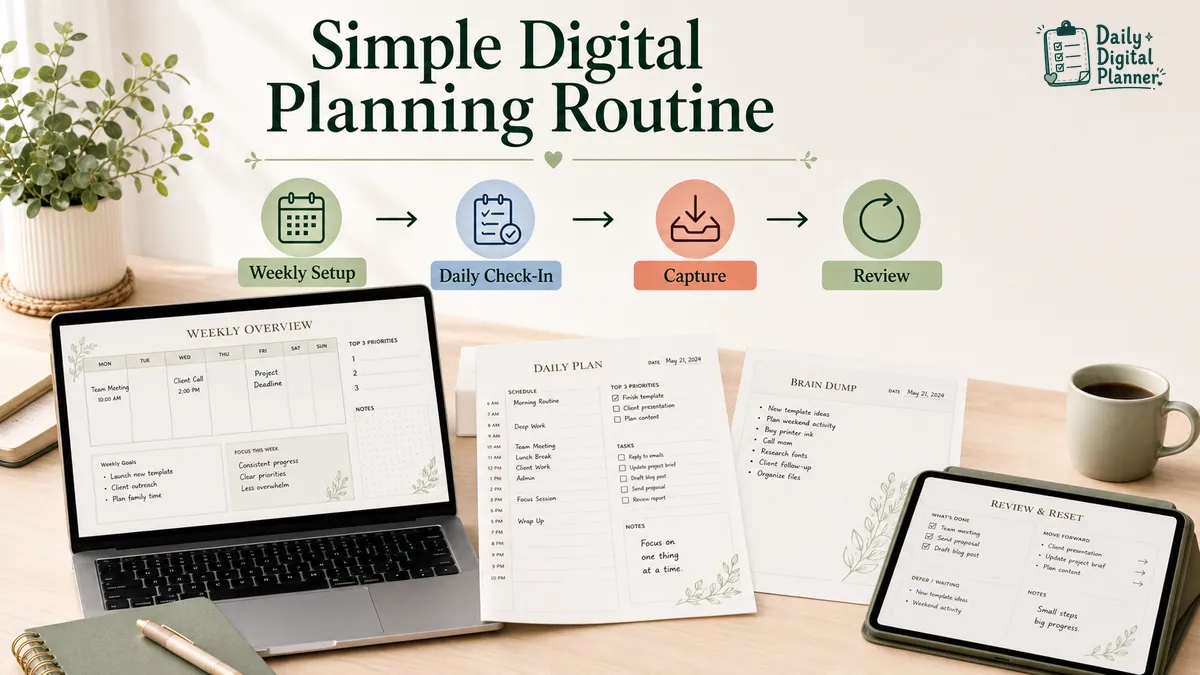
A simple digital planning routine is a weekly setup and daily check-in loop built around a small set of planner pages. The routine works when it is easy to reopen, easy to update, and clear enough that you do not need a second system to manage the first one.
In Daily Digital Planner’s context, this routine uses digital planner PDF templates rather than app rankings or complicated dashboards. You can use the same routine with a printable PDF, a fillable PDF, or a digital planner page if the product format supports the way you want to plan.
The routine is simple on purpose: set up the week, check in each day, capture loose tasks, choose a few priorities, and review what should move forward. The goal is not a perfect planner. The goal is a page you can come back to tomorrow.
What Is a Simple Digital Planning Routine?
A simple digital planning routine is a repeatable way to use planner pages for weekly setup, daily check-ins, task capture, priority selection, and review. It gives planning a clear loop instead of letting every task, note, and reminder compete for space.
The routine usually has four parts:
- Weekly setup: Review fixed commitments and prepare the next few daily pages.
- Daily check-in: Open the planner, choose today’s active tasks, and note time-sensitive items.
- Task capture: Put loose tasks, reminders, and follow-ups in one visible place before sorting them.
- Review and reset: Move forward only the items that are still active.
This article focuses on PDF planner use. A calendar app, Notion dashboard, or task manager can be useful for some people, but those are different systems. A PDF planner routine is strongest when the page layout itself makes the next action clear.
What Should You Set Up Before You Start?
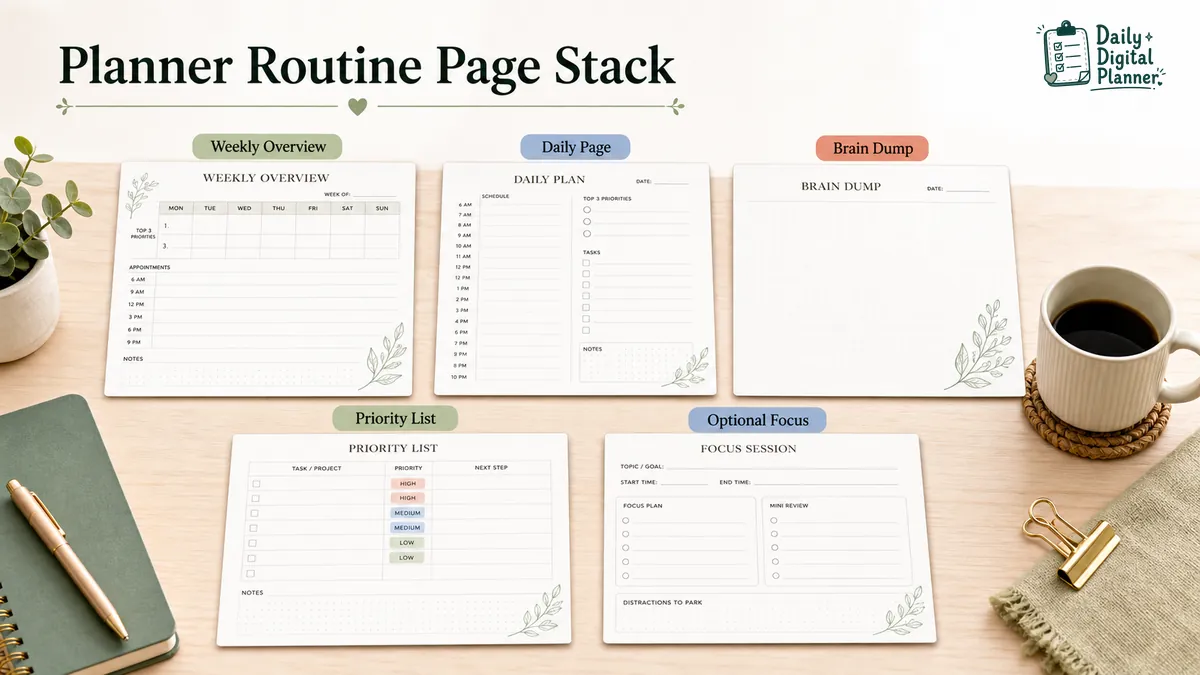
Before starting a digital planning routine, choose one weekly view, one daily page, and one capture place. That small page stack is enough to test the routine without building a planner system that takes more work than the planning itself.
Start with these pieces:
- Weekly overview page: Use this page for fixed commitments, deadlines, recurring routines, and the main outcomes for the week.
- Daily planner page: Use this page for today’s appointments, tasks, top priorities, notes, and review.
- Capture page or field: Use this space for loose thoughts, task fragments, follow-ups, and reminders before deciding where they belong.
- Optional focus or routine page: Add this only when one recurring problem needs its own page, such as focus sessions, habits, meals, or home routines.
If the setup already feels hard, pause and choose a digital planner layout before adding more pages. Layout comes before decoration. The first question is whether the page makes the routine easier to repeat.
How Should Your Weekly Planning Routine Work?
Your weekly planning routine should review fixed commitments, choose a short outcome list, and prepare only the daily pages you expect to use. The weekly page gives the routine a wider view so the daily page does not carry every decision alone.
Use this weekly setup:
- Review fixed commitments. Add appointments, deadlines, meetings, classes, family events, and recurring routines first.
- Choose weekly outcomes. Pick the few results that would make the week feel handled.
- Check work and home load. Separate work tasks from home tasks when the week has both.
- Prepare the next daily pages. Set up only the next few pages or the next workweek, depending on how often plans change.
- Leave a review space. Keep one area for carryovers, notes, and changes that appear during the week.
For a work-heavy week, a broader work planner can help keep projects, meetings, and deadlines in one planning path. For home routines, chores, meals, habits, or household reminders, use a home and life planner as the better parent route.
Review fixed commitments first
Fixed commitments should go into the weekly planner before optional tasks because they define the space left for everything else. Appointments, deadlines, school events, work calls, and recurring home routines are not just items on a list. They shape the week.
After those commitments are visible, the remaining open space is easier to read. That makes the weekly page more useful than a long task list with no time context.
Choose a short weekly outcome list
A short weekly outcome list gives the week a direction without turning the planner into storage for every possible task. Three to five outcomes are usually easier to use than a full inventory.
Write outcomes as finished states when possible. "Send client invoice" is easier to review than "business admin." "Plan weekday dinners" is clearer than "meal stuff." Clear outcomes make the daily pages easier to fill later.
Prepare only the daily pages you will use
Prepare only the daily pages you will actually use so the routine stays light. A printable planner can be printed a few pages at a time, and a fillable PDF can be saved or duplicated only when the product and PDF reader support that workflow.
If you like paper visibility, compare printable planner options before choosing a template. If you want to type into a planner, confirm that the product is a fillable PDF planner instead of assuming every PDF has typed fields.
What Should You Do in Your Planner Each Day?
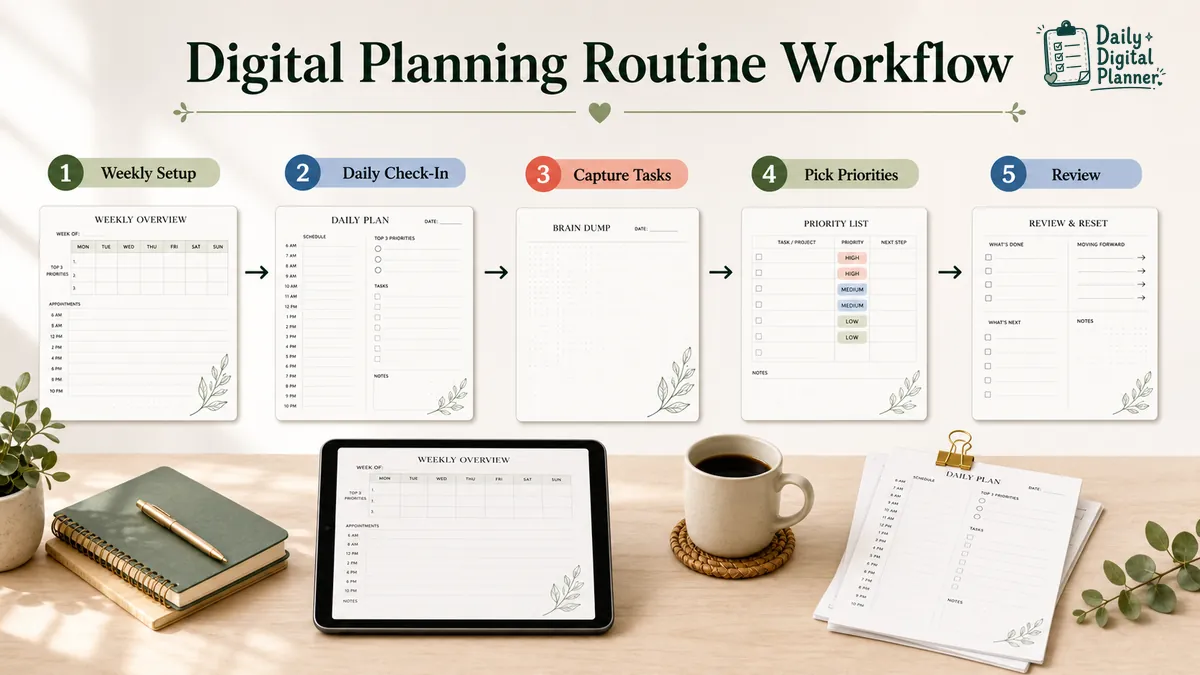
Your daily planning routine should take only a few minutes and move from capture to priority to review. A short daily check-in keeps the planner active without asking you to rebuild the whole week every morning.
Use this daily routine:
- Open today’s page. Check the date, fixed commitments, and anything carried forward from the previous day.
- Capture loose tasks. Put new reminders, follow-ups, and unsorted thoughts in one place.
- Choose today’s top priorities. Pick the few tasks that fit the day you actually have.
- Add time cues if needed. Use appointments, broad time blocks, or start times only when they help.
- Review before closing the page. Decide what is done, what moves forward, what waits, and what can be removed.
This sequence is small, but it prevents the most common planner problem: treating the daily page as a place where every possible task must live.
Capture loose tasks before choosing priorities
Capture loose tasks before choosing priorities so the daily plan starts from one visible list instead of scattered notes. A capture field can hold reminders, emails to answer, household tasks, meeting follow-ups, or tasks that are not ready for scheduling.
The capture step should not become a second permanent task list. Move active items to the right place, and delete or defer the ones that do not belong today. If task capture is the main problem, a brain dump planner gives unsorted work a dedicated page before you choose what matters.
Pick today's top priorities
Today’s top priorities should be a short list of tasks that fit the available time, energy, and consequences of the day. The list should not include every task you care about.
Pick priorities after capture, not before. Capture shows the real inventory. Priority selection decides which few items deserve space on today’s page. If the decision is still unclear, use a priority planner template to compare urgency, importance, effort, and consequence before moving tasks into the daily plan.
Close the day with a short review
A short review closes the day by deciding what is finished, what carries forward, what waits, and what should be removed. This step is small, but it keeps tomorrow from starting with yesterday’s clutter.
Use the review to update the planner, not to judge the day. Move only active items forward. Drop tasks that no longer matter. Add one next reminder if tomorrow needs it.
Which Planner Pages Make the Routine Easier?
Most simple digital planning routines need a weekly page, a daily page, a capture page, and optional support pages only when a repeated problem needs them. The smaller the page stack, the easier it is to understand what each page is for.
| Planner page | Job in the routine | Use when | Skip when |
|---|---|---|---|
| Weekly overview | Shows fixed commitments, deadlines, recurring routines, and weekly outcomes | You need to see the week before filling daily pages | Your routine is only one short daily checklist |
| Daily planner page | Holds today’s appointments, tasks, priorities, notes, and review | The main problem is daily execution | You only need long-range planning |
| Brain dump or capture page | Collects unsorted tasks and reminders before sorting | Loose tasks pile up in many places | You already have one reliable capture location |
| Priority list | Separates the active short list from the full task inventory | The task list is long and today’s choice is unclear | Your daily page already has a clear priority field |
| Focus page | Supports a bounded work session | You need to define one task, time block, and distraction notes | You do not use timed sessions |
| Routine or habit page | Tracks repeated actions | A recurring routine needs checkboxes or review | One daily checklist is enough |
Add a support page only when it solves a visible problem. If timed work sessions help, a Pomodoro planner can sit beside the daily page without taking over the whole routine.
Should You Use Printable, Fillable, or Digital Planner Pages?
You should use the planner format that reduces friction in your real routine: printable for paper visibility, fillable PDF for typing and saving, digital planner PDF for device use, and a bundle when one page type is not enough. The best format is the one you will reopen.
| Format | Best for | How you use it | Check before buying |
|---|---|---|---|
| Printable planner | Handwriting, desk visibility, binders, clipboards, and home printing | Download the PDF, print the pages you need, and write by hand | Page size, margins, ink-friendly design, screenshots, and print instructions |
| Fillable PDF planner | Typing entries before saving or printing | Open the file in a compatible PDF reader, type into fields, save a copy, or print | Confirmed fillable fields, compatible software, save behavior, and print behavior |
| Digital planner PDF | Reviewing or annotating planner pages on a device | Open or import the PDF in a compatible reader or planning app | File format, device workflow, page navigation, and whether the product supports the needed use |
| Planner bundle | Work, home, routine, and productivity pages in one larger template set | Download a set of related planner templates and choose the pages that fit the routine | Included templates, format mix, screenshots, current price, and download access |
Choose a printable planner if the page needs to stay visible on a desk, wall, clipboard, or binder. Choose a fillable PDF planner if typed entries, saved copies, and clean printed pages are part of the routine.
Do not assume a downloadable PDF is automatically fillable. Check the product page before buying.
How Do You Keep the Routine From Getting Too Complicated?
Keep the routine small enough to reopen after a missed day. A planner routine becomes hard to keep when it asks you to copy tasks across too many pages, backfill old entries, or maintain fields that do not change your next decision.
Use these rules:
- Keep one capture place. Loose tasks should not be split across five pages, three notes apps, and a daily planner.
- Keep one daily decision point. Choose today’s active tasks once, then work from that short list.
- Do not backfill every missed page. Restart with today and carry forward only active items.
- Change one part at a time. If the routine is not working, adjust the page, the review time, or the capture method, not all three at once.
- Remove fields that stay blank. A blank field is feedback. It may not belong in your routine.
If planner overload is the main problem, compare low-friction digital planner layouts before adding more templates. That guide focuses on page structure and restart behavior without turning planner use into medical advice.
Which Daily Digital Planner Templates Can Support This Routine?
The best Daily Digital Planner template path depends on whether your routine is mainly work, home, daily focus, or multi-template planning. Choose the page family that matches the routine before choosing a visual style.
Use these routes:
- Digital planner overview: Start with digital planner PDF templates when you are still comparing the main format.
- Work routine: Use a work planner when tasks, meetings, projects, deadlines, and focus blocks are the main routine.
- Home routine: Use a home and life planner when routines, meals, habits, chores, and household reminders shape the week.
- Multi-template routine: Use a work, home, and productivity planner bundle when one page is not enough and several related templates need to work together.
- Download support: Review how to buy and download a planner before checkout if you want the purchase email and account Downloads path to be clear.
The routine should lead the template choice. If the routine is still unclear, start with the smallest useful page stack and add a planner bundle only when the same missing pieces appear more than once.
Simple Digital Planning Routine FAQs
Simple digital planning routine FAQs should clarify format, consistency, and page count without turning the article into app advice. The routine stays useful when the page set remains small and the next step stays visible.
Is a digital planning routine the same as a planner app routine?
No, a digital planning routine is not always the same as a planner app routine. This guide focuses on PDF planner pages that can be printed, filled, saved, or used digitally depending on the product format.
A planner app can manage calendars, alerts, or synced task lists. A PDF planner routine is more page-based. The planning happens through weekly pages, daily pages, capture areas, priority fields, and review steps.
Do I need to plan every day?
No, you do not need to complete a full planner setup every day. A simple daily check-in is enough when the weekly page already holds the bigger commitments.
Use the daily page for today’s active tasks, appointments, and review. Leave long-range decisions on the weekly page unless they need action today.
What should I do if I miss a day?
Restart with today if you miss a day. Open the current page, carry forward only active items, and choose one next action instead of backfilling every missed entry.
Backfilling can make the planner look complete, but it often adds work without improving the next decision.
Should I use one planner or a bundle?
Use one planner when the routine has one clear job, and use a bundle when work, home, routines, focus, and review need separate templates. A bundle should reduce page-hunting, not add more pages to maintain.
Check the included templates before buying. The right bundle should match the routine you actually plan to use.
Build the Routine Around the Page You Will Reopen
The best digital planning routine is the smallest loop you can reopen without friction: weekly setup, daily check-in, task capture, priority choice, and review. Add pages only when they solve a repeated problem.
Start with one weekly view, one daily page, and one capture place. Choose printable, fillable, or digital planner pages by how you will actually use them. If the page stack grows, make each page earn its place in the routine.